AITR

I’ve found every cab does not work over a wide variety of models and using the same IR all over the place lends to an every model sounding the same thing going on. No I still don’t need 500+ slots but more than 2 is helpful.
The point isn't that 2 is enough. The point is that 2048 are too many.
I use other cabs too but I don't have a bunch of tones. I have clean and dirty for my gigs w or w/o effects.
I am also not trying to recreate anyone else's tone.
Clean and dirty.. Live the Prince tune is the same 2 amps and effects as the Thin Lizzy tune.
 
Anyone knows of a PC Automation Software that can automate the task to move the IRs to the CAB Scratchpads?

I have started experimenting with RoboTask Lite Free Version.
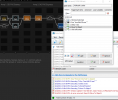
I can open Axe-Edit, but I get an error when I try to move to the CAB block to click the mouse button
When I record the task it identifies it as Caption = "Axe-Edit III", Window Class = "JUCE_17c4faa51ed" but it fails when running
2021-10-05 16_01_11-Axe-Edit III.png

I know that loading these IRs is a simple task to do manually. This is just for education and entertainment.
 
Anyone knows of a PC Automation Software that can automate the task to move the IRs to the CAB Scratchpads?

I have started experimenting with RoboTask Lite Free Version.
I can open Axe-Edit, but I get an error when I try to move to the CAB block to click the mouse button
When I record the task it identifies it as Caption = "Axe-Edit III", Window Class = "JUCE_17c4faa51ed" but it fails when running
View attachment 89654

I know that loading these IRs is a simple task to do manually. This is just for education and entertainment.

Power Automate Desktop comes with Windows 11. I'll try to automate this process at the weekend.
 
One more thing,

As far as I saw, drag&drop is a little problematic with automation, since the two windows may overlap (Explorer window where the IR containing directory is open, and Axe Edit).

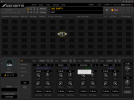
A little feature would be such great for automations like this. @FractalAudio, is it possible, and more importantly costless, to enable the import cab function of the right click menu?

If I can succeed with the automation, I'll share it for Windows 11 & MK1 users.

1633428076382.png
 
Last edited:
Anyone knows of a PC Automation Software that can automate the task to move the IRs to the CAB Scratchpads?

I have started experimenting with RoboTask Lite Free Version.
I can open Axe-Edit, but I get an error when I try to move to the CAB block to click the mouse button
When I record the task it identifies it as Caption = "Axe-Edit III", Window Class = "JUCE_17c4faa51ed" but it fails when running
View attachment 89654

I know that loading these IRs is a simple task to do manually. This is just for education and entertainment.
Autohotkey could do this quite easily, though it's not a simple thing to jump into if you don't have prior AHK experience.
 
The Mark 1 doesn't have any FullRes banks, unless you mean being able to sacrifice User 2 for FullRes cabs. I'd go for that. My User 2 bank is empty and only have about a dozen cabs in User 1.
 
Could be useful for recording maybe. Live though, drastic IR changes can sometimes feel a bit disjointed. It can sometimes be better to stick with a few similar sounding IRs so the live mix stays more consistent and you don't suddenly get buried in the mix when changing presets. That largely depends on how consistent every one else sounds between songs/parts though too.
 
Could be useful for recording maybe. Live though, drastic IR changes can sometimes feel a bit disjointed. It can sometimes be better to stick with a few similar sounding IRs so the live mix stays more consistent and you don't suddenly get buried in the mix when changing presets. That largely depends on how consistent every one else sounds between songs/parts though too.

Agreed , I’d also use it for headphones/ practicing etc

Though I brought this thread up from the grave specifically for my use case is room correction as 40ms (Normal Res without MPT) doesn’t have enough frequency resolution for significantly correcting bass peak/nulls

Very niche and somewhat anti-purpose I know
 
Last edited:
Though I brought this thread up from the grave specifically for my use case is room correction as 40ms (Normal Res without MPT) doesn’t have enough frequency resolution for significantly correcting bass peak/nulls

Very niche and somewhat anti-purpose I know
I’ve gotten good room correction with the IK Multimedia Arc Studio and would definitely recommend.

You can also use Cab lab 4 to convert your WAV files to UltraRes IRs, which go up to 170ms and use a lot less cpu than FullRes.
 
I’ve gotten good room correction with the IK Multimedia Arc Studio and would definitely recommend.

You can also use Cab lab 4 to convert your WAV files to UltraRes IRs, which go up to 170ms and use a lot less cpu than FullRes.
I’d just found out that UltraRes changes the phase by MPT so I would not recommended to use unless you just want amplitude correction.

This is also one of the reasons why I brought this thread up as fullres doesn’t sound like it changes the phase ,

I’m personally going to experiment with the temporary fullres slots in the AX3 mk1 using IR’s extracted from a trinnov and compare that to just the trinnov itself.

Ultra-Res is always minimum phase. Don't use Ultra-Res.
 
Last edited:
I’d just found out that UltraRes changes the phase by MPT so I would not recommended to use unless you just want amplitude correction.

This is also one of the reasons why I brought this thread up as fullres doesn’t sound like it changes the phase ,

I’m personally going to experiment with the temporary fullres slots in the AX3 mk1 using IR’s extracted from a trinnov and compare that to just the trinnov itself.
Cab Lab has an option for the phase. You can set it to leave the phase alone.

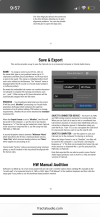
1757995049903.png
 
Literally fractal said this
Ultra-Res is always minimum phase. Don't use Ultra-Res.

Cab Lab has an option for the phase. You can set it to leave the phase alone.

View attachment 159625
I already tried importing in Ultra Res before, see this thread and it changed phase because of importing in UltraRes and fractal says not to use it for keeping original phase

it changed phase even if I set to IR processing to none


https://forum.fractalaudio.com/threads/importing-ir-changes-phase-turned-off-cabinet-import-processing.215379/

Edit: Update 9/16 11:34 Am (gmt-4) I got Ultra Res to import without affecting phase kind off

Depending on the IR which was my issue (other than windowing), especially if it's highest impulse is negative will import it flipped or 180 degree out of phase so inverting it with the filter block will fix it
 
Last edited:
Back
Top Bottom