sevenstring
Inspired
This is the best sounding FW so far...FrdMan V3 with SDD Preamp...Glorious....


Make sure the IR didn’t change, if you are using dynacabs. There are two new dynacabs that move the order around I think.I do hear you. I will double check everything. This is just a report. This is the preset as it is with the new firmware. I will have to redo it.
I never reverse firmware so I will just re adjust it. All opinons on my preset welcome. This is a main stage preset for small to midsize venues that I use.


do you have a preset to share? Never really got into the FrdMan.This is the best sounding FW so far...FrdMan V3 with SDD Preamp...Glorious....
This has been happening for half a year or so. I don't know if it's an Axe-Edit problem or if it has something to do with a Windows update, but I would also be happy if it could be fixed somehow.WHY is it, on Windows, when I install an Axe-Edit update that it completely DELETS the AxeEdit SHORTCUT? It messes up the Taskbar and also my Desktop Shortcut order each time. I don't have this problem with any other company (line6, Neural,...)
Isn't it possible to fix this BUG?


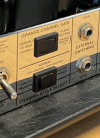
The Rev F has these switches to set orange to modern, or red to vintage.Just a note
In the wiki it is mentioned that recto 1 is the original dual rectifier with 2 channels
Rectifier models:
But that is a mistake as the original dual rectifier doesn’t have vintage and modern mode .
- Recto1: original 2-channel Rectifier, Orange channel, Modern mode
- Recto1: original 2-channel Rectifier, Orange channel, Vintage mode
- Recto1: original 2-channel Rectifier, Red channel, Modern mode
Just green and orange in channel one
And red in channel two
I imagine that this recto 1 is a « modern » dual rectifier from the 2000 +

Ha so that’s a rev F? We don’t have many infosThe Rev F has these switches to set orange to modern, or red to vintage.
It happened with an older version.Hello all,
I have run down the problem. ALL my DYNACABS were reset to 10% on the ROOM LEVEL. They are normally OFF or at 2%.
There is ALWAYS a reason. These field reports need to be understood. The CABS should NOT be reset unless the block is reset.
Observe: The FM3 is a mirror of my main AXE 3. BEFORE update. The AXE 3 was updated and see the CAB setting are now COMPLETELY different.
Please take these field reports seriously. Also, please address this issue.
got this from hereAnother thing with the Modern modes is that the power amp distorts early (again since there is no negative feedback and, therefore, the power amp has a lot more gain). At 9:00 on the Master the power amp is distorting (it's probably a linear taper pot for the ol' "Wow, this amp is loud bro!"). The taper of the Axe-Fx Master Volume is not the same and you have to turn it up higher to get the same amount of virtual power amp distortion.
Another thing is that if you put ANYTHING in the loop of a Recto it changes the tone significantly. Even just a short cable. All the models were made with the loop off.
And another thing is that Rectos changed a lot. I have three of them and they all sound completely different. One of them has a different value Gain pot than the others. One of them has a different value bright cap than the one with the same Gain pot. Since the gain pot and bright cap interact this makes a HUGE difference. Experiment with the Bright Cap value.
The Recto1 models are based on our Rev. F (IIRC, whatever the desirable ones are). The Recto2 models are based on the latest version.
Ha so that’s a rev F? We don’t have many infos

Hello all,
I have run down the problem. ALL my DYNACABS were reset to 10% on the ROOM LEVEL. They are normally OFF or at 2%.
There is ALWAYS a reason. These field reports need to be understood. The CABS should NOT be reset unless the block is reset.
Observe: The FM3 is a mirror of my main AXE 3. BEFORE update. The AXE 3 was updated and see the CAB setting are now COMPLETELY different.
Please take these field reports seriously. Also, please address this issue.

Best practice is to make a backup of your unit before FW updates, so that you could restore your presets in case of unforeseen events like this.Hello all,
I have run down the problem. ALL my DYNACABS were reset to 10% on the ROOM LEVEL. They are normally OFF or at 2%.
There is ALWAYS a reason. These field reports need to be understood. The CABS should NOT be reset unless the block is reset.
Observe: The FM3 is a mirror of my main AXE 3. BEFORE update. The AXE 3 was updated and see the CAB setting are now COMPLETELY different.
Please take these field reports seriously. Also, please address this issue.

Just a note
In the wiki it is mentioned that recto 1 is the original dual rectifier with 2 channels
Rectifier models:
But that is a mistake as the original dual rectifier doesn’t have vintage and modern mode .
- Recto1: original 2-channel Rectifier, Orange channel, Modern mode
- Recto1: original 2-channel Rectifier, Orange channel, Vintage mode
- Recto1: original 2-channel Rectifier, Red channel, Modern mode
Just green and orange in channel one
And red in channel two
I imagine that this recto 1 is a « modern » dual rectifier from the 2000 +

Hello all,
I have run down the problem. ALL my DYNACABS were reset to 10% on the ROOM LEVEL. They are normally OFF or at 2%.
There is ALWAYS a reason. These field reports need to be understood. The CABS should NOT be reset unless the block is reset.
Observe: The FM3 is a mirror of my main AXE 3. BEFORE update. The AXE 3 was updated and see the CAB setting are now COMPLETELY different.
Please take these field reports seriously. Also, please address this issue.
That's correct, happened with firmware 28, about which Cliff said "See the Release Notes and turn the Room Level down."It happened with an older version.
What version of fw do you come from?
Not fw 30 I think
Axe fx 2 , but yep alrightYek’s write up says it’s a Rev F
https://forum.fractalaudio.com/thre...to2-mesa-dual-rectifier-2-ch-and-3-ch.114701/
Which has the modes @Callan showed

I do not know either what could be wrong with my unit. I will check the firmware again this weekend and not only reset the channels of the preset, but also perform a reset of all system parameters. See what happens...I got our reference AC-20 out and compared it. The 12AX7 models are spot-on. Not sure what is going on with your unit.