Share your DIY controller project based on MIDI for 3rd Party Devices | AXE3 | FM3 | FM9 | VP4 |

Hey there

  • does it even work on AXe-fx3, FM9?
    • Fx3 on Windows
      • OK:
        • Preset change. GUI doesnt update, but preset on the FXIII goes up or down.
        • Scene change.
        • Toggle the effects. GUI doesnt update, but FXIII does toggle.
        • Scrollable sysex messages
      • NOK:
        • Preset change with arrows in GUI
        • Frontpanel changes incl sysex info not updating the GUI (maby this is not possible at all to capture)
  • does it work well at all?
    • That depends on what it is supposed to do. Can you give some functional requirements?​

Thank you for adding the FXIII to your site

Cheers 🍻
I've done some minor fixes:
  • Click on scene from the list will now update the bypass state of the blocks
  • Is now PWA and capable of running offline
  • added temporary links to switch between FM3, FM9, AXE Fx III
  • some other minor fixes...

"Can you give some functional requirements?"
Thank you, bro. I will come back to your offer :-)
 
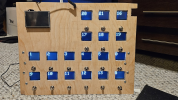
So I finally made progress with the boards I ordered:

20241205_194804.jpg

The colours are way off in the pic. It looks much better than shown. I made a boo boo on the PCB with the 74hc595 mux chip, so I had to cut a trace and solder a jumper. Other than that, it's running fine. It's even powered from the USB connection. I plan on doing a larger version soon with a 3.3V buck converter. I have a 5V but since Teensy 4.1 is not 5V tolerant, I have to use a lower voltage or the inputs from the mux chip may damage it.

Some Highlights:
  • I have custom fonts via tft_espi and via Takko OpenFontRender
  • The titles are split into separate lines based on pixels, not character spacing.
  • The screens muxed. They are very fast to update.
  • Using a sprite as a frame buffer for flicker-free updates.
  • The presets are sent to the Teensy via USB MIDI Sysex and stored on the "Eprom"
  • I was able to set the clock to 45MHz, but didn't notice much of a difference so I dropped it back to 27MHz for now. Likely be more of a difference when more screens are added.
 
St7789 is the top right screen that shows the tuner.. it runs at 50Mhz atm and is super smooth. This 2.8' is a better view for my eyes, but to big to have 16 of those imho . Yes 2.4' just may be the right size.

Also running 2 SPI channels, 1 for the ST7735 and 1 for the ST7789

The teensy supports 3 SPI channels, so there is still room for expanding. Maby place 2 other ST7789 beneath this one, there is still space but I have no use for them I think.
Could be something else.. idk 😁


View attachment 148157

View attachment 148158
this is beyond awesome !

I’d wished for ages that L6 with HELIX would allow this - and now so glad i've moved over to Fractal .

is there another thingie like this somewhere - but with knobs instead of stomps? to tweak effect block params etc ?
 
Well, it's alive! Ugly but functional.

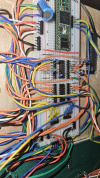
Had a heck of time with the screens due to SPI issues. I had read to keep them in a line somewhere, but that is not correct. SPI should be a star configuration or whateve gives the shortest length. You can see the lower screens are being fed by wires from the breadboard instead of the "out" pins from the middle board. Other lessons. Each st7735 should have it's own .10uf cap as close to VCC as possilbe to gnd. Also, the spi bus wires (MOSI, SCCLK and CS should have a low value (10-100ohm) resistor in series as close to the teensy as possible. The exact value would be determined after the final build using a scope or logic probe. Use a value that results in the cleanest signals.

I'm going to try SMD for the next build which will include new lower boards, and 2 uppers for the top screens. Along with a board for the teensy, large display and power supply. I'm also going to do a network connection so I can use Midi over ethernet as well as POE to power the whole thing. Also some regular midi jacks and wall wart jack if you want to use that.

Next up is the firmware which I'm continuing to build. There will also be a flutter app for programing via Sysex so It can be updated via web browser, PC, Android or IOS device.

Next time maybe I'll try something more ambituous... :P


1734663584865.png
1734663601303.png
 
Hey there,
Great progress man and cool to see the mockup...

The SPI gave me some hard times too. I have them now linefed by the teensy per row to keep the line as short as possible for the clock.
2 rows worked perfectly together in line, but the 3rd added gave me brainshakes.


My build has no 10uf caps or any use off caps anywhere (accept the midi line) , but if it is really needed for the long run I must investigate the use of it. Good for me to learn some more about these electronics tech things. The configuration without capacitors works on my end, but for how long

Cheers 🍻
 
Ya the caps decouple the screens from the rest of the power line. They keep the power steady to each display. Without out them power fluctuates and introduces noise to the spi lines attached to them. May not be necessary, but good design practice. I also have a 100uf cap in each row (except the top right now). That is a big well for all the displays and chips on the board.

As for the resistors in line, they match the impedance of the spi output to the inputs. Impossible to calculate, so a scope is used to see how the pulses look on the lines and the value is tweaked to get the cleanest signal. Should be able to get higher speeds with them...

Some good info here.
 
Some good info here.
Thnx for that 🤘. Great info

The site says 22-Ohms, you say 10uf and 100uf, I need some guidance here cause I dont know sjizzle about electronics lol. The place where to set the Capacitor/resistors is clear, but need to know now what kind to choose. Will try to implement asap to see if it works. Btw my screens are 5V connected. Can you give some guidance what to choose?
 
Last edited:
The decoupling caps help maintain a steady supply to the circuit. They charge up and prevent any surges in power from pulling down VCC and causing issues. You want to include them at every "Stage" in a circuit. For example at every TFT, every Multiplixer chip, etc. Typically .1uf at each of these stages works fine. There are formulas for designing power supplies, but for the most part, arbitrary values will work. If you look at datasheets for many CMOS chips they all seem to be around .1uf. I didn't include any on my TFT's but did on my mux chips.

I also included a "large" decoupling cap on each board. I grabbed whatever I had which in this case was one 100uf and one 47uf electrolytic cap. They decouple the entire board from the rest of the supply. Again, very arbitrary. They all are from VCC to ground.

Type doesn't matter much for decoupling caps, but electrolytics tend to be the only choice for larger values (10uf+). For my .1uf I used ceramics. Just be careful with electrolytic caps as they have to be installed in the proper direction like a diode or they will blow, often in a big hot spray of acid. So don't do that. :)

Here is the schematic for my board updated for .1uf at each tft:
1734733784681.png

I finally got the new build up and running completely:


20241220_144601.jpg

I had a heck of a time with the controls on the upper part. Only worked sporadically and lots of presses when nothing actually was. Finally figured out I forgot to put pull up resistors on the breadboard. Duh. Thats what happens when working from memory. While I was fixing that I added some decoupling caps which I also forgot to add...
 
Thank you for this very detailed guide. Will get some caps 1uf and add them. Ceramic? Check ;)

Cheers 🍻

EDIT: bought them 🤘
 
Last edited:
Just installed the 1uf ceramic capacitors and the screens are all even bright now. Had some little brightness difference on the bottom and top row, now not anymore. Have to get a 10uf for the main VCC and ground.

Thank you @mavriq for the tips 🤘

20241227_105455.jpg
 
Last edited:
Hey All,

Maybe someone can help. I'm fiddling about with some ideas around midi/sysex etc for my FM3. I have the AxeFxControl library up and running and it's fine as far as it goes. However, it doesn't handle some of the functionality around block settings (I'd like to get/set some amp parameters). So I turned to the sysex documentation in the wiki and I can't help thinking it must be wildly out of date because it doesn't match my reality here.

For example, the docs suggest that after calling GET_FIRMWARE_VERSION you will receive FRONT_PANEL_CHANGE_DETECTED messages - I don't think that's true, and I've tried everything I can think of. Reading between the lines, it looks like older hardware versions didn't track changes live and put up some sort of "Pause Communication" message. But these days twiddling a knob on the FM3 is certainly reflected immediately in the Editor.

Another example: the docs suggest that if I send PRESET_BLOCKS_DATA, I should get back a list of the blocks with their Ids. I don't. I get a response but it doesn't make sense - it's nearly all 0x01 and decoding it with the for loop in the wiki makes no sense.

Code:
00000000: F0 00 01 74 11 0E 1A 01 01 01 01 01 01 01 01 01  �..t............
00000010: 01 01 01 01 01 01 01 01 01 01 01 01 01 01 01 01  ................
00000020: 01 01 01 01 01 01 01 00 F7                       ........�

The extracted block ids make no sense:
i = 6, id = 16
i = 11, id = 16
i = 16, id = 16
i = 21, id = 16
i = 26, id = 16
i = 31, id = 16
i = 36, id = 112

If I send GET_BLOCK_PARAMETERS_LIST with blockid == 106 (supposedly the blockid of Amp1), the docs suggest I should get a sequence of replies, bracketed with BATCH_LIST_REQUEST_START and BATCH_LIST_REQUEST_COMPLETE, but I don't. I get a single reply

Code:
00000000: F0 00 01 74 11 01 6A 00 7F 77 00 00 00 00 00 00  �..t..j.␡w......
00000010: 00 02 00 00 00 75 F7                             .....u�

Does anyone know of "better" documentation? Any other suggestions?

Thanks
Miles
 
I updated the wiki since that entry was obviously old and didn't mention the FM9.

Updated link:

https://wiki.fractalaudio.com/wiki/index.php?title=MIDI_SysEx#Axe-Fx_III.2C_FM9_and_FM3

@yek - I'm thinking maybe the section below could use a disclaimer that it doesn't apply to Axe Fx III, FM9 and FM3. What do you think?

https://wiki.fractalaudio.com/wiki/index.php?title=MIDI_SysEx#MIDI_SysEx_Functions
 
I updated the wiki since that entry was obviously old and didn't mention the FM9.

Updated link:

https://wiki.fractalaudio.com/wiki/index.php?title=MIDI_SysEx#Axe-Fx_III.2C_FM9_and_FM3

@yek - I'm thinking maybe the section below could use a disclaimer that it doesn't apply to Axe Fx III, FM9 and FM3. What do you think?

https://wiki.fractalaudio.com/wiki/index.php?title=MIDI_SysEx#MIDI_SysEx_Functions
Totally agree with the disclaimer. Now one must first read, try-out and discover that only the legacy is supported.
 
Back
Top Bottom