Bug? PC sound stops when using my Axe-FX 3 as an audio interface.

Stel Andre

Inspired
Hello to all! I have noticed a bug lately that I never faced before in my old Axe-FX 2 or my Axe-FX 3. I often use my Axe as an audio interface on my PC. Lately I have noticed that the PC sound stops working suddenly. Then it might return, but in totally random timing. What could it be wrong?

I noticed than when I change the sample rate from the Axe-FX USB Audio Control Panel, at the bottom right area of my desktop, say from 128 to 512 or something, then the sound comes back. But I might have to change these values back and forth every time it stops. Is this a driver issue? Maybe USB cable?

I would love to know if anyone has similar issues and what might be the problem.

P.S. I have installed some other drivers from other audio interfaces, like the Focusrite. But that interface isnt plugged on my computer when I use my Axe Fx as my audio interface. In efforts to avoid any conflict. Could these drivers cause any conflict, even when the Focusrite isn't even plugged on my PC?

Thanks in advance!
 
Hello to all! I have noticed a bug lately that I never faced before in my old Axe-FX 2 or my Axe-FX 3. I often use my Axe as an audio interface on my PC. Lately I have noticed that the PC sound stops working suddenly. Then it might return, but in totally random timing. What could it be wrong?

I noticed than when I change the sample rate from the Axe-FX USB Audio Control Panel, at the bottom right area of my desktop, say from 128 to 512 or something, then the sound comes back. But I might have to change these values back and forth every time it stops. Is this a driver issue? Maybe USB cable?

I would love to know if anyone has similar issues and what might be the problem.

P.S. I have installed some other drivers from other audio interfaces, like the Focusrite. But that interface isnt plugged on my computer when I use my Axe Fx as my audio interface. In efforts to avoid any conflict. Could these drivers cause any conflict, even when the Focusrite isn't even plugged on my PC?

Thanks in advance!
I’ve had kind of a similar issue. In my case the sound came back after I restarted the unit.
I checked all USB power settings and some of them were set to turn off USB devices after a while. I turned these off and so far no issues.

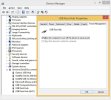
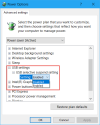
If you’re on Windows you have to check two places. First is power settings in control panel, you have to disable USB selective suspend setting as shown in this screenshot. If you have a laptop, make sure to do this on all power plans.

IMG_7312.png

Second is device manager under USB devices. You have to untick the option shown in this screenshot for all USB devices.

IMG_7313.jpeg
If you’re on mac, I can’t help you where to find these settings. But it was mentioned here that there are similar settings on mac as well, so a bit of googling might help.
 
Last edited:
I’ve had kind of a similar issue. In my case the sound came back after I restarted the unit.
I checked all USB power settings and some of them were set to turn off USB devices after a while. I turned these off and so far no issues.

If you’re on Windows you have to check two places. First is power settings in control panel, you have to disable USB selective suspend setting as shown in this screenshot. If you have a laptop, make sure to do this on all power plans.View attachment 165382Second is device manager under USB devices. You have to untick the option shown in this screenshot for all USB devices.View attachment 165383
If you’re on mac, I can’t help you where to find these settings. But it was mentioned here that there are similar settings on mac as well, so a bit of googling might help.

Thanks for the detailed info my man. Very helpful. It was set to "enabled" and I disabled it. Hope that fixes it. Thank you so much! <3
 
Unfortunately, it did it again yesterday. I did change all the option you mentioned above though. But the sound stopped a couple of time yesterday, and it also did something weird. The guitar kept sounding on both of my JBL studio monitors, but the PC/youtube sound died for a few seconds, then only played through the Left speaker alone, then died again, (while guitar sound from the Axe was full on with no issues), and then I touched that Sample Rate from the Buffer Settings of the FAS Icon at the bottom right corner of my screen, and the sound came back. Could it be the USB cable? Maybe I have switched it with another one and not the right one? I don't know what might cause that. Drivers conflict to other audio interfaces perhaps?
 
Can you provide more information on your setup, connections, and use case? You mention an audio interface, monitors, and the Axe. How is everything connected? Losing one channel of audio and dropouts immediately made me think cable or sample rate mismatch, but it could be windows settings related to the default recording and playback device, or countless other things.
 
Unfortunately, it did it again yesterday. I did change all the option you mentioned above though. But the sound stopped a couple of time yesterday, and it also did something weird. The guitar kept sounding on both of my JBL studio monitors, but the PC/youtube sound died for a few seconds, then only played through the Left speaker alone, then died again, (while guitar sound from the Axe was full on with no issues), and then I touched that Sample Rate from the Buffer Settings of the FAS Icon at the bottom right corner of my screen, and the sound came back. Could it be the USB cable? Maybe I have switched it with another one and not the right one? I don't know what might cause that. Drivers conflict to other audio interfaces perhaps?
I’d check what has changed (if any) before this started happening. If you think you swapped your USB cable, it’s better to try another one, or the original one that was connected without any problems if you know which one it is. The issue seems weird, but as Cliff says “99% OF THE TIME THE PROBLEM IS A CABLE OR CONNECTOR”.
 
The main thing changed is my new PC build. In that process I might have changed the cable with another USB cable of the same color so I might be using a faulty one. I will check that soon. The connections are.. my Axe plugged on my PC, and I am using it as an audio interface when I play or record. When I dont play/record, sometimes I use my focusrite as my audio interface, keeping my Axe Fx closed obviously. The focusrite 2i2 doesnt have an on/off switch so I do not plug it on my PC when I dont use it. Long story sort, no other audio interface is simultaneously connected on my PC. Its always only one actively connected, my Axe or the Focusrite, or another pedalboard that can be used as an audio interface. I would bet its the cable.. I do not remember dealing with such cut-outs in sound with my focusrite, so I am assuming the speakers, or their cables wouldnt be the issue. As for the Windows settings, I did all mentioned above. The buffer size is the same. Sometimes (as i mentioned) when that issue occurs, I change the buffer size from the FAS icon on my taskbar, bottom right of my screen, and the problems fixes, but might re-occur a bit later.
 
I’d check what has changed (if any) before this started happening. If you think you swapped your USB cable, it’s better to try another one, or the original one that was connected without any problems if you know which one it is. The issue seems weird, but as Cliff says “99% OF THE TIME THE PROBLEM IS A CABLE OR CONNECTOR”.
I have run into this a few times. Getting a new usb cable fixed it every time for me.
 
Re seat your usb connections to the motherboard if using the front pc case usb case ports.

Have you tried another usb slot from the motherboard?
 
Re seat your usb connections to the motherboard if using the front pc case usb case ports.

Have you tried another usb slot from the motherboard?
I had the same issue. When I changed the usb port which fractal was connected, problem gone. I have a 5 year old PC. Some of the ports are usb 2, some usb 3 with blue collar. Cant remember which one was the problem but give it a try.
 
I have the same problem with the FM3 and Win 10 laptop. Handling the FM3 works fine, but practicing to music playback is impossible, because the laptop stops working. Pulling the USB cable helped sometimes, altering the buffer was not helpful. I will get a further new cable soon and hope on some further advice here.
It works perfect with my Mac.
 
Last edited:
I have a similar issue, but with the FM3. It’s connected to a laptop and while recording in Reaper, the audio from previously recorded tracks suddenly disappears. YouTube and other system sounds also stop working. After some time, everything comes back to normal.


The Fractal is only a few months old, but the problems started after I installed the latest FM3 firmware 12.0 not sure if this is related
 
I have the same problem with the FM3 and Win 10 laptop. Handling the FM3 works fine, but practicing to music playback is impossible, because the laptop stops working. Pulling the USB cable helped sometimes, altering the buffer was not helpful. I will get a further new cable soon and hope on some further advice here.
It works perfect with my Mac.
I have a similar issue, but with the FM3. It’s connected to a laptop and while recording in Reaper, the audio from previously recorded tracks suddenly disappears. YouTube and other system sounds also stop working. After some time, everything comes back to normal.


The Fractal is only a few months old, but the problems started after I installed the latest FM3 firmware 12.0 not sure if this is related
He is trying to get help with an Axe-fx 3, not an FM3. Different hardware, different drivers. Try searching or posting FM3 questions/issues in the FM3 section instead of hijacking someone's thread.
 
If two different devices have the same fault, you first need to look at the identical components in both devices. This reduces the search.
 
I have a similar issue, but with the FM3. It’s connected to a laptop and while recording in Reaper, the audio from previously recorded tracks suddenly disappears. YouTube and other system sounds also stop working. After some time, everything comes back to normal.


The Fractal is only a few months old, but the problems started after I installed the latest FM3 firmware 12.0 not sure if this is related
Same here.
 
Back
Top Bottom