OMG 9 without FC-6: How to use the 3 switches by themselves

First of all thanks for spending the time to create this, and to answer user questions. Much appreciated!

Reading through this thread but haven't loaded anything yet. I came upon this response of yours and I am a bit confused. Currently I only have the FM3, no FC-6 or FC-12 yet. I thought this solution was for users who didn't have added foot controllers. For me, without any additional foot controller, is this not something I should use, or will it work for me also?

Sorry if this is a dumb question, and also sorry if it is asked and answered further in this thread. I will continue reading now.
@Rex answered well. I will add that I used this layout for years without the FC6. I found it easy to use and it covered all my bases.
Have at it and test it. If you don't like it, revert to the factory layouts or roll your own!
 
@Rex answered well. I will add that I used this layout for years without the FC6. I found it easy to use and it covered all my bases.
Have at it and test it. If you don't like it, revert to the factory layouts or roll your own!
Thanks! I have read through the entire thread now and am at my FM3. So I will give it a try now. I appreciate the help.
 
You’re right. This is for people who have the FM3 only.

What @Patzag was saying is that both this and OMG9 are made so they can live together in the same machine. That makes it so people who do have an FC can be ready for times when they have an FC connected and times when they don’t.
Thanks, as I just wrote to Patzag, I have read this entire thread and am ready to give it a try.
 
  • Like
Reactions: Rex
One more question:
I am working with the OMG3 now. Very nice. This is probably another dumb question: When I select preset and play with the preset a bit, then want to change to another preset I get a message on the FM3 screen saying to hit Enter or Exit. Once I get this message on the FM3, even if I select Save in FM3-Edit, the message doesn't go away. Even if I try to hold down SW2 to get home, the message doesn't disappear. The only way to get it to go away is to go to the FM3, not FM3-Edit and select either Enter of Exit on the FM3. Can you tell me what I am doing wrong? Thanks!
 
One more question:
I am working with the OMG3 now. Very nice. This is probably another dumb question: When I select preset and play with the preset a bit, then want to change to another preset I get a message on the FM3 screen saying to hit Enter or Exit. Once I get this message on the FM3, even if I select Save in FM3-Edit, the message doesn't go away. Even if I try to hold down SW2 to get home, the message doesn't disappear. The only way to get it to go away is to go to the FM3, not FM3-Edit and select either Enter of Exit on the FM3. Can you tell me what I am doing wrong? Thanks!
Describe exactly what you are doing - all key/button presses.
 
Describe exactly what you are doing - all key/button presses.
Here is an example:
I am at Home from SW2
I select SW1 (Preset)
I then see the Scenes for the preset
From here I hold down SW2 to get back to Home
From Home I select SW1 for Preset again
I know see the Presets in the bank I am in, showing the preset I was just in
I select SW2 to change presets
I now get the message I mentioned and I can't change presets, or do anything as I described earlier. Even if I save from FM3-Edit the message remains

Not sure if this helps you or not. I do appreciate the help. I must be doing something stupid as this seems pretty basic what I am doing so I must not be following the process correctly.
 
When you select SW1 (Presets), this does not (or should not) send you to Scenes. It should send you to the Preset page so you can select a preset. I suspect the layouts might've been loaded in the incorrect location.
Can you reload following the instructions exactly and see if that handles it. If not, I'll help you debug it.
 
When you select SW1 (Presets), this does not (or should not) send you to Scenes. It should send you to the Preset page so you can select a preset. I suspect the layouts might've been loaded in the incorrect location.
Can you reload following the instructions exactly and see if that handles it. If not, I'll help you debug it.
I will check this a bit later, but I appreciate the help. I am fairly certain I loaded the files into the correct location, but .....
 
When I first turn on the FM3 the message FM3-Only Layout 4 shows on the bottom of the FM3 screen.
If I select PRESETS from here I see the same message and the PRESETS no appear in the widows above the switches. So far this seems correct.
From here if I select any switch I get the error message mentioned in my post above.
I did reload the layouts and they are in the correct location. There must be a setting I am missing?
I also checked and when I press longer as instructed on SW1 or SW3 I get the correct funtionality and messages, meaning FM3-Only 3 Layout 7 and FM3-Only 2 Layout 6
Further, when I select SCENES from a PRESET and press and hold SW3 for MORE, I see the message FM3-Only 3 Layout 7
Further, when I select EFFECTS from a PRESET and press and hold SW3 for MORE, I see the message FM3-Only 2 Layout 6
 
Last edited:
Hmmm. OK. What firmware are you on?
Try to Upgrade All Presets. I suspect that you have PROMPT ON EDITED PRESET CHANGE turned on in Global settings and as you load a preset that was not saved, it prompts you to save it.
 
Hmmm. OK. What firmware are you on?
Try to Upgrade All Presets. I suspect that you have PROMPT ON EDITED PRESET CHANGE turned on in Global settings and as you load a preset that was not saved, it prompts you to save it.
I am running the current beta, 8 I believe. I will do what you suggest in a bit when I am back at the FM3.
 
I am running the current beta, 8 I believe. I will do what you suggest in a bit when I am back at the FM3.
I had already upgraded the presets (all) when I installed the beta as I believe that was needed. I just changed the PROMPT ON EDITED PRESET CHANGE and that seems to have fixed the issue. It is correct that unless I press and hold SW1 or SW3 from HOME, I shouldn't see the FM3-Only 3 Layout 7 or FM3-Only 2 Layout 6 messages? Basically, as long as I am working wihin FM3-Only Layout 4, meaning PRESETS-SCENES_EFFECTS, I am using the features you created for the FM3 Only.
Thanks for the help. I can now begin actually using the OMG3 to create a better playing experience.
 
Whenever you press a switch, there's a short prompt which shows the effect of the switch you pressed. That's true regardless of what the switch does except Scenes and Presets.
Once you start with Layout 4, no matter what you do, you'll be within the FM3-Only scope. And LongPress switch2 will bring you "Home".
Glad you're up and running.
 
Whenever you press a switch, there's a short prompt which shows the effect of the switch you pressed. That's true regardless of what the switch does except Scenes and Presets.
Once you start with Layout 4, no matter what you do, you'll be within the FM3-Only scope. And LongPress switch2 will bring you "Home".
Glad you're up and running.
Thanks again. I really, really appreciate the help!
 
Has anyone been able to integrate setlists into this layout?

https://forum.fractalaudio.com/threads/omg9-song-section.205690/
Hi @Ledvedder this is my test for song mode maybe @Patzag can integrate it

I've used the layout 1 view 2,3,4

Instructions:
  1. Import this layout on Layout 1
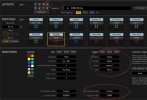
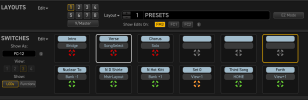
  2. On Layout 4 View 1 Replace the Hold function of the 2nd button (Scene button) to go to Layout 1 View 2 (See 2nd Image) (this replace Per preset custom switch 1)
1736894527038.png
1736894756077.png

I've Created two Versions one with the Sections on two Views and another with 5 sections instead of 6 but with just one page
I've also put my sections names in the pictures (SONG MODE 2)

1736896269624.png
 

Attachments

Also @Patzag some requests (that I've changed on mine but I think are useful)

L4V2 (Switch 4) -> Hold Function set to Go Back to Preset (allows to quickly switch between scenes and preset ) -> Go to L4V4 (Custom Text Preset)

Alternative -> Hold Function go to L7V3 -> page 3 of Scenes (to quickly go from scene 1-3 to 4-6 or 7-8)

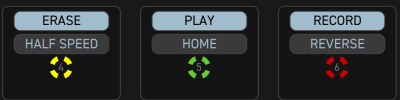
L6V2: Looper:
I've completely changed it as for me having the record button on the left is really unconfortable (I'm right handed)
Also I never use the once function so here's my looper:
1736901194457.png
As I didn't need L6V3 I've added another effects layer there here's my L6 (I've modified 3 Hold function to go to view 3 instead of 4)
1736902208366.png

Utility:
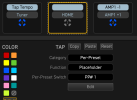
I've changed the Tap Tempo Switch adding the tuner to the HOLD and putting the per preset switch in the middle
1736901819614.png
 

Attachments

Also @Patzag some requests (that I've changed on mine but I think are useful)

L4V2 (Switch 4) -> Hold Function set to Go Back to Preset (allows to quickly switch between scenes and preset ) -> Go to L4V4 (Custom Text Preset)

Alternative -> Hold Function go to L7V3 -> page 3 of Scenes (to quickly go from scene 1-3 to 4-6 or 7-8)

L6V2: Looper:
I've completely changed it as for me having the record button on the left is really unconfortable (I'm right handed)
Also I never use the once function so here's my looper:
View attachment 150437
As I didn't need L6V3 I've added another effects layer there here's my L6 (I've modified 3 Hold function to go to view 3 instead of 4)
View attachment 150439

Utility:
I've changed the Tap Tempo Switch adding the tuner to the HOLD and putting the per preset switch in the middle
View attachment 150438
Cool.
I don't have hold funtions on the looper because of timing. On a switch with a Hold function, the switch actuates when you release, not on the downstroke. I'm not accurate enough to time upstrokes, and most people find it uncomfortable. Which is why my looper view only has switches with no Hold functions.
 
ok i Just bought an fc6 and everything is so much better! thanks @Patzag for this this should be the default layout for the fm3 is soo good

apart from some personal preferences switch is perfect
 
You may have to move them so they all line up in one bank...and have your main preset the number 2 preset in the middle....

I moved three presets to have a preset line up with two others.

Not sure if that was your exact question but it gave me all three on the home preset screen.
 
Back
Top Bottom