Software FracPad III - iOS/Android/Mac/Win Editor for the Axe-Fx II/XL/XL+, AX8/FX8, Axe-Fx III and FM3/FM9

Third party software for Fractal Audio products.
Has anyone using Android had success with a different Bluetooth midi device besides the Yamaha MD-BT01?
No, that's the only device I can't get to work. Ultra galaxy 25. I couldn't even get to device code for Al @AlGrenadine Worked fine with previous version. Keeps saying Android needs to be updated.
 

Attachments

  • Screenshot_20251115_070851_Settings.jpg
    Screenshot_20251115_070851_Settings.jpg
    349.9 KB · Views: 15
Last edited:
Hi @AlGrenadine , I've been successfully using fracpad with my old AX8 and my old Ipad Air. I've then acquired an FM3 and would like to use it with FracPad but i dont have a Yamaha MD-BT01. before purchasing one, can you please confirm if there're any other devices that i can use? the MD-BT01 is quite expensive and I'm wonedring if I can source an alternative and cheaper product for my use case. thanks in advance!
 
Hi @AlGrenadine , I've been successfully using fracpad with my old AX8 and my old Ipad Air. I've then acquired an FM3 and would like to use it with FracPad but i dont have a Yamaha MD-BT01. before purchasing one, can you please confirm if there're any other devices that i can use? the MD-BT01 is quite expensive and I'm wonedring if I can source an alternative and cheaper product for my use case. thanks in advance!
Hi
You can use a Roland um-one.
Always cheaper = always more problems.
 
Hi @AlGrenadine, new FM3 user here.
I thought about buying FracPad for iOS and I'm curious about the timeline or plans to support FM3 firmware 11.0 and also upcoming 12.0?
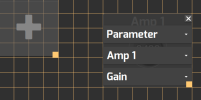
Also I notices by using the MacOS version that there is a wrong assignment in the custom screen panel for the AMP1 Block parameters (see attached screenshots). The other blocks I didn't check in detail, I just saw some parameters worked but some didn't. Is this working in the iOS version and just a problem in the MacOS version? The feature would be pretty helpful.
Thanks for support.
 

Attachments

  • Bildschirmfoto 2025-12-17 um 11.19.10.png
    Bildschirmfoto 2025-12-17 um 11.19.10.png
    39.7 KB · Views: 16
  • Bildschirmfoto 2025-12-17 um 11.19.03.png
    Bildschirmfoto 2025-12-17 um 11.19.03.png
    44 KB · Views: 16
Hi @AlGrenadine, new FM3 user here.
I thought about buying FracPad for iOS and I'm curious about the timeline or plans to support FM3 firmware 11.0 and also upcoming 12.0?
Also I notices by using the MacOS version that there is a wrong assignment in the custom screen panel for the AMP1 Block parameters (see attached screenshots). The other blocks I didn't check in detail, I just saw some parameters worked but some didn't. Is this working in the iOS version and just a problem in the MacOS version? The feature would be pretty helpful.
Thanks for support.
Hi
A new version supporting latest firmwares will be out at the beginning of January if firmwares tend to stabilize, i mean if no new version gets out.
I don't understand what's the problem with your screenshots?
 
Hi
A new version supporting latest firmwares will be out at the beginning of January if firmwares tend to stabilize, i mean if no new version gets out.
I don't understand what's the problem with your screenshots?
That's great, thanks for the feedback!

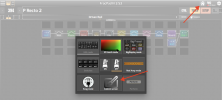
I attached additional screenshot. I mean the Custom Screen where you can define your customized layout (see Screenshot 1)
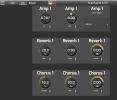
In the second screenshot I tried to create 9 knobs to change parameters of the preset, the first 3 for the amp, second 3 for the reverb and the lower 3 for the chorus block. If I leave the edit mode (Screenshot 3) the knobs for the Reverb and Chorus Blocks show the correct parameters, the Knobs for the Amp show completely different parameters of the amp. Maybe that's because I use Firmware 12.0 Beta and the IDs for the Amp parameters have changed? I haven't test it with a different firmware <11.0.
 

Attachments

  • Bildschirmfoto 2025-12-17 um 15.16.32.png
    Bildschirmfoto 2025-12-17 um 15.16.32.png
    600 KB · Views: 11
  • Bildschirmfoto 2025-12-17 um 15.22.13.png
    Bildschirmfoto 2025-12-17 um 15.22.13.png
    173.9 KB · Views: 11
  • Bildschirmfoto 2025-12-17 um 15.22.22.png
    Bildschirmfoto 2025-12-17 um 15.22.22.png
    172.9 KB · Views: 13
That's great, thanks for the feedback!

I attached additional screenshot. I mean the Custom Screen where you can define your customized layout (see Screenshot 1)
In the second screenshot I tried to create 9 knobs to change parameters of the preset, the first 3 for the amp, second 3 for the reverb and the lower 3 for the chorus block. If I leave the edit mode (Screenshot 3) the knobs for the Reverb and Chorus Blocks show the correct parameters, the Knobs for the Amp show completely different parameters of the amp. Maybe that's because I use Firmware 12.0 Beta and the IDs for the Amp parameters have changed? I haven't test it with a different firmware <11.0.
No that's probably because amp parameters are ordered differently on fm3 (stupid move from fas if you ask me), i'll try to fix this in next version
 
Hi Alexander,

I want to use fracpad on a samsung android tablet for axe fx III and FM3. Used to have it for axe fx II a long long time ago ->
1) I guess I need a new licence ?
2) any specific interface cable to use (USB C on tablet)

Kind greetings
 
Hi Alexander,

I want to use fracpad on a samsung android tablet for axe fx III and FM3. Used to have it for axe fx II a long long time ago ->
1) I guess I need a new licence ?
2) any specific interface cable to use (USB C on tablet)

Kind greetings
Hi
If you already have FracPad III, you don't need another license, only if you still use the Fracpad 1.xx.
For the Axefx III, you can connect via usb directly or via a yamaha md-bt01 / cme widi for Bluetooth operating.
For the FM3, you'll need an usb midi adapter like Roland um-one for wired operating, or a yamaha md-bt01 / cme widi for Bluetooth operating

Kind regards,
Alex
 
Hi
If you already have FracPad III, you don't need another license, only if you still use the Fracpad 1.xx.
For the Axefx III, you can connect via usb directly or via a yamaha md-bt01 / cme widi for Bluetooth operating.
For the FM3, you'll need an usb midi adapter like Roland um-one for wired operating, or a yamaha md-bt01 / cme widi for Bluetooth operating

Kind regards,
Alex
BT is used for SongbookPro, so if my understanding is right : any usb C to USB B cable would do for FXIII
For FM3 the connection is not made to the USB B connection but to MIDI IN/OUT ?
 
Back
Top Bottom