FM3 Firmware Version 10.0 public beta

Status
Not open for further replies.
Welp after updating my fm9 I had to make changes because I was hitting cpu max. I was worried that once this update made it to fm3 I would not be able to run my preset any more. I seem to like CPU hungry stuff. Compressor, pitch block, London plate and ultra rez ir 😔
 
I just want to say and I hope @FractalAudio sees this that I am very happy that the components that may be pushing the FM3 CPU/DSP to its limit have been added to the FM3. I would much rather have the super sweet reverbs (when possible) and use them on a more basic preset than not have them available. Nothing better than a clean or lightly driven amp with lush reverb. Same with the the compressors, drives, Algorithms, etc.. So far when building a new preset from scratch with everything correctly loaded the CPU usage isn’t that bad overall.

So in short…I love this new Firmware and will make use of all the hard work those responsible have put into it.♥️
Thank You once more!
 
Luckily I don't really use dedicated compressor blocks or plate reverb. For me, this update saved a TON of CPU. I'm running my hall reverb in ultra-res quality now compared to normal and it sounds fantastic. My main presets are all 7-8% lower in CPU utilization now even with ultra-res.

-Aaron
 
I am very happy that the components that may be pushing the FM3 CPU/DSP to its limit have been added to the FM3. I would much rather have the super sweet reverbs (when possible) and use them on a more basic preset than not have them available.
Yes, I agree with that, but honestly I would limit the diffusion value in all plate reverbs to 20/25% max by default, in most cases this alone would avoid hitting the CPU limit in old presets.
 
So far so good, just updated my non turbo fm3, I have no idea where the negativity has come from .. so amazed by the unit I started on fw5 and the fact it’s still getting updates is anazing

Also, the spring reverbs! Not so long ago there was a ton of doom and gloom that it couldn’t be done and now it has? Amazing!

Really great work guys!
 
cool stuff. really happy with the fas modern amp atm. i ll probably get the full fat version 10 and stop updating. lol
 
If it helps someone with old FM3 - btw I have not reloaded presets - only updated editor and Firmware to beta 10

( I Use very First old version of FM3) -
With old firmware - LARGE PLATE reverb high quality echo density 8 - and own Preset with IR - I had about 80% CPU

With new version 1.07.07 and Beta 10 - same preset says about 95% short visible - red Cpu limit
Turning Reverb block ON OFF doesnt do anything to CPU LIMIT - deleting Block says 44.6% -
If I here choose same REVERB Block again - it just pops red CPU limit directly again

* BUT if I then in REVERB BLOCK go to TYPE and again Choose same LARGE PLATE -
CPU suddenly goes to 64.6 % - High quality - now auto pre choosen echo density 4
Even changing echo density then here to 8 CPU 'only' gets 78.5 % and playable as before

So try just go in Reverb block to TYPE and Choose Same reverb again .

cheers
 
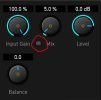
In FM3-Edit i see in some Effects (Reverb, Delay, Chorus, Phaser...) this little "GBL" Switch near the Mix Knob. Is this new and is this the "Global" Function of the bigger Brothers?

Global FM3-Edit.JPG
 
Probably not the most important feature but... love the new UI for Dyncabs. The top to bottom speaker image for some reason makes easier for my brain to assimilate where is the mic positioned against the speaker, specially to locate the speaker cap. Thanks!
 
In FM3-Edit i see in some Effects (Reverb, Delay, Chorus, Phaser...) this little "GBL" Switch near the Mix Knob. Is this new and is this the "Global" Function of the bigger Brothers?

View attachment 154671

I am going to quote @iaresee from about 3 years ago (i searched for this too)

"Yes, it means "Global". If you enable global for that parameter than the value used comes from the Setup > Global Settings > Config page under the EFFECT MIXING section. There are two parameters there, Reverb Mix and Effects Mix, that let you change the value for any block using the global section, globally, from that one place.

It's a nice way to say, dial back all your reverbs in your presets if you're in a room that's really boomy, without having to visit every REV block in every preset you're going to use and do it there.

https://wiki.fractalaudio.com/wiki/index.php?title=Reverb_block#Rev_Mix_.28Global_Menu.29"
 
Status
Not open for further replies.
Back
Top Bottom