I use a wah block in some presets but my expression pedal is broken and I’m not using wah at the moment, the problem is : the presets that should be auto engaged just with the pedal after 5%, it’s always on and I can’t bypass the wah block and I didn’t want to remove the wah block or change anything in my scenes and presets.
I tried to disengage the wah block with another unit that’s working fine and save the preset but the wah block is always on and can’t be bypassed. Any tips ?
I had a similar situation with my modeler mounted on a Temple Audio board where I used their 4xMOD to route the foot controllers to the pedal ports on the modeler, so this might apply.
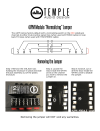
The 4xMOD uses shorting plugs internally, which tricks the modeler into thinking the controller is toe-up or toe-down, depending on how the modifier is set. I asked Temple Audio why-for, and how to fix it, and they said there's a trace we can cut that stops the nonsense.
If this seems like the symptoms fit, open the 4XMOD to get at the board, and follow the directions in
https://www.templeaudio.com/page/4jpm.
After doing that for the pair of controllers, the modeler isn't fooled. At that point it's possible to tell the modeler to default to a given setting if the pedal isn't moved (which it can't be if it isn't connected) so the preset will default the pedal and block to whatever state you want.
On the front panel go to Setup > MIDI/Remote and scroll down to the "Initial Value" section. I define my pedal to be "off" when it's at toe-down AKA 100%.
I think that's all I needed to do.
PS - it looks like Temple Audio took down the PDF for cutting the traces.
Here's a screenshot of it…