Persistent Wah block won’t disengage

danielworks

Inspired
I use a wah block in some presets but my expression pedal is broken and I’m not using wah at the moment, the problem is : the presets that should be auto engaged just with the pedal after 5%, it’s always on and I can’t bypass the wah block and I didn’t want to remove the wah block or change anything in my scenes and presets.

I tried to disengage the wah block with another unit that’s working fine and save the preset but the wah block is always on and can’t be bypassed. Any tips ?
 
Does autoengage work correctly with the other functional pedal? You might need to recalibrate after plugging in the different pedal.
 
I use a wah block in some presets but my expression pedal is broken and I’m not using wah at the moment, the problem is : the presets that should be auto engaged just with the pedal after 5%, it’s always on and I can’t bypass the wah block and I didn’t want to remove the wah block or change anything in my scenes and presets.

I tried to disengage the wah block with another unit that’s working fine and save the preset but the wah block is always on and can’t be bypassed. Any tips ?
Is it just that preset only? I had an issue where after extensive T/S I had my FC1 EV1 plugged in to external 1 and it was constantly engaged no matter what preset or no preset or what cable or other EV I had what ever else including reconfigs and factory reboot of FC12 I did, no joy. What fixed it was a complete factory reboot of the AXE III. I did back up my presets and reloaded them after that and the problem was gone also.
 
I use a wah block in some presets but my expression pedal is broken and I’m not using wah at the moment, the problem is : the presets that should be auto engaged just with the pedal after 5%, it’s always on and I can’t bypass the wah block and I didn’t want to remove the wah block or change anything in my scenes and presets.

I tried to disengage the wah block with another unit that’s working fine and save the preset but the wah block is always on and can’t be bypassed. Any tips ?
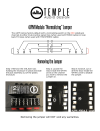
I had a similar situation with my modeler mounted on a Temple Audio board where I used their 4xMOD to route the foot controllers to the pedal ports on the modeler, so this might apply.

The 4xMOD uses shorting plugs internally, which tricks the modeler into thinking the controller is toe-up or toe-down, depending on how the modifier is set. I asked Temple Audio why-for, and how to fix it, and they said there's a trace we can cut that stops the nonsense.

If this seems like the symptoms fit, open the 4XMOD to get at the board, and follow the directions in https://www.templeaudio.com/page/4jpm.

After doing that for the pair of controllers, the modeler isn't fooled. At that point it's possible to tell the modeler to default to a given setting if the pedal isn't moved (which it can't be if it isn't connected) so the preset will default the pedal and block to whatever state you want.

On the front panel go to Setup > MIDI/Remote and scroll down to the "Initial Value" section. I define my pedal to be "off" when it's at toe-down AKA 100%.

I think that's all I needed to do.


PS - it looks like Temple Audio took down the PDF for cutting the traces.

Here's a screenshot of it…
Screenshot 2025-08-21 at 12.21.53 PM.png
 
Last edited:
I use a wah block in some presets but my expression pedal is broken and I’m not using wah at the moment, the problem is : the presets that should be auto engaged just with the pedal after 5%, it’s always on and I can’t bypass the wah block and I didn’t want to remove the wah block or change anything in my scenes and presets.

I tried to disengage the wah block with another unit that’s working fine and save the preset but the wah block is always on and can’t be bypassed. Any tips ?
What are the settings for Auto Engage? What are the settings for the initial value of the controller you use?
 
It won't... It's still an open circuit.

Not necessarily - inserting a TS plug into a TRS jack, for example, will complete the circuit between sleeve and ring. So depending on how it’s set up, either open or closed should lock it at one end or the other - so either a jack (open) or a jack with the lugs connected (closed) will typically emulate heel or toe position of the pedal.

In my rig plugging a TS plug into my wah XPDL jack puts it in heel position, and plugging in a TRS jack puts it in toe position. If neither of those works for OP, then a TRS jack with tip and sleeve connected may be what’s needed.
 
Not necessarily - inserting a TS plug into a TRS jack, for example, will complete the circuit between sleeve and ring. So depending on how it’s set up, either open or closed should lock it at one end or the other - so either a jack (open) or a jack with the lugs connected (closed) will typically emulate heel or toe position of the pedal.
With the Axe-FX pedal ports it has to be a TRS plug w/ tip shorted to sleeve to get a 0% reading. TS plug is read as 100%, same as nothing plugged in.
 
With the Axe-FX pedal ports it has to be a TRS plug w/ tip shorted to sleeve to get a 0% reading. TS plug is read as 100%, same as nothing plugged in.

So assuming OP has the XPDL set up so that 0% (or, for example, <5% …) is bypass, a TRS with tip connected to sleeve should do what he desires.

Interesting that TS gives 100% on my FM3 (I assume because it’s connecting ring to sleeve) - do you know which lug of the AxeFX is supply/reference voltage vs the attenuated/control voltage?
 
For expression pedals, Ring is the input, Tip is the output, and Sleeve is ground. However, the pedal jacks can also function as switch inputs, so the tip can also serve as its own voltage reference when a TS cable is used. The FM3 is also different in that it supports two switches per jack with both tip and ring serving as separate voltage references. Closing the switch shorts the corresponding reference to ground.
 
I've set the auto engage to 5% , Medium speed ...but like I said, no pedal is connected at the moment
In your Midi/Remote settings, there's an initial controller value set for the controller you use. What is it?
Did you calibrate the pedal?
 
I've set the auto engage to 5% , Medium speed ...but like I said, no pedal is connected at the moment

I would have thought that if auto-engage was linked to movement (speed), then with nothing plugged in there would be no movement and the wah would never engage. But I just tried it and, indeed, when set to speed as the auto-engage trigger and with the XPDL unplugged, it does seem to stay engaged.
 
I would have thought that if auto-engage was linked to movement (speed), then with nothing plugged in there would be no movement and the wah would never engage. But I just tried it and, indeed, when set to speed as the auto-engage trigger and with the XPDL unplugged, it does seem to stay engaged.
I have found this to be the case also. I use Position rather than speed.
 
No. Any pedal is connected and still can't bypass Wah block. So I just removed wah blocks from all presets until buy a new unit
@danielworks Could you just back up your presets and do a clear presets and reset your axe to factory default settings. I had same problem and tried everything and that worked for me. It tripped me out. Just curious.

Thanks,
Rich
 
I have the same issue. I have several MF presets which default at toe up. On edit, I set to toe down by manually typing in 0% but it always defaults to 5%. I’m not at the unit so I can’t compare to any factory presets. My pedal has been calibrated but a long time ago. Is 5% a FAS default for auto engage ?
 
Back
Top Bottom
