
Classic VCAMaybe not for this version firmware, but actual question: where is Compressor type "Studio FF Compressor" now?

Classic VCAMaybe not for this version firmware, but actual question: where is Compressor type "Studio FF Compressor" now?

Via the drop downs in the scene manager, thus like 'swap this scene with scene 3'.Did you execute the swap in Scene Manager? Or through the menu?

I just had a scare.
Turned my FM9 on and no sound and I was panicking, trying to figure out what was going on as it worked fine yesterday before shutting down for the evening and nothing changed etc.
So I turn the FM9 off and waited like 10 seconds and turned it back on and I now have sound... Weird, don't think I've had that happen before.
I had same thing yesterday
had input because tuner worked and had output levels
weird
worked fine today
I have this promblem in my FM3:+1
Looked at the block signal levels page, and only the input and first block showed signal. The rest of the blocks' input and output meters were pinned full on and red instead of green.
Power cycle fixed it, haven't had another episode of it yet....

+1I think the Solo 88 might be my new favorite amp model, it's definitely up there with the EVH Stealth for sure. Seems tighter and clearer than the Solo 100 model, with tons of sustain and a great sparkle when you turn up the treble.
https://forum.fractalaudio.com/threads/fm9-firmware-version-9-02.213429/post-2677857Updated to 9.02 finally. Ran through everything during install. Waited 5 seconds blah blah RANF and I didn’t have sound. At all. Rebooted. And boom. Had sound. First time that’s ever happened.

Good to know I wasn’t** the only one lol. Thanks for the thread!

Was it just eq tweaks after the upgrade, or what?Nice improvement in the feel with this one. Hard to describe to seems to feel more dynamic. Required a bit of tweaking on a few presets to get the most out of it. Nice work!!


Press the Page Right (>>) button twice to get to the Meters view.I was playing around with the old presets after the 9.02 update, but I just booted it up and tried to play a little while ago, and there's no sound. I haven't turned it off yet and it's been quite a while, but there's no sound at all. I haven't changed any presets, and the level meter, volume, and output settings are all normal. I can actually see it going up on the meter. But there's no sound at all.
When I check while playing the guitar, the levels of all blocks from input to output are displayed normally in green. There is no sound at all for all presets and all amp blocks. It will be better if I reboot, but I am very worried if I do not know in advance what conditions cause the sound to disappear. Has there been any investigation so far?Press the Page Right (>>) button twice to get to the Meters view.
Try to identify the first block showing as red and the one previous to it as well.
If you can, note which model/type of both blocks.
This will help diagnose this issue.
After that, reboot and most likely your sound will return.
Hmmm, interesting.When I check while playing the guitar, the levels of all blocks from input to output are displayed normally in green. There is no sound at all for all presets and all amp blocks. It will be better if I reboot, but I am very worried if I do not know in advance what conditions cause the sound to disappear. Has there been any investigation so far?
The cause is still unknown. Is it because the symptom appears right away when booting up, and not because it suddenly happens while it's working properly?Hmmm, interesting.
I think most who encountered this had one or more blocks showing red.
There's no no cause as of yet.
Just to confirm - you don't have a CPU warning on the main screen?
In any case, you should be fine to just reboot.


Make sure the volume knob is turned up.I was playing around with the old presets after the 9.02 update, but I just booted it up and tried to play a little while ago, and there's no sound. I haven't turned it off yet and it's been quite a while, but there's no sound at all. I haven't changed any presets, and the level meter, volume, and output settings are all normal. I can actually see it going up on the meter. But there's no sound at all.
Yeah... That's interesting. It looks normal.The cause is still unknown. Is it because the symptom appears right away when booting up, and not because it suddenly happens while it's working properly?
If I could find out in advance before the show, I'd like to keep it on in a normal state.
CPU is around 60%, and is this the correct screen? There's no red mark.
View attachment 155843

Help: I am using the new FM9-edit.......I cant seem to find "PRE EQ of the amp page and lower Definition or High Cut.."Hi Matt,
I'll use a term that John Petrucci coined: if you like a more "chocolatey" tone, a great place to quickly adjust the overall brightness of a preset is the master High Cut in the Cab Block. In FM9-Edit, find it on the Preamp page of the Cab Block. Increasing the slope gives you more precision control.
If you want to more closely simulate the effect of lowering the tone control on your guitar, turn to the PRE EQ of the amp page and lower Definition or High Cut.
These are simple tweaks that can really make your tone your own.

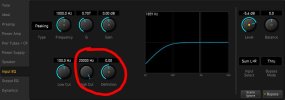
Oohh…….INPUT EQ and not PRE EQ……got it…..Thank you!
