Do you have different result with my test presets?Do you have all the required settings for Gapless?
- Gapless == ON
- Spillover == ALL

Do you have different result with my test presets?Do you have all the required settings for Gapless?
- Gapless == ON
- Spillover == ALL

I haven't tried but my own presets are in the mid-high 70s and I haven't experienced any audio gapsDo you have different result with my test presets?

In addition to firmware and usb, is it possible to get the dynacab version on the utilities/version page?FM9 Firmware Version 9.01 is now available for download:
https://www.fractalaudio.com/downloads/firmware-presets/fm9/9p0/fm9_dsp_rel_9p01.zip
An updated version of FM9-Edit is required for use with this release:
https://forum.fractalaudio.com/threads/fm9-edit-1-03-11.212919/
New DynaCabs
A Dyna-Cab update is required if you are updating from a firmware version prior to 9.0 Beta 2.
The required Dyna-Cab file is included in the zip file for this release.
If you are upgrading from version 9.0 beta 1 or older, please follow the instructions in the included Firmware Update Guide. If you are updating from 9.0 beta 2 or 9.0 you do not need to reinstall Dyna-Cabs.
Preset CPU and Factory Presets
This firmware version includes major improvements to sound quality and performance. As a result, some presets now require more CPU. Older Factory Presets may exceed 80% CPU usage, especially on the standard (non-Turbo) FM9. To address this, new Factory Presets have been created for firmware 9.0+. These are not installed automatically and must be downloaded separately:
https://forum.fractalaudio.com/threads/fm9-factory-presets-version-9-0-release.212825/
I’m not sure when the final updates happened but they were being updated throughout the beta. Wouldn’t hurt to pull down the latest version and reapply them just to be sure.NO need to reinstall presets if coming from beta right ?

My Pete Thorn presets don't act right either, so bummed, I use that Cythornian one alotWas there any change to the Marshall Plexi 100 amp model from FW 8.01 to FW 9.0 or 9.01? I am wondering because although I would love to upgrade, my custom Hendrix presets stopped working properly after FW8.01. So I have decided to stay on 8.01 for now. But if there was a bug in the Marhsall Plexi 100 W Jumped and it was fixed then I will choose to try an upgrade. Has anyone used the Plexi 100 W Jumped in their presets? Have you noticed a change from 8.01? Was it better or worse? It seems to be tolerable on the monitors but on my RS Elis 8's it sounds completely flat.
It is not a big deal really. I can just stay on 8.01 until my custom manufacturers redo their presets for 9.01.


That's not really relevant to the firmware but whether or not you already updated the presets.NO need to reinstall presets if coming from beta right ?
Give your large encoder knob a good workout.I have a weird thing happening to me since the last update. And this is an update from 9 beta 2 to 9.01. My FM9 has started to tentatively change presets and I can't figure out why.
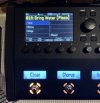
In this case I was playing something, I think it was preset my #003. Suddenly, when I have a look at the FM9 it has preloaded the next preset. Look again and it has preloaded the one after that, and it just keep increasing. And I did say preloaded - it doesn't actually change presets. If you look at the two screenshots below. The first one is dimmer and you can see that the 3 scenes are Clean, Chorus and Bridge. But none of the scenes are loaded (no blue highlight). You can also see that my switches, which are set to Scene 1 Name, Scene 2 Name, ... does not show scenes from this preset.
If you look on the second screenshot, it has actually loaded this preset for comparison. The screen has full brightness, the blue indicator show which scene is engaged and the buttons show the correct scene names.
I've been looking at the midi monitor to see if I can figure this out but I haven't seen anything obvious yet. I can only assume that it's something in my mac that's sending something. But nothing in my mac has been updated since the 9 beta 2 to 9.01 update and nothing like this has happened before. Has anyone else seen anything similar?
View attachment 154835
View attachment 154836


View attachment 154844
Yep encoder makes sense.
Unless you have one of these around. Which also gunks up an encoder.... and changes presets randomly.
 . Didn't think about that. I haven't seen them playing with the Fm9. I'll keep en eye out.
Give your large encoder knob a good workout.
I'm not aware of anything except that knob that can do what you're describing.
It might be dirty...
As mentioned previously, I don't think there is anything (midi or otherwise) that could do that except the main encoder.View attachment 154851
Yeah, I don't have one of those around, I have three
Are there any midi messages or similar that would do the same thing as what's the encoder is doing. I've only ever seen PC change, not PC show, or preemptive load or whatever that could be?
That does nothing to the sound... It only updates the settings used by the editor.I’ve officially upgraded to FW 9.01 PRESETS 9.0 finally and it’s sounding marvellous!
For those upgrading, before you post anything negative about your presets, make sure you do a, REFRESH AFTER FIRMWARE, in your latest FM9edit software.
My U2 and Slash presets sound fabulous now!

I love how this is bantered about like it's some kind of magic fix for all issues. Even sonic ones. LOL! I've literally never had to manually kick this off. Happens automatically when opening FM9 Edit after a firmware upgrade.That does nothing to the sound... It only updates the settings used by the editor.
It doesn't always work correctly...I love how this is bantered about like it's some kind of magic fix for all issues. Even sonic ones. LOL! I've literally never had to manually kick this off. Happens automatically when opening FM9 Edit after a firmware upgrade.
Are you changing scenes with the editor? In that scenario I believe that is expected behavior.The "Scene Revert" setting seems to not be doing anything. Unit behaves as if it's set to OFF all the time. Anyone else having this issue?View attachment 154896


