Axe-Fx For The Recording Musician

@GlennO ,

Hello Glenn. Thank you for the excellent guide on DAW recording with the Fractal Axe-FX/FM9/FM3.
I do have a question, specifically in regards to option #5.

I have an FM9, and I wish to use my new Audient ID24 interface as the USB recording interface with my DAW (Studio One 6 Pro). I understand that I will be physically hooking up the FM9's S/PDIF Out to the S/PDIF In of the ID24, and then from S/PDIF out on ID24 back to the S/PDIF In on the FM9. My goal is to be able to record, simultaneously, a DI Track as well as the full (wet) guitar track from FM9 output block.

However, this is where I am a bit flummoxed...
From the instructions in your guide (Option #5):


I have scoured the Audient ID24 manual, as well as watching Audient's YT video on the "ID Mixer" PC application. I cannot find any way to set the ID24 to send the guitar input signal to both the computer (via USB) as well as back to the Axe-FX via S/PDIF. At least, I don't see anything in the ID24 interface software. Is this routing something that would reside in the Studio One 6 DAW software, instead?

It’s possible the ID24 lacks that feature. If you’re on a Mac, you can use configuration #4 instead, which is simpler anyway.
 
It’s possible the ID24 lacks that feature. If you’re on a Mac, you can use configuration #4 instead, which is simpler anyway.

Thank you GlennO, for your reply...and thanks again for the excellent guide/tutorial. However, I have to question whether Audient could make such an oversight. I have to think it is something I haven't figured out, on my end. I am still waiting for some Toslink/Optical cables, so I haven't actually fired this up and tried to figure this out, live, on the actual hardware. I am just going on a detailed review of the User Manual, as well as Audient YouTube video tutorial on their "ID Mixer" app. Hopefully, it is something I am missing, and that it is "do-able" within the Audient ID24 interface/hardware. If I have success, I will post back with update.

Cheers,
John
 
Thank you GlennO, for your reply...and thanks again for the excellent guide/tutorial. However, I have to question whether Audient could make such an oversight. I have to think it is something I haven't figured out, on my end. I am still waiting for some Toslink/Optical cables, so I haven't actually fired this up and tried to figure this out, live, on the actual hardware. I am just going on a detailed review of the User Manual, as well as Audient YouTube video tutorial on their "ID Mixer" app. Hopefully, it is something I am missing, and that it is "do-able" within the Audient ID24 interface/hardware. If I have success, I will post back with update.

Cheers,
John
I'd suggest contacting Audient support for a definitive answer.
 
Thank you @GlennO for your guide! I tried configuration #5 on my Mac with a new Native Instruments Komplete Audio 6 MK2 interface, but supposedly the spdif do not support direct monitoring on that thing. I have tried everything possibly but I won't get it to work. Just a heads up if someone is considerating this interface.
I will send it back and use configuration #1 instead which works just fine.
 
Thank you @GlennO for your guide! I tried configuration #5 on my Mac with a new Native Instruments Komplete Audio 6 MK2 interface, but supposedly the spdif do not support direct monitoring on that thing. I have tried everything possibly but I won't get it to work. Just a heads up if someone is considerating this interface.
I will send it back and use configuration #1 instead which works just fine.
I'm using configuration 5 with an FM3 and a Komplete Audio MK2 and works perfectly.
Maybe you missed something from the guide or at configuration level..

When you say "direct monitoring" you mean monitoring without using a DAW? in that case of course no, as far as I know direct monitoring uning SPDIF or USB (without a DAW or any other software) is not possibile
 
Hi,

First, great job done to prepare the manual - thank you.

I tried to connect the following setup.


I did it in the following way :

1. Computer via USB
2. Guitar into Input 1
3. Mic (condenser) via Input2 (though preamp with phantom power)
4. Headphones on the front panel (output1)
5. Output 2 (copied Output 1) - studio monitors (active)
6. Output 3 - power amp, (copied Input 1 with 18dB gain)

To get everything mixed together in an unlikely situation when I would like to run all 3 outputs I have linked them together in the preset configuration. I decided that upon the actual need I can switch off certain outputs (like power amp or monitors)

The setup generally works meaning that I can use everything as required with the following exception.

When I listen to youtube or play a backing track on a computer I normaly use Monitors (Output2). The setup is USB Mapping 1/2->OUT2.
With the above I can't use both headphones and monitors as headphoines are at OUT1 (front panel). I can manually change every time USB Mapping to OUT1 or OUT2 depending on whether I need headphones or monitors but I was wondering if there is a way of them working together.

Is the whole idea of connection appropriate ?

Thanks in advance
Wojtek
 
That all sounds good. You can put the output mapping on a performance control to easily switch the computer playthrough between headphones and monitors.
 
It’s possible the ID24 lacks that feature. If you’re on a Mac, you can use configuration #4 instead, which is simpler anyway.

Hello Glenn,

I did receive a reply with a solution from Audient support. I will re-post this, here, in its entirety (including my original query), in case anyone else has a similar use-case, and who also uses an Audient ID24 or ID44 interface. Again, this will be relevant to a setup as per Configuration #5 in your manual, and basis a Windows/PC computer.

---------------------------------------------------------------------

Hello Audient Community. I am hoping someone can help me out with using my
Fractal FM9 and my new Audient ID24. My goal is to be able to use the ID24,
exclusively, as my USB Audio interface, connected to my laptop running PreSonus
Studio One 6 Pro DAW. Specifically, I am hoping I can SIMULTANEOUSLY record a
guitar DI Track as well as the wet (effected) guitar track that was processed by my
Fractal FM9.


I am hoping to get my effected guitar signal, from my Fractal FM9, into the Audient
ID24 via S/PDIF. To be specific, I would be running coaxial S/PDIF Out of FM9 to
an optical convertor, and then from that, using TosLink optical into the ID24 Optical
IN. Likewise, I would go S/PDIF Optical Out from ID24 back to Fractal FM9 S/PDIF
IN.

I have connected everything up, and was successfully able to see digital
communication (green light on the ID Mixer Digital IN — PC software). Since I am
plugging my guitar into the ID24 instrument input (on front of device), I need to
somehow tell the ID24 interface to send this guitar input signal to both my DAW
(via USB), but ALSO to send it back to my Fractal FM9 via the ID24's digital/optical
OUT. For the life of me, I cannot see anyway to "map" or "copy" the Instrument
input (my guitar) to the ID24's Digital Out.
Am I missing something? I have scoured the ID24 User Manual, as well as Audient
YouTube videos, and have been up one side and down the other of the ID Mixer
App.

--------------------------------------------------------

Audient Tech reply:

If you need to send the DI signal to the Fractal via the the Optical inputs
then using a CUE mix would be the easiest way to do this. Assign the
Optical output to CUE A in the routing matrix. Then in the mixer, click on
CUE A and pull up the fader for the Mic 1 channel. The screenshot below
shows this setup.

In your DAW, the dry signal would can be recorded via Input 1 (Mic 1)
and the Processed signal can be recorded via Input 3+4 (S/PDIF 1+2).
I hope this helps!
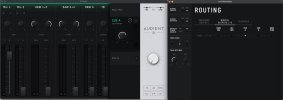

Audient ID24 ID Mixer pic showing output routing for connection with Fractal FM9.jpg
 
Last edited:
Hey GlennO

Thanks for this - exceptionally clear and well thought out. I just got a new Apollo interface and I am psyched to be able to use the guide to get my Axe III and my DAW all happy clams.

Much appreciated.

Joe
 
I still can't believe that the 6th generation of a 3k unit is such a struggle to set up for something that has been an easy task for a million outboard devices for the last 50 years. Such a failed design and it almost has an arrogant taste to it, making the Axe-Fx work only on 48khz and making it not work conveniently for a home studio setup (which is what 90% of users have).

Way to go, Fractal Audio........ -_-
 
I still can't believe that the 6th generation of a 3k unit is such a struggle to set up for something that has been an easy task for a million outboard devices for the last 50 years. Such a failed design and it almost has an arrogant taste to it, making the Axe-Fx work only on 48khz and making it not work conveniently for a home studio setup (which is what 90% of users have).

Way to go, Fractal Audio........ -_-


If you're having a specific problem, I would recommend starting a new thread where you describe the details of your issue. That would be a better way to bring attention to your problem than posting to this thread.
 
Quick question here. Is it better to track your DI with a stereo track to get the proper/accurate level as if the guitar was being plugged straight into the FM3? Or should it be a mono DI?

I ask because I have a friend who wants to try this with his FM3, but a video I saw of Cooper Carter reamping with the FM3 where he only used a mono DI track, but I thought I’ve seen it mentioned that a stereo recorded DI is more accurate? What’s the scoop on that?
 
Quick question here. Is it better to track your DI with a stereo track to get the proper/accurate level as if the guitar was being plugged straight into the FM3? Or should it be a mono DI?

I ask because I have a friend who wants to try this with his FM3, but a video I saw of Cooper Carter reamping with the FM3 where he only used a mono DI track, but I thought I’ve seen it mentioned that a stereo recorded DI is more accurate? What’s the scoop on that?
The DI should be mono because the guitar is mono*.
Stereo happens when, in your chain, you apply stereo effects or you use 2 cabs panned hard left/right.

*The DI track is what the interface receives from your guitar, so assuming a standard guitar, the signal is mono<


EDIT: I was wrong, please follow the instructions given by GlennO
 
Last edited:
I’m going to humbly disagree with Ricardo here. The reamping tutorial in the post at the top of this thread instructs you to record your DI in stereo, not mono. That’s what I generally recommend.

That’s because AxeFX presets almost always have the amp block set to summed stereo input. While your guitar is a mono instrument, the AxeFX input sends a stereo representation of that mono input into the grid, with the lleft duplicated into the right.

If you simply record a mono DI and send it to the AxeFX when reamping, it won’t sound the same as when you’re playing your guitar because you’re only sending one channel instead of two to the amp block.

The simplest way to solve this problem is to record your DI in stereo. That way the preset will sound the same as your guitar. However, if you really want to record your DI in mono, you can compensate for this issue by boosting the DI by 6dB in your DAW when reamping, or routing the mono DI to two usb channels.
 
I’m going to humbly disagree with Ricardo here. The reamping tutorial in the post at the top of this thread instructs you to record your DI in stereo, not mono. That’s what I generally recommend.

That’s because AxeFX presets almost always have the amp block set to summed stereo input. While your guitar is a mono instrument, the AxeFX input sends a stereo representation of that mono input into the grid, with the lleft duplicated into the right.

If you simply record a mono DI and send it to the AxeFX when reamping, it won’t sound the same as when you’re playing your guitar because you’re only sending one channel instead of two to the amp block.

The simplest way to solve this problem is to record your DI in stereo. That way the preset will sound the same as your guitar. However, if you really want to record your DI in mono, you can compensate for this issue by boosting the DI by 6dB in your DAW when reamping, or routing the mono DI to two usb channels.
So, if the DI was recorded mono, you can essentially duplicate that track and turn it into a stereo track, and then it would be at the proper level, right?
 
So, if the DI was recorded mono, you can essentially duplicate that track and turn it into a stereo track, and then it would be at the proper level, right?

Yes, to get the proper level, it's best to record the DI in stereo. And, yes, if you convert a mono DI track into a stereo track with the DI in both the L and R channels, that would be the same as recording the DI in stereo.
 
Back
Top Bottom