Axe-Fx For The Recording Musician

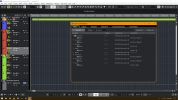
I have tried a couple of times in Bandlab Cakewalk (current version 2024.02) to record via USB direct, or for re-amping, but I always get this message, whether it be from FM9 or AxeFX III.

I have a Focusrite Scarlett Solo interface that I usually end up recording with instead, via the processed audio output of the Fractal Audio device, but I cannot re-amp that way.
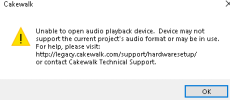
1710700598436.png


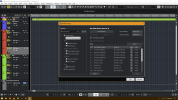
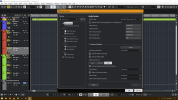
I have tried various combinations of the of the input and output drivers.
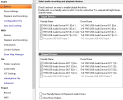
1710700838859.png

The web site the message points to is not helpful. Any help would be appreciated.
 
I have tried a couple of times in Bandlab Cakewalk (current version 2024.02) to record via USB direct, or for re-amping, but I always get this message, whether it be from FM9 or AxeFX III.

I have a Focusrite Scarlett Solo interface that I usually end up recording with instead, via the processed audio output of the Fractal Audio device, but I cannot re-amp that way.
View attachment 137018

Maybe a sample rate mismatch? Is your project set to 48 KHz/24 bit? Make sure Windows privacy settings aren't preventing microphone access.
 
Maybe a sample rate mismatch? Is your project set to 48 KHz/24 bit? Make sure Windows privacy settings aren't preventing microphone access.
Yes! My existing project was set to 44.1 khz and 16 bit. I set up a new session to 48 KHz/24 bit, and it records and plays back perfectly!

However, it looks like changing those settings on an existing recording (44.1 KHz/16 bit) won't allow me to play anything back.

Do I have to export each track as 24 bit, and then import each one back in?
 
Yes! My existing project was set to 44.1 khz and 16 bit. I set up a new session to 48 KHz/24 bit, and it records and plays back perfectly!

However, it looks like changing those settings on an existing recording (44.1 KHz/16 bit) won't allow me to play anything back.

Do I have to export each track as 24 bit, and then import each one back in?

Unfortunately that's the way it is with Cakewalk, since it doesn't handle mixed formats very well, so yes, you'll have to do something like that if you want to salvage the project.
 
Hello everyone, I think I have a little problem
I want to record drums, guitar and bass as tracks with Cubase 12

My hardware:
Windows PC + Cubase 12
AI = Behringer UMC1820, Ultra Gain ADA8200 and for guitars an AXE-FX3

Guitar and bass are connected to speakers on AX3 Out 1 and 3 for the sound
but....
no matter what program I use Cubase Ableton etc

I get an input signal everywhere except from the AX, only IN 1 (guitar) works, IN3 there is no signal, e.g. in Cubase.
I've created presets everywhere... but to no avail

Now I only have the AX on the PC, even then I get a signal under IN 1, strangely enough, on IN1 and IN2???!!!!

What did I forget to set?

Thank you very much in advance
 
Hello everyone, I think I have a little problem
I want to record drums, guitar and bass as tracks with Cubase 12

My hardware:
Windows PC + Cubase 12
AI = Behringer UMC1820, Ultra Gain ADA8200 and for guitars an AXE-FX3

Guitar and bass are connected to speakers on AX3 Out 1 and 3 for the sound
but....
no matter what program I use Cubase Ableton etc

I get an input signal everywhere except from the AX, only IN 1 (guitar) works, IN3 there is no signal, e.g. in Cubase.
I've created presets everywhere... but to no avail

Now I only have the AX on the PC, even then I get a signal under IN 1, strangely enough, on IN1 and IN2???!!!!

What did I forget to set?

Thank you very much in advance
Don't know if this will help, but here are some print screens of my Cubase settings (note I am on Cubase 13 but I don't think anything has changed here since 12).

1712258305368.png

1712258406577.png

1712258480434.png

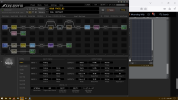
And here are my Axe FXIII settings that might be relevant:

1712258612673.png
Input 1 is my guitar, input two is my vocal mic on L channel and my cajon mic on R channel!

Hope you get this resolved. If there is anything else from my setup you would like to see, let me know!!!


Hi Moondog Wily
Mine looks almost exactly the same as yours
only that my audio interface of the UMC 1820 is set as master

Either I'm too stupid or...

I can't figure out why I only get one input signal via AX IN1 with Cubase...
1.png2.png
 
Mine looks almost exactly the same as yours

That looks completely different than what Moondog Willy is doing :). It looks like you're trying to use configuration #4 on Windows by aggregating with asio4all? If so, #4 usually doesn't work very well on Windows. But if you're determined to try to get that to work, the Cubase I/O settings you posted look fine, so the problem must be in asio4all or your UMC, or you're not sending anything out on channel 3 from your Axe-FX. Always start troubleshooting problems like this by checking the meters page on the Axe-FX home screen.
 
Hi GlennO

Thank you for your quick response

"so the problem must be in asio4all or your UMC"
I would understand that if the other inputs had no signal either... but Cubase has all signals except for Ax In 3

"or you're not sending anything out on channel 3 from your Axe-FX"
That's exactly the problem not only with channel 3 but also with channel 4.
and I don't know how to check it

What do you mean by "checking the meters page on the Axe-FX home screen" What exactly should I pay attention to?
 
What do you mean by "checking the meters page on the Axe-FX home screen" What exactly should I pay attention to?

On the Axe-FX main screen, go to the meters page and verify that you have output on channel 3.

But....I would advise against trying to use configuration #4 on Windows. You'll probably get better results if you send the mono guitar and mono bass over spdif left and right channels to the UMC, and use the UMC as your audio device instead of trying to use an aggregate.
 
That looks completely different than what Moondog Willy is doing :). It looks like you're trying to use configuration #4 on Windows by aggregating with asio4all? If so, #4 usually doesn't work very well on Windows. But if you're determined to try to get that to work, the Cubase I/O settings you posted look fine, so the problem must be in asio4all or your UMC, or you're not sending anything out on channel 3 from your Axe-FX. Always start troubleshooting problems like this by checking the meters page on the Axe-FX home screen.
Yeah, I did not realize @Kriss78 was trying to run multiple sound cards/aggregate stuff, so my layout does not fit his scenario.

@Kriss78, you are in much more capable hands with GlennO, follow his guidance and I am sure you will be able to work things out ;~))
 
OK
What would you recommend ? How would you do that?
I would like to record our hobby band.
The hardware is known (UMC 1820, Ultra Gain, AX for the guitar sounds software currently Cubase since you know something good and simple)
7 microphones are needed for the drums, then there are the guitar and bass, plus 2 vocal microphones
 
OK
What would you recommend ? How would you do that?
I would like to record our hobby band.
The hardware is known (UMC 1820, Ultra Gain, AX for the guitar sounds software currently Cubase since you know something good and simple)
7 microphones are needed for the drums, then there are the guitar and bass, plus 2 vocal microphones
Glenn O will know best, but my take is as follows.

Treat the Ax the same way you would treat what is coming out of a pedal board. So like everything else (aka mics), the output from the Ax would go into the UMC1820. Then in your Cubase studio you want to use just the inputs from the UMC1820. Your Ax stuff will be coming through the UMC1820 just like all the mics. If you can connect your Ax via digital to the UMC1820, that would be best as you will avoid some AD/DA conversions, but even if you did have to connect it to the UMC1820 via analog cables, I don't think it will significantly affect your tones for a hobby band.
 
OK
What would you recommend ? How would you do that?
I would like to record our hobby band.
The hardware is known (UMC 1820, Ultra Gain, AX for the guitar sounds software currently Cubase since you know something good and simple)
7 microphones are needed for the drums, then there are the guitar and bass, plus 2 vocal microphones

I agree with Moondog Willy. As I mentioned above:

You'll probably get better results if you send the mono guitar and mono bass over spdif left and right channels to the UMC, and use the UMC as your audio device instead of trying to use an aggregate on Windows.
 
The guide that I uploaded at the top of this thread is screenshots of a PDF. If anybody wants a PDF version, let me know and I'd be happy to upload that file.

P.S. The reason I didn't upload a PDF to begin with is because I update the guide from time to time, and if you download a PDF, at some point it will become outdated.
Thanks for this guide! I can't seem to find the pdf version though so would appreciate it if I could get a copy. I'm sorting through some issues with Reaper and this will be handy.
 
Thanks for this guide! I can't seem to find the pdf version though so would appreciate it if I could get a copy. I'm sorting through some issues with Reaper and this will be handy.

The guide that I uploaded at the top of this thread is screenshots of a PDF. If anybody wants a PDF version, let me know and I'd be happy to upload that file.

P.S. The reason I didn't upload a PDF to begin with is because I update the guide from time to time, and if you download a PDF, at some point it will become outdated.

The guide that I uploaded at the top of this thread is screenshots of a PDF. If anybody wants a PDF version, let me know and I'd be happy to upload that file.

P.S. The reason I didn't upload a PDF to begin with is because I update the guide from time to time, and if you download a PDF, at some point it will become outdated.
I would love a copy of the guide in PDF format..
 
I'm following option 5, the SP/DIF input/output version, and getting stuck.

So far:

  • I've connected the guitar to an input on my AudioFuse Studio
  • Connected the AudioFuse to the FM9 SP/DIF for both input and output
  • Used the AudioFuse Control Center to route the analog input to SP/DIF Out, going to the FM9
  • Made sure that the AudioFuse is using internal clock at 48k
  • On the FM9, I've set output 1 as the source for SP/DIF
  • I've set the word clock source to SP/DIF
  • Input 1 is set to DIGITAL
  • SP/DIF output source is OUTPUT 1
  • Turned the SP/DIF gain on the USB tab all the way down to -40.0
  • In FM9 Edit, the input block is consistently showing around -20.0dB, though it floats because the line is dirty
  • In the DAW, the SP/DIF inputs from the FM9 are silent until I touch a string, at which point they begin a 2KHz hum that never stops

The line is dirty- I have a ground loop that I just can't sort out, but I don't see how that would cause this.

Can anyone shed some light on this?

Thanks!
 
If the headphone output of the fm9 sounds good, then I would suspect a feedback loop on your DAW. I would first disconnect the audio interface from your computer (or just exit your DAW) and make sure you can monitor the fm9 correctly through your audio interface. Once that sounds good, then connect the audio interface to your computer (or launch your DAW) and attempt to record what you’re hearing.
 
Last edited:
@GlennO ,

Hello Glenn. Thank you for the excellent guide on DAW recording with the Fractal Axe-FX/FM9/FM3.
I do have a question, specifically in regards to option #5.

I have an FM9, and I wish to use my new Audient ID24 interface as the USB recording interface with my DAW (Studio One 6 Pro). I understand that I will be physically hooking up the FM9's S/PDIF Out to the S/PDIF In of the ID24, and then from S/PDIF out on ID24 back to the S/PDIF In on the FM9. My goal is to be able to record, simultaneously, a DI Track as well as the full (wet) guitar track from FM9 output block.

However, this is where I am a bit flummoxed...
From the instructions in your guide (Option #5):

Plug your guitar into your audio
interface instead of your Axe-FX. Use
your audio interface software to
route that guitar input to both the
computer via usb for recording DI
tracks and to the Axe-FX via spdif for
processing.


I have scoured the Audient ID24 manual, as well as watching Audient's YT video on the "ID Mixer" PC application. I cannot find any way to set the ID24 to send the guitar input signal to both the computer (via USB) as well as back to the Axe-FX via S/PDIF. At least, I don't see anything in the ID24 interface software. Is this routing something that would reside in the Studio One 6 DAW software, instead?
 
Last edited:
Back
Top Bottom