It’s possible the ID24 lacks that feature. If you’re on a Mac, you can use configuration #4 instead, which is simpler anyway.
Hello Glenn,
I did receive a reply with a solution from Audient support. I will re-post this, here, in its entirety (including my original query), in case anyone else has a similar use-case, and who also uses an Audient ID24 or ID44 interface. Again, this will be relevant to a setup as per Configuration #5 in your manual, and basis a Windows/PC computer.
---------------------------------------------------------------------
Hello Audient Community. I am hoping someone can help me out with using my
Fractal FM9 and my new Audient ID24. My goal is to be able to use the ID24,
exclusively, as my USB Audio interface, connected to my laptop running PreSonus
Studio One 6 Pro DAW. Specifically, I am hoping I can SIMULTANEOUSLY record a
guitar DI Track as well as the wet (effected) guitar track that was processed by my
Fractal FM9.
I am hoping to get my effected guitar signal, from my Fractal FM9, into the Audient
ID24 via S/PDIF. To be specific, I would be running coaxial S/PDIF Out of FM9 to
an optical convertor, and then from that, using TosLink optical into the ID24 Optical
IN. Likewise, I would go S/PDIF Optical Out from ID24 back to Fractal FM9 S/PDIF
IN.
I have connected everything up, and was successfully able to see digital
communication (green light on the ID Mixer Digital IN — PC software). Since I am
plugging my guitar into the ID24 instrument input (on front of device), I need to
somehow tell the ID24 interface to send this guitar input signal to both my DAW
(via USB), but ALSO to send it back to my Fractal FM9 via the ID24's digital/optical
OUT. For the life of me, I cannot see anyway to "map" or "copy" the Instrument
input (my guitar) to the ID24's Digital Out.
Am I missing something? I have scoured the ID24 User Manual, as well as Audient
YouTube videos, and have been up one side and down the other of the ID Mixer
App.
--------------------------------------------------------
Audient Tech reply:
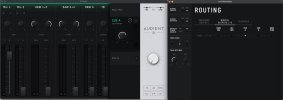
If you need to send the DI signal to the Fractal via the the Optical inputs
then using a CUE mix would be the easiest way to do this. Assign the
Optical output to CUE A in the routing matrix. Then in the mixer, click on
CUE A and pull up the fader for the Mic 1 channel. The screenshot below
shows this setup.
In your DAW, the dry signal would can be recorded via Input 1 (Mic 1)
and the Processed signal can be recorded via Input 3+4 (S/PDIF 1+2).
I hope this helps!