Saarang Narayan
Experienced
Thank you for clarifying!It was inadvertently changed when the PVH models were remastered. It has been restored to its previous behavior which matches the actual amp.

Thank you for clarifying!It was inadvertently changed when the PVH models were remastered. It has been restored to its previous behavior which matches the actual amp.

Since updating to 28.08 and most recent Axe-Edit 1.14.17 the "Type" field is blank in every block.
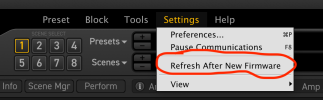


RANF?Since updating to 28.08 and most recent Axe-Edit 1.14.17 the "Type" field is blank in every block.


Gracias, pero me refiero a una emulación de este amplificador, en el Axe FX IIIAquí tienes:

Maybe that IR has gotten corrupted somehow.I am having an issue that seems odd, since updating to Firmware 28.08. I have the current AxeEdit 1.14.17, I am using a Mac M1 15.5, but this issue is present whether via the hardware or AxeEdit. I have a preset "YA JCM Slash fw24.03" created by Justin York, I believe (sorry if mistaken), and I've used it regularly since it was available. I have the York Audio IRs that Justin used in the original preset. I've had the same IR "YA MRSH 412 MV30a Mix 01" in this preset's Cab1 slot since I picked up his IRs. It has worked flawlessly from FW24.03 up through FW28 (I can't be certain I played through this preset on each of the iterations in FW28, but earlier in FW28 for sure). This preset, with this IR selected, passes no sound beyond the cab block, per the Layout / Meters. I haven't made any adjustments or changes to this preset, within the last month or more, and maybe not ever. After spending a bunch of time looking for a setting that was awry, I decided to just select another one of the IRs from the same YA pack. Instant sound! I certainly haven't ever had an IR blow out one me, in our beloved AF3! physical amp speaker humor, or attempt at.. jk of course. Since these are pay-for IRs, I don't see any value in posting the preset, as I of course can't post the pay-for IR, and the preset is working beautifully with any other IRs I've tried.
If there is anything I'm missing (I even tried the RANF, and re-booted my AF3, to no avail), please do let me know. The seemingly problematic IR is stored in User2 Slot 26, just for hopeful completeness, which the attached screenshot also displays. Let me know if there are any details I've forgotten to include or that you believe might matter.
Cheers,
Lee
Take a breath...I am having an issue that seems odd, since updating to Firmware 28.08. I have the current AxeEdit 1.14.17, I am using a Mac M1 15.5, but this issue is present whether via the hardware or AxeEdit. I have a preset "YA JCM Slash fw24.03" created by Justin York, I believe (sorry if mistaken), and I've used it regularly since it was available. I have the York Audio IRs that Justin used in the original preset. I've had the same IR "YA MRSH 412 MV30a Mix 01" in this preset's Cab1 slot since I picked up his IRs. It has worked flawlessly from FW24.03 up through FW28 (I can't be certain I played through this preset on each of the iterations in FW28, but earlier in FW28 for sure). This preset, with this IR selected, passes no sound beyond the cab block, per the Layout / Meters. I haven't made any adjustments or changes to this preset, within the last month or more, and maybe not ever. After spending a bunch of time looking for a setting that was awry, I decided to just select another one of the IRs from the same YA pack. Instant sound! I certainly haven't ever had an IR blow out one me, in our beloved AF3! physical amp speaker humor, or attempt at.. jk of course. Since these are pay-for IRs, I don't see any value in posting the preset, as I of course can't post the pay-for IR, and the preset is working beautifully with any other IRs I've tried.
If there is anything I'm missing (I even tried the RANF, and re-booted my AF3, to no avail), please do let me know. The seemingly problematic IR is stored in User2 Slot 26, just for hopeful completeness, which the attached screenshot also displays. Let me know if there are any details I've forgotten to include or that you believe might matter.
Cheers,
Lee
I know, I was just kidding... and I'd love a Mezzabarba tooGracias, pero me refiero a una emulación de este amplificador, en el Axe FX III


Reinstall the iR. If that doesn't work contact support.I am having an issue that seems odd, since updating to Firmware 28.08. I have the current AxeEdit 1.14.17, I am using a Mac M1 15.5, but this issue is present whether via the hardware or AxeEdit. I have a preset "YA JCM Slash fw24.03" created by Justin York, I believe (sorry if mistaken), and I've used it regularly since it was available. I have the York Audio IRs that Justin used in the original preset. I've had the same IR "YA MRSH 412 MV30a Mix 01" in this preset's Cab1 slot since I picked up his IRs. It has worked flawlessly from FW24.03 up through FW28 (I can't be certain I played through this preset on each of the iterations in FW28, but earlier in FW28 for sure). This preset, with this IR selected, passes no sound beyond the cab block, per the Layout / Meters. I haven't made any adjustments or changes to this preset, within the last month or more, and maybe not ever. After spending a bunch of time looking for a setting that was awry, I decided to just select another one of the IRs from the same YA pack. Instant sound! I certainly haven't ever had an IR blow out one me, in our beloved AF3! physical amp speaker humor, or attempt at.. jk of course. Since these are pay-for IRs, I don't see any value in posting the preset, as I of course can't post the pay-for IR, and the preset is working beautifully with any other IRs I've tried.
If there is anything I'm missing (I even tried the RANF, and re-booted my AF3, to no avail), please do let me know. The seemingly problematic IR is stored in User2 Slot 26, just for hopeful completeness, which the attached screenshot also displays. Let me know if there are any details I've forgotten to include or that you believe might matter.
Cheers,
Lee

Gracias, pero me refiero a una emulación de este amplificador, en el Axe FX III
A firmware thread is about the firmware, not a wish list...Thank you, but I mean an emulation of this amplifier, in the Axe FX III
Thanks, that was next up. Just wanted to see if it was isolated to me or not. CheersMaybe that IR has gotten corrupted somehow.
Reload it from the download you got from Justin, see if that helps.
10-4 Thank youReinstall the iR. If that doesn't work contact support.
Was about sleepy time. Prob shouldn’t type at that time.Take a breath...
...make a paragraph.
Plenty of help will follow... just breathe. <3

Thanx Cliff!!!!https://www.fractalaudio.com/downloads/firmware-presets/axe-fx-3/28p0/axefxiii_dsp_rel_28p08.zip
Axe-Fx III Firmware Release Notes
28.08
Added Supro 1695T amp model based on a Supro Black Magick.
Fixed Presence knob taper in PVH 6160 models.
Fixed wrong UI for USA MK V Green amp model.
Fixed Amp block Soft-Reset function does not set Edited LED.
Added global parameter to notify editor when a refresh is necessary.
Various other fixes and improvements.

While my instance was not the same IR slot or IR, one of mine stopped passing audio, so I reloaded the original IR into the same slot. That sorted the issue on mine. Might want to give that a try.Hello folks. Since the last update, I have had problems with the F2.0386 factory cab.
When I select this cab, there is no sound. It seems that the cab is damaged in some way.
Is this an issue with the firmware, or is there a memory chip on my device that is dying?
I have lodaded the firmware twice.
AXE FX 3 MK2
FW 28.08
A simple preset consisting of cab F2.0386, which is not working on my device, is attached.