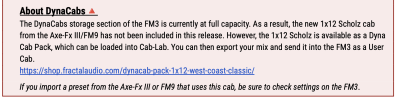
Yes.@Admin M@
Does this mean AXE FXIII and FM9 users get this cabs for free and FM3 users have to buy them???
View attachment 155245

@Admin M@
Does this mean AXE FXIII and FM9 users get this cabs for free and FM3 users have to buy them???
View attachment 155245

https://forum.fractalaudio.com/thre...re-loaded-on-the-hardware.213308/post-2673174View attachment 155246
I wonder if it would be possible to curate the Dynacabs in the FM3 in the future... for example discard ones you never use, so you can try new ones that otherwise wouldn't fit?


We were all set, but we're now integrating the new changes from Axe-Fx III 28.05. There will be a private beta this week and we'll fold it all in to the release of 10.0.


We were all set, but we're now integrating the new changes from Axe-Fx III 28.05. There will be a private beta this week and we'll fold it all in to the release of 10.0.

We were all set, but we're now integrating the new changes from Axe-Fx III 28.05. There will be a private beta this week and we'll fold it all in to the release of 10.0.


From the Blocks Guide:Have you tried releasing down the gain knob on the amp settings what is diffirence between input trim ? do you guys adjust the input trim i never did that
Input Trim – This control allows you to modify any model to have more or less gain than would be possible with the regular controls. This is different from the Gain in that it does NOT interact with the surrounding circuitry to change frequency response. In other words, use Input Trim to adjust gain without also changing tone.
.500 simulates the normal input so try lowering it further...
Just adding some more context here since this initially read to me as if .500 should be the default input trim setting across all amps, which isn't true (and I know now that's not what you were saying)..500 simulates the normal input so try lowering it further...
Values above 1 increase the level. Values below 1 lower the level. 1 is unity gain, 2 is twice as much.
...
If the real amp has two inputs, for example Low and High, the model is always based on the High input. Set Input Trim to 0.500 to get the equivalent of the Low input.
To translate Input Trim values to dB, use the formula: 20 * LOG10(trim value). In other words: calculate the LOG10 result of the input trim value, and multiply this with 20. Use the LOG10 function on a scientific calculator. For example:
- Input Trim at 0.500 = -6dB, because: 20*LOG10(0.5)
- Input Trim at 4 = 12dB, because: 20*LOG10(4)

We were all set, but we're now integrating the new changes from Axe-Fx III 28.05. There will be a private beta this week and we'll fold it all in to the release of 10.0.

Endless waiting, I'm still on 9.01Maybe this Friday?