Windows 11

for those not dependent on specific driver support and special apps, and perhaps gaming, many linux distros will do the job for family members who just need a browser 90% of the time. I installed Chrome Flex OS on some older laptops, and it is perfect for the kids to do their homework (school use google classroom). I can also control them using googles family link app, blocking most apps and setting screen time.
Yep. I have been dual-booting my home PC for years. I can do most everything on Linux that I need to do most days, but a lot of my DAW plug-ins are non-native so I just live with Win11 for that when I need to. With some help in the forum here, I was able to get the Fractal editor working in Ubuntu (Studio) as well. In addition to all the normal files & stuff, I am able to share my browser and email profiles (Mozilla) across both OSs, so it's seamless.

I have a couple other PCs that my kids use, both are Ubuntu. They think it's normal ;) but they do complain about Libre Office sometimes because their schools use that other office thing.
 
Windows XP had the best design in my opinion. Windows 7 was great too!

Theres a lot of very weird design decisions for Window 11. The start menu is absolute garbage. Even after adjusting the start menu settings, I'm still stuck with pinned apps and recommended. Like, let me click start and view all my apps. The settings menu is absolute trash. If you need to go to advanced settings, it just takes you to control panel. Most of the time, I just search for Control panel in the start menu.

Windows 11 seems half baked. Like they just wanted to push it out so they can take advantage of the AI capabilities. I uninstalled any and all AI shit on Windows and my phone
 
Last edited:
I agree with all of your sentiments regarding Windows 11, but it is very stable and you can get rid of all the bloat and spyware by running Windows 11 debloater. It gets rid of all of the telemetry and junk!
 
Remember, if you do this, there will be no support from MS. A future update blows up your PC and you're on your own.
How exactly is that different from a supported install, where an update can delete files in your user directory or even wipe your entire disk? I don't think MS support will tell you anything more useful than "oops, too bad, hope you have backups". You might have more standing in court but that's probably it.

I'm happy I got off the windows train after 7, which I still used as my daily driver until 3 years ago but have since migrated my home PC to Archlinux. 10 was already a bridge too far for me with ads in the OS, lack of control over updates, Cortana, telemetry, pushing Edge and/or an MS account in your face at every opportunity, and lots of other trash I didn't need but which could not be truly disabled. I like my PC to be under my control and not under that from MS which seemed impossible with 10, and from what I've read 11 does not seem better in that regard. And of course you can fight the OS and try to make it less shit with registry hacks and 3rd party software etc until the next update breaks that or rolls it back. But if I have to fight the OS to make it usable then I'll just install Linux instead - at least there I only need to solve technical problems, not wrestle with the latest consumer hostile garbage thought up by some waste-of-space MBAs.
 
There seems to be a lot of regression as well. The new File Explorer doesn't automatically update. For example, if I change the name of a file the sorting doesn't change despite the fact that the new file name is alphabetically different. Also, if another program creates a file in the folder you're viewing it doesn't update. These are inexcusable bugs as these things were fixed way back in the Windows NT days.
 
Yes I noticed that about file explorer too. Very annoying. You have to go to another folder and come back. Or press refresh.
 
While it's good that File Explorer is now tabbed, as a long-time user of the highly customizable "QT Tab Bar" I'm missing so many QoL features...
most of all, not being able to quickly go "one folder up" in the hierarchy by double-clicking on empty space. Saving tab groups, customizing visuals (different colors for different file types, for example).

(I haven't checked yet if I can install QT Tab Bar anyhow, I just assumed it would mean trouble.)
 
There seems to be a lot of regression as well. The new File Explorer doesn't automatically update. For example, if I change the name of a file the sorting doesn't change despite the fact that the new file name is alphabetically different. Also, if another program creates a file in the folder you're viewing it doesn't update. These are inexcusable bugs as these things were fixed way back in the Windows NT days.

The folder regression pisses me off so much, feels like they spent money just to break something that didn't need to be fixed. In some of my folders, I liked having large photo thumbnail for being able to find certain things quicker visually (music gear for this example). Now they have this half-covering BS where the photo is partially obstructed by the folder and there isn't a setting to change it back to how it was perfectly functioning in Windows 10 🤦‍♂️I was surprised that people have to install 3rd party programs just to retain the previous functionality.
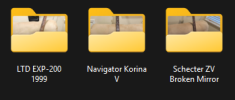
folder BS.png
 
I've gotten used to Windows 11 over the last year, and use it every day for work. My biggest complaint with the file manager is that when manually changing file names, the position of the cursor jumps around to front or back of the name, making it very slow sometimes or repeated tries. That drives me crzy. I don't think it did this in Windows 10 or before.

But I choose to use Mac and Linux at home, both with their own pros-cons.
 
I dunno, I kinda like using electricity. The internet...less and less.
Well, admit that electricity is something I'd rather keep as an electrical engineer. And one phone with less than 10 white listed sites; fractal stuff, the bank and a few indispensables you need to go to once a while. But I'm getting off topic here. W11 works flawless on my 2017 ASUS small laptop and using Kaspersky to let only the necessary flow through. But I don't like it either, too much change just to make you feel 'older'.
 
I'm sure virus scanners incl. personal firewalls are perfect tools to collect your data because it has access to all what you are using. I would be careful with Kaspersky from Russia. Standard Linux distributions doesn't need/use virus scanners.
https://www.cnet.com/tech/services-...-collect-your-data-privacy-security-concerns/
av-software-testing-table.png
 
Last edited:
I’m sure ya need a PC for a lot of work ya do, but I’ve been glad to not touch one for anything music related for almost 18 years now and can’t even remember what it’s like having a PC crash once me mid-session, which is exactly how I got to Apple.
My P.O.S Mac crashes all the time and now takes 10 minutes to "wake up" Would't take another one if you gave it to me
 
There seems to be a lot of regression as well. The new File Explorer doesn't automatically update. For example, if I change the name of a file the sorting doesn't change despite the fact that the new file name is alphabetically different. Also, if another program creates a file in the folder you're viewing it doesn't update. These are inexcusable bugs as these things were fixed way back in the Windows NT days.
HATE this carry-on. Having to refresh folder views constantly... grrrrrrrrr
 
My P.O.S Mac crashes all the time and now takes 10 minutes to "wake up" Would't take another one if you gave it to me
Do a fresh install. Is it an intel processor? The M1 processor is still extremely fast and the M4 mini at $599 is an insane value.
 
The folder regression pisses me off so much, feels like they spent money just to break something that didn't need to be fixed. In some of my folders, I liked having large photo thumbnail for being able to find certain things quicker visually (music gear for this example). Now they have this half-covering BS where the photo is partially obstructed by the folder and there isn't a setting to change it back to how it was perfectly functioning in Windows 10 🤦‍♂️I was surprised that people have to install 3rd party programs just to retain the previous functionality.

View attachment 161185

Idiots - I just checked this and this is the latest 25h version why oh why
 
Back
Top Bottom