I just tried it and it's still totally fucked up.
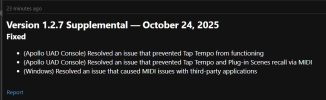
New version of Console should be v1.2.7.764I just tried it and it's still totally fucked up.
Yeah... I split across the lot to try it out.UA Connect gave me version v1.2.7.747 when I updated. So I bagged it and after a short battle I managed to get v1.2.7.764 to download correctly. Everything is functioning as it should.
It's a Windows issue.Thankfully I am not experiencing any of those issues with the 1.2.7 version of the Console. In fact I just ran a full backup which ran at full speed with and without the Console open. Was it Mac users or Windows users that were reporting these issues that you saw? I saw a post on the UA forum: "UAD Console update seems to hijack all MIDI devices" where Windows users are reporting midi related issues with the 1.2.7 version of the Console and midi devices.
Just installed UA Console v1.2.7.764 with no problems.
Did you only read one post in here?I'm guessing you're using a Mac.

A number of Windows users are reporting on the UA Forum that Console Version 1.2.7.764 has solved their Midi related issues. However, some users had issues installing the “764” version of Console because UA Connect was still serving the earlier version of Console instead of the new one. If you check the version of Console you have installed and it is not the new ”764” version the solution that a number of people have reported is to sign out of UA Connect, then reboot your computer, sign back in to UA Connect and run the Console Update if it then shows for you. If that dead nor work it would be best to submit a report to UA Support…others have been helped by the support team. I wish you the best.It's a Windows issue.
I came here trying to figure out why my Axe Edit suddenly became unusable after updating the editor, I didn't even think about the fact that I updated console at the same time.
I just reverted back to 1.2.4 with Console and Axe Edit is working perfect again.
I'm so over Universal Audio at this point, I was teetering on the edge of selling my Apollo Twin X and this definitely pushes me over the edge. I'm listing it tomorrow.
Universal Audio is great if you're a Mac user, but they can stop claiming and representing themselves as the top of the line brand when they can't even manage compatibility of their interface with anything other than a DAW/Console on Windows. If you try to use your Apollo and an XLR mic for say, OBS or a video call on Zoom it's so unbearably crackly that you can't understand anything being said. This has been known about by UA for years, but they continue to say it's because of the Windows WDM driver or whatever yet no other interfaces have the problem.
They don't give two shits about Windows users and Windows users shouldn't give two shits back.


We are not experiencing this issue with either of our Macs.Here a Mac based anomaly after installing Console 1.2.7.764:
I'm on a Mac running Sequoia 15.6.1, Console 1.2.7.764 (Apollo X6), AXE III FW 30.01 and AXE Edit 1.14.20. All current.
It seems that somehow the graphics engine is getting overwhelmed/wedged (see pict below). I've got Console, Ableton and AXE Edit running. I go and edit in Ableton which hides the Axe Edit window behind Ableton windows. When I click back onto AXE Edit to activate it's window I get the results below.
If I click again on the Menu bar of AXE Edit the full window get's drawn.
During all this AXE III works fine, and I don't notice any performance issues in AXE Edit with the exception of more graphics glitches in the drawing of curves (modifier, LFO's etc) in AXE Edit.....which resolve within 500ms to correct shapes.
May or may not be related to Console install but only happens (consistently) after I installed 1.2.7.764.
Not sure this belongs here but.....
Cheers
View attachment 161304

What's that PDF? Do you have or did you have Acrobat running? Adobe's products are a mess in my experience.Here a Mac based anomaly after installing Console 1.2.7.764:
I'm on a Mac running Sequoia 15.6.1, Console 1.2.7.764 (Apollo X6), AXE III FW 30.01 and AXE Edit 1.14.20. All current.
It seems that somehow the graphics engine is getting overwhelmed/wedged (see pict below). I've got Console, Ableton and AXE Edit running. I go and edit in Ableton which hides the Axe Edit window behind Ableton windows. When I click back onto AXE Edit to activate it's window I get the results below.
Yes, that was an open PDF using Preview on the Mac, not Acrobat. I have had this happen without a PDF open, but I'll keep an eye on that.What's that PDF? Do you have or did you have Acrobat running? Adobe's products are a mess in my experience.
There are instructions on the UA Forum and the UA website on how to revert back to the previous version of Console. You might want to contact UA customer support to report your issue and see if they are aware of anyone else experiencing the same issue and to provide you with a solution. Best of luck getting this resolved.Yes, that was an open PDF using Preview on the Mac, not Acrobat. I have had this happen without a PDF open, but I'll keep an eye on that.
Happening pretty consistently here for me. Will try to isolate causes by limiting other open apps.
For sure new since recent Console update.