Input gate tames a little high end?

What is a true "analog" gate
I honestly have no idea so I apologise if I say stupid things now - my understanding is that "analog" just reacts to voltage changes without "thinking", and "digital" gate needs processor to react.
And apply processing I guess, if we basically have a bit of a compressor block in the input! I wonder if it can be used as an additional processing...

And thank you for explaining re: expander in the input block!
 
If most of your noise is coming from your guitar, then it makes much more sense to control that noise before it gets drastically boosted by the amp.
I probably wrong about this as well, but with the low noise we have in Fractal, it's pretty much a given that the noise will come from the guitar!
However, I get consistently better results with gate after amp. My presets either don't have gating at all (thanks to low noise floor, even with singles), or gate after amp, if a preset has CCV and Brutalz. And it's still has -60dB, I never need more.
 
At what settings did you notice a difference?
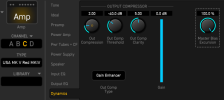
The Input|Gate is at OFF... any value above that I could notice and the Amp|Dynamics|Input Dynamics at about 1.0 I did notice a difference.
Oh, and "Out Comp Type" I've changed from Output to Gain Enhancer and then rolled down the Amp|Gain (aka 1st knob) from 8.5 to 5.5
I found that 5.0, like in the (excellent) video, was a lot and just 2.0 was enough to get the benefit without padding/reducing the overall level so much. In part it acts like compressor but here's more to it than that. It's an arguably powerful parameter.

11.png
 
Last edited:
I should note that the gate in the Input block is a downward expander. If you want a "gate" gate which is an open/close proposition use the Gate block with either Classic or Modern gate types.
okay that's a big difference then!
what would you personally recommend? Are there some "golden" Settings you think the downward expander works best?
Gate-Block placed after the amp and even sidechained is not an ideal solution?

Just out of curiosity, how does the Axe Fx Input gate compare to the Helix input gate? So far I had less hissing on the Helix with similar settings.
 
After trying it out more... the Intelligent gate is the one where I really hear a difference, even toggling between Off and -99 on a sustained chord I can hear it changing. Classic is better.

I added a Gate block and used the Classic Gate. I can't tell any difference with that one, so I'm using that now. Might be nice to have the Gate options added to the Input block since a lot of folks probably aren't aware we have a couple more options if you add a Gate block.
 
After trying it out more... the Intelligent gate is the one where I really hear a difference, even toggling between Off and -99 on a sustained chord I can hear it changing. Classic is better.

I added a Gate block and used the Classic Gate. I can't tell any difference with that one, so I'm using that now. Might be nice to have the Gate options added to the Input block since a lot of folks probably aren't aware we have a couple more options if you add a Gate block.

I can't remember if I've ever used the Gate block, I will try that!

What settings do you use for the block? Classic with as short an attack/release as possible?
 
After trying it out more... the Intelligent gate is the one where I really hear a difference, even toggling between Off and -99 on a sustained chord I can hear it changing. Classic is better.

I added a Gate block and used the Classic Gate. I can't tell any difference with that one, so I'm using that now. Might be nice to have the Gate options added to the Input block since a lot of folks probably aren't aware we have a couple more options if you add a Gate block.

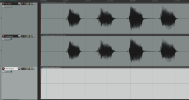
At -99 dB, the input gate is doing practically nothing. Here's the null test results between OFF and -99 dB threshold on Inteligent mode with all else at defaults. These are power chord hits with my Les Paul's bridge Duncan JB humbucker.

1768508445861.png

Perfect cancellation, meaning there is no difference between them at all. That is also after normalizing the DI +12.1 dB as well. Results in classic mode at those settings were the same. No difference.

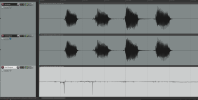
Even at the default setting of -60 dB threshold, the difference is tiny. The Null Output track has been normalized again with 37.5 dB of boost for a total of 49.6 dB of boost to get that waveform showing the difference. Even then it's mostly background noise between notes and just a tiny nip off of the initial pick hit before the note sounds.

1768511133485.png


Don't underestimate the power of suggestion.
 
Last edited:
Just curious and total noob question here, but are there other considerations that can be a factor here? I haven't messed with -99dB settings yet, but maybe time domain vs frequency domain stuff.
 
After trying it out more... the Intelligent gate is the one where I really hear a difference, even toggling between Off and -99 on a sustained chord I can hear it changing. Classic is better.

I added a Gate block and used the Classic Gate. I can't tell any difference with that one, so I'm using that now. Might be nice to have the Gate options added to the Input block since a lot of folks probably aren't aware we have a couple more options if you add a Gate block.
Does the classic gate in the Input block achieve the same thing?
 
The Modern and Classic Gate modes in the Gate block can open and close faster. They also have the Hold time parameter to help combat rapid gate flapping artifacts when using really fast attack and release times combined. If you need really tight and aggressive gating for very high gain tones, the Gate block's gate modes will likely be a better choice.
 
The Modern and Classic Gate modes in the Gate block can open and close faster. They also have the Hold time parameter to help combat rapid gate flapping artifacts when using really fast attack and release times combined. If you need really tight and aggressive gating for very high gain tones, the Gate block's gate modes will likely be a better choice.
What type of gate settings do you like a for an all around general purpose gate?

Also, something I was curious about; I notice that the default value in the input block is 2ms Attack. While a millisecond difference is super fast and can be tough to hear, would you happen to know why or speculate as to why 2ms was chosen instead of the fastest setting 1ms? Like I said, it's so minute, but I assume there is a reason it was chosen.
 
Default settings are a decent place to start. Settings will depend on your noise levels and needs, so there's no one size fits all approach. You have to experiment to find the best balance for your environment and guitars. I personally use it only to fully silence the signal when I mute the strings, so I keep the threshold pretty low so it doesn't chop off sustained notes and chords. I don't use a ton of gain, so I rarely need anything more aggressive than the default settings. YMMV.

A slower responding gate is less obvious, sort of fading in and out rather than snapping open or shut.
 
Fast attack and release can cause low end distortion, something to watch out for. Or rather, if you think about it, really really fast compression is the same thing as clipping, and really fast is relative to the frequency of the notes. That's not a very good explanation, but it's a thing, really.
 
Back
Top Bottom