FM9 Edit Not Responding

Dolan

Inspired
All firmware has been updated in both the unit and the most recent editor. USB cables are not an issue as the FM9 and editor work fine with my Mac. The I am unable to use with the editor is a Dell XPS 13 9380.
 
It could be the port on the Dell or actually the USB cable. Oddly enough you may need a different USB cable for the Dell....
 
It could be the port on the Dell or actually the USB cable. Oddly enough you may need a different USB cable for the Dell....
Interesting. The ports in the Dell are fine. I tried other devices and no problems. I tried my Axe III with the Dell and the same cables and same issue, editor does not respond.
 
Interesting. The ports in the Dell are fine. I tried other devices and no problems. I tried my Axe III with the Dell and the same cables and same issue, editor does not respond.
Right, so my point is you may need another USB cable just for the Dell. I have had this issue going from computer to computer. I am not exactly sure why. It just seems like it is one of those "grown up" tech things, but nonetheless try a different USB cable. I had a really nice gold ended cable with my AF3 and the mac wouldn't read it. Tried a cheapo Amazon version and it worked. Sometimes a splitter or hub will cause interference. I would guess this might fix the issue.
 
Interesting. The ports in the Dell are fine. I tried other devices and no problems. I tried my Axe III with the Dell and the same cables and same issue, editor does not respond.

If you close out the editor and try again will it work? It’s like that for me with my Windows work laptop. Sometimes it takes 3-4 attempts. Says it’s connected but nothing happens. My desktop never has issues.
 
If you close out the editor and try again will it work? It’s like that for me with my Windows work laptop. Sometimes it takes 3-4 attempts. Says it’s connected but nothing happens. My desktop never has issues.
I've tried that, no dice.
 
Sounds like you have tried a lot of different things. I’ll throw these out there just in case.

- As mentioned, try another cable. Use the shortest one you can find and go direct with no hub for testing purposes

- if the Dell laptop has more than one USB port, try them all

- try varying the sequence you use to start things up
- start pc, start FM9, connect USB cable, start Edit
- start FM9, connect USB cable, start PC, start edit,
- etc.

- go to Start -> Control Panel -> Device Manager and make sure the Dell is recognizing the FM9 in the device list and that no errors are displayed. If an error is displayed you need to fix this.

- uninstall and reinstall the FM9 USB driver on the Dell

Hope this helps.
 
I'm the same apart from i'm using Mac. I've tried 3 different USB cables (including the one that came with the unit) and still nothing
 
Can you connect with standalone FractalBot?

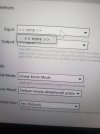
The editor has settings for the "ports" to use for sending and receiving. Make sure those are set to FM9.
 
Can you connect with standalone FractalBot?

The editor has settings for the "ports" to use for sending and receiving. Make sure those are set to FM9.
 

Attachments

  • 20220918_133708.jpg
    20220918_133708.jpg
    2 MB · Views: 18
  • 20220918_133651.jpg
    20220918_133651.jpg
    1.9 MB · Views: 17
Did you try FractalBot?

From the look of that, and your earlier post, it appears the driver isn't active. But that could be a driver issue or a USB cable/port issue, I think.

Also, what kind of cable are you using? I just checked the specs for your computer and it says there are 4 USB-C ports.

I have no experience connecting Fractal devices to a USB-C port.

Was this working and stopped or never worked?

I'd suggest opening a support ticket with Fractal.
 
If anyone could help regarding edit not responding to my Mac (3.0 firmware and USB 1.01 on FM9, and latest version of FM9 Edit) I'd be very grateful. Tried 3 different USB cables nothing coming up. Fractal Bot app not even picking up USB reading. Any advice? Cheers
 
I got it going. How? I don't know because I ain't that smart! I do love this thing. Perfect to gig and rehearse with.
 
Back
Top Bottom