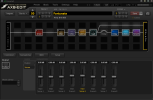
FM9-Edit 1.03.19

Michael Pickens

FAS Software Engineer
Fractal Audio Systems
Moderator
FM9-Edit 1.03.19 is now available via auto-update or from our website:

https://www.fractalaudio.com/fm9-edit/


RELEASE NOTES

VERSION 1.03.19
January 19, 2026

Current FM9 Firmware Version: 11.00

SYSTEM REQUIREMENTS
  • Mac version requires OS version 10.13 or newer
  • Windows version requires Windows 7 or newer
  • Minimum firmware version 3.00

NEW IN THIS VERSION

* Support for firmware 11.00
o Updated internal patch version.

* Updated fonts in the FractalBot panel.
 
Anyone else experiencing that Windows Smart App Control blocks FM9-Edit from launching? I installed the new version a few days ago.
First time I have experienced it today. Not sure if it is something new, and that Fractal needs to be added to a list of safe writers or something like that?
 
FM9-Edit 1.03.19 is now available via auto-update or from our website:

https://www.fractalaudio.com/fm9-edit/


RELEASE NOTES

VERSION 1.03.19
January 19, 2026

Current FM9 Firmware Version: 11.00

SYSTEM REQUIREMENTS
  • Mac version requires OS version 10.13 or newer
  • Windows version requires Windows 7 or newer
  • Minimum firmware version 3.00

NEW IN THIS VERSION

* Support for firmware 11.00
o Updated internal patch version.

* Updated fonts in the FractalBot panel.
Would it be possible to get a small change made to the FM9 editor, a feature that is currently in the AX8 editor?. In the AX8 editor, while on the scene output level screen, the currently selected scene is highlighted in the lower pane, where the scene levels are displayed (selected scene # text is orange). The current version of FM9 edit does not have this highlighted text in the lower pane, which would be nice to have. Thanks

AX8.png
FM9.png
 
Last edited:
  • Like
Reactions: yek
Would it be possible to get a small change made to the FM9 editor, a feature that is currently in the AX8 editor?. In the AX8 editor, while on the scene output level screen, the currently selected scene is highlighted in the lower pane, where the scene levels are displayed (selected scene # text is orange). The current version of FM9 edit does not have this highlighted text in the lower pane, which would be nice to have. Thanks
I'll see what I can do.
 
Back
Top Bottom