FM3 Firmware Version 6.00

  • New Speaker Drive algorithm in Amp block. This new algorithm more accurately models the frequency dependent distortion of guitar loudspeakers. The default value (upon resetting the block) is 2.0 which gives roughly 1 dB of compression. Setting the value to 0.0 defeats the speaker drive modeling. Higher values give a smoother and more focused sound, rounding off the “sharp edges” and yielding greater compression.
  • Added Speaker Thump to Amp block. This models the dynamic, nonlinear behavior of a guitar speaker. A value of 5.0 roughly corresponds to an amp running into a speaker rated at the same power as the amplifier, i.e., a 100W amplifier running into a 100W speaker. The reset value is a conservative 2.5 which represents, i.e., a 50W amp running into a 100W speaker. Note that the majority of the response is in the subsonic region and the effect is primarily tactile. Existing presets are not affected and the value will be zero.
Amazing update!!!

Is there a way to set those values to 2 and 2.5 on existing presets in bulk?
 
Amazing update!!!everything works well....also my midi appl, voes mc 5jr,
Amp Preamp Low cut sets on default back
Thank you1

Amazing update!!!everything works well....also my midi appl, voes mc 5jr,
Amp Preamp Low cut sets on default back
Thank you
In the Preamp section (my amp 1959slp jumped)
Low + high cut frequency set to default
10hz and 32999 hz, in all presets,
Fm6 and refreshed
 
Amazing update!!!

Is there a way to set those values to 2 and 2.5 on existing presets in bulk?Clic
In FM3 Edit do the following steps:
1- Set the parameter you want to change to the desired value
2- Click that parameter (knob or switch) with the right mouse button, holding down the Shift key
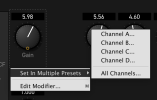
3- You will get this menu
Captura de pantalla 2022-12-08 a les 22.07.19.png
4- Select "Set in multiple presets" and choos if you want to change all channels or only one.
5- The preset browser is shown. Just choose the presets you want to apply the changes
 
Last edited:
My FM3 just bricked in the middle of the update. I know how to reset on my AxeFx3…same thing with this ? The screen just shows the fractal logo and it won't do anything else
 
My FM3 just bricked in the middle of the update. I know how to reset on my AxeFx3…same thing with this ? The screen just shows the fractal logo and it won't do anything else
Hold the Page Left and Page Right buttons while powering on. This should land you in the emergency utility and you can apply the firmware update as normal.

If this doesn't resolve the problem, please contact support: https://www.fractalaudio.com/getting-help/
 
That's like Christmas Eve for me tonight. Another great gift under the tree. Thank you very much for the hard work.
 
Back
Top Bottom