Axe FXiii Latest Firmware + FC12 Board + Mission SP-1

Welsheagle

Member
Hi All ,

Apologies but I have searched and tried using other disscussion's and You Tube Videos to try and figure this out
but I cannot setup the Mission SP-1 to do both Volume and Wah. I have all the cables connected ( TRS )

But unfortunately cannot get my old brain around it , does anyone have a Step by Step guide
or video ?

Much Appreciated for any help

Cheers
 
I assume that you're trying to use a single expression pedal to do volume and wah in one preset but not at the exact same time. If that is the case, try using channels. @2112 put out a great video on that topic a while back.

 
Hi Zed ,

Cheers for that link but it is not what I am after , The Mission SP-1 has a switch so I should be able to engage and disengage the Wah function when needed but when disengaged it defaults to just Volume and when engaged Just Wah .
 
The SP-1 switch is latching, not momentary like the modeler defaults to. Since you don’t mention setting that up I’m going to assume that you didn’t.

P. 12 in the FX3 manual describes the process for connecting the switch to the FX3 and setting it to latching. If you’re connecting it to the FC-12 start with p. 9 in the FC Manual.

I’d not rely on that switch to tell the modeler how I want the pedal to be treated, I’d use channels and scenes, or a control switch on the FC to toggle it. That’d allow me to use the switch to toggle other things like a boost, or distortion or a Vibe I could turn on/off without removing my foot from the pedal during a solo. Typically I know scene by scene whether I want it to be a volume or a wah but toggling the previously mentioned effects is more dynamic. The modeler is very flexible in how we set up the various pedals and switches and, over time, I’ve bounced around using my pedals in different ways trying to find what felt best for me.
 
Last edited:
Hi Greg

Cheers for that but alas as previously stated I can't get my head around it all , I am loving the unit but surely it shouldnt be this hard or in depth to get an external pedal with foot switch working between a Volume and Wah ? I guess it's one of things that once you've done it you would know for future but based on what I can source and find I am not entirely sure anyone has got this working unless its one of those keep it to chest type of set ups ...lol
 
Here's one way to do it.

Assign a control switch modifier to the bypass state of the volume and wah block. In the modifier menu for the wah change start to 100 and end to 0. Leave these at the default values for the vol. This way activating the control switch will bypass one block while the other is engaged.

Add the relevant control switch to an unused layout and then create a stand in switch that maps the control switch to the mission latching switch.
 
I have done this with the M-Plex block. Wah and Volume blocks are on different rows, and the SP-1 switch switches between the M-Plex rows. I usually have the wah block row active with auto off function at the toe down position. Then I can always start the wah when needed. If I need the volume block for swells I press the SP-1 switch. Not the best way but I didn´t figure out other way in the beginning so I have kept this solution...

M-Plex.png

M-Plex modifier.png

Wah modifier.png

Volume modifier.png
 
Cheers Leon & GuitarManiac

Still have not got it working as I would like , for what should be such a simple thing to setup it is not very user friendly.

At the end of the day I have one external pedal with a toe switch it should not be this hard to have it working as Volume then Wah when toe switch engaged.

On the Mission Pedal I have Out 1 connected to FC Pedal 1 and Out 2 Connected to FC Pedal 2 ( Or should Out 2 be connected to FC Switch 1&2 ? )

I have tried various methods and ways I cannot even get the Toe Switch to work :(
 
Wow, thank you for the video. I had missed that you can assign a modifier to bypass! I learned something new and got the SP-1 to work exactly like in the video. Also saved one block without the need of M-Plex. You just have to remember to configure the right inputs to each modifier. I assigned output 1 of the SP-1 to FC1pedal1 in FC12 and output 2 of the SP-1 to FC1pedal2. In the bypass modifiers you choose FC1pedal2. And remember to change the start of the vol block to 100 and end to 0, just like in the video.
 
Last edited:
Cheers Leon & GuitarManiac

Still have not got it working as I would like , for what should be such a simple thing to setup it is not very user friendly.

At the end of the day I have one external pedal with a toe switch it should not be this hard to have it working as Volume then Wah when toe switch engaged.

On the Mission Pedal I have Out 1 connected to FC Pedal 1 and Out 2 Connected to FC Pedal 2 ( Or should Out 2 be connected to FC Switch 1&2 ? )

I have tried various methods and ways I cannot even get the Toe Switch to work :(
Pretty sure the toe switch needs to be connected to the switch 1 or 2 jacks on the fc
 
Hi Dave , Does not appear you have to do thatit works but still with issues I guess I am missing some little tweek

Here is what I did

Basic Profile for testing :

1702045524173.png

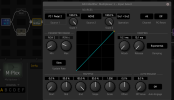
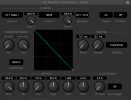
For the Volume Block I Assigned a Modifier to the Bypass FC1-Pedal 1:

1702045577512.png

Then for the actual Volume Control on the Volume Block :

1702045892848.png

Now for the Wah Block same principle as above but with Wah Bypass Control Set to FC 1 Pedal 2

No if I hot the toe switch it engages the Wah and not Volume and When I disengage the Wah it reverts to Volume
Only thing is there seems to be somethign I missing as at the Max Values both pedals engage ?
 
Hi Dave , Does not appear you have to do thatit works but still with issues I guess I am missing some little tweek

Here is what I did

Basic Profile for testing :

View attachment 131112

For the Volume Block I Assigned a Modifier to the Bypass FC1-Pedal 1:

View attachment 131113

Then for the actual Volume Control on the Volume Block :

View attachment 131114

Now for the Wah Block same principle as above but with Wah Bypass Control Set to FC 1 Pedal 2

No if I hot the toe switch it engages the Wah and not Volume and When I disengage the Wah it reverts to Volume
Only thing is there seems to be somethign I missing as at the Max Values both pedals engage ?
You're controlling both, the volume itself and the block bypass, using the same source (the pedal sweep position), that's not gonna work. You need to control the 2 bypass functions from your toe switch source, and the 2 values (volume or wah parameter) from the pedal source (FC 1 Pedal 1).
 
Back
Top Bottom