Axe-Edit III 1.14.07

Michael Pickens

FAS Software Engineer
Fractal Audio Systems
Moderator
Axe-Edit III 1.14.07 is now available via auto-update or from our website:

https://www.fractalaudio.com/axe-fx-iii-edit/


RELEASE NOTES

VERSION 1.14.07
DECEMBER 20, 2024

Current Axe-Fx III Firmware Version: 27.03

SYSTEM REQUIREMENTS
  • Mac version requires OS version 10.13 or newer
  • Windows version requires Windows 7 or newer
  • Minimum firmware version 3.02

NEW IN THIS VERSION

* Updated the knob graphics.

* Corrected a crash bug in Preset Manager when dragging and dropping a folder into the right-hand pane.
 
Nice update on the interface functionality. Thanks.

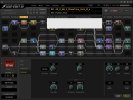
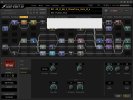
It does feel a bit harsh depending on ambient lighting, monitor used and age of the eyes doing the looking.
Maybe a simple dimmer function somewhere in Setup to allow people to adjust to taste would be a good option.

Thanks again for all the work.
 
Been getting this "empty fields" issue since first 1.14.07 version.
Intermittent not sure what triggers it.
RANF fixes it until it happens again.
I think Yek mentioned this in an earlier thread.
 

Attachments

  • Empty_Fields.jpg
    Empty_Fields.jpg
    542.5 KB · Views: 45
Strange issue, AxeEdit messes up my AKAI MIDI inputs. Running on 2017 iMac, Ventura 13.7.2, Logic Pro 11.0.1, Akai MPK25 Midi controller.

When I kill AxeFX and reset the MIDI controllers all is back to normal.
 
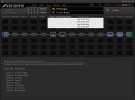
Empty Fields in Amp pop-up:

Just wanted to confirm that on every launch of 1.14.07 with firmware 27.03 (Release) the AMP Info Pop-up Window is not populated properly for any given amp. Running on Mac with Sequoia 15.1.

Meaning: if Amp1 is used in the preset you get blanks for all channels whereas the unused Amp(2) displays "not used" (see pict below).

If both Amps are used in the preset they both display blank in this pop-up. Rebooting app does not fix this, nor is it specific to any presets it, works the same on everything (even new official AXE presets).

The only way to reset this is to RANF. Then you are fine until the next reboot of AXE Edit, which resets the problem.

All amps work fine throughout all this and display fine within the Amp blocks. It is only the Info Pop-Up that is effected.

Empty_Fields_2.jpg

Empty_Fields.jpg
 
Last edited:
Empty Fields in Amp pop-up:

Just wanted to confirm that on every launch of 1.14.07 with firmware 27.03 (Release) the AMP Info Pop-up Window is not populated properly for any given amp. Running on Mac with Sequoia 15.1.

Meaning: if Amp1 is used in the preset you get blanks for all channels whereas the unused Amp(2) displays "not used" (see pict below).

If both Amps are used in the preset they both display blank in this pop-up. Rebooting app does not fix this, nor is it specific to any presets it, works the same on everything (even new official AXE presets).

The only way to reset this is to RANF. Then you are fine until the next reboot of AXE Edit, which resets the problem.

All amps work fine throughout all this and display fine within the Amp blocks. It is only the Info Pop-Up that is effected.

View attachment 149642

View attachment 149643
Hi, I don't experience this in Win. All is as expected. .02
 
Empty Fields in Amp pop-up:

Just wanted to confirm that on every launch of 1.14.07 with firmware 27.03 (Release) the AMP Info Pop-up Window is not populated properly for any given amp. Running on Mac with Sequoia 15.1.

Meaning: if Amp1 is used in the preset you get blanks for all channels whereas the unused Amp(2) displays "not used" (see pict below).

If both Amps are used in the preset they both display blank in this pop-up. Rebooting app does not fix this, nor is it specific to any presets it, works the same on everything (even new official AXE presets).

The only way to reset this is to RANF. Then you are fine until the next reboot of AXE Edit, which resets the problem.

All amps work fine throughout all this and display fine within the Amp blocks. It is only the Info Pop-Up that is effected.

View attachment 149642

View attachment 149643

I am experiencing exactly the same symptoms in win10. Newest rev of everything. I never loaded the beta version. Original AXE-FX III.
 
Back
Top Bottom