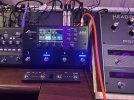
🔥Introducing the new AM4 Amp Modeler

Day 2 with the AM4. I have never owned a FAS device with amp modeling (own a VP4) and all my previous amp models have been in stompbox form. I've been thru most of the main offerings in that category and have never been happy for too long with any of them. I'm just a bedroom player...I've owned two tube amps briefly but those went quickly due to volume. This AM4 sounds amazing. I'm totally in love with the deluxe tweed. So responsive and gnarly but also cleans up nicely. It's a very physical experience when turned up (FR10). You throw the amp something and it throws something back at you to play off of. This morning I was already looking up deluxe tweed style amps and thinking about getting or building one for the occasional blast in the house. lol. Bravo. Had Neil Young & Crazy Horses album Arc Weld on all the way home from work.
 
so far, it's a pretty good unit...
a few snags..

1) clock through spidf is spotty unless I let the AM4 be the master clock (occasional glitches otherwise)
2) maxing out cpu with my blocks. hopefully this can be streamlined so it's not throttling.

View attachment 163216
I noticed the same thing with only Factory presets. Some are over CPU limits and throwing a warning.
 
You can’t compare it 1:1 to an FM9.
For example, the reverb on the FM9 runs in a separate core.

I have yet to cross 80% in any preset, but I never run reverb at ultra high quality.
 

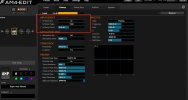
I don't have an AM4 yet, but I just had a review of this video and paused a few times to have a look at the options of expert mode. I really do appreciate the layout and access to all controls, and expert more looks very accessible too. With the limitations on blocks, I noticed the option of Output Compressor on the Power Amp section. Is it safe to assume that this will just serve as the stereotypical "glue" to smooth the audio? I do understand this would be very different from a compressor before the amp ...
 
1959 SLP Jumped, Dimension 3, Dual Delay and Large Hall
You have the reverb quality set to Ultra High. Setting it to Normal lowers the CPU to 78%. Setting it to Economy goes to 76%. In a band setting, I don't think you'll hear much of a difference.

You have also used the amp GEQ to cut lows -- AND the individual cab IRs and the cab master EQ. If you can make it work with just the cab master EQ, you'll get that down another 1%.
 
I don't have an AM4 yet, but I just had a review of this video and paused a few times to have a look at the options of expert mode. I really do appreciate the layout and access to all controls, and expert more looks very accessible too. With the limitations on blocks, I noticed the option of Output Compressor on the Power Amp section. Is it safe to assume that this will just serve as the stereotypical "glue" to smooth the audio?
Yes, but it can also serve as an obviously squishy/sustainy tone tool, and it also has a very nice "Gain Enhancer" option.

By the way, that was a beta version of the editor you saw. In the release the output compressor is on the amp Expert tab rather than the Power Amp tab, since this makes more sense.

1764964742138.png
 
I would love it if the modes on the screen matched the four blocks. Effects mode would show the typical blocks as they are and presets would show the names of the presets in the four blocks and scenes would show the scene names in the blocks. I know its Been mentioned and I think I might get confused using different presets and scenes without seeing the names on the screen.
 
You have the reverb quality set to Ultra High. Setting it to Normal lowers the CPU to 78%. Setting it to Economy goes to 76%. In a band setting, I don't think you'll hear much of a difference.

You have also used the amp GEQ to cut lows -- AND the individual cab IRs and the cab master EQ. If you can make it work with just the cab master EQ, you'll get that down another 1%.
Ya, I was toggling some effects back and forth and saving iterations. I tried some different combinations. It would sit at about 80 but then peak at 85 when playing. Plus it adds 1 percent when the editor is connected. I was just surprised by the high cpu number given there is only 4 blocks. Having said that, at no point did it cut out the audio even at 85%.
 
Plus it adds 1 percent when the editor is connected.
Say what now?

dog what GIF


Man yall are taking me back to school on some stuff I have been using for half a decade or so. 😂
 
Say what now?

dog what GIF


Man yall are taking me back to school on some stuff I have been using for half a decade or so. 😂
This was true on the prior generation devices... Connecting USB added a small increase in CPU.

Current generation all have a separate processor to offload the work.

Sounds like maybe AM4 doesn't?
 
Well done Fractal! The AM4 is amazing! As a long-time Fractal user, I find the new user interface refreshing. It's so easy to to dive in and tweak sounds quickly.
As much as I love the FM3, it was overkill as I mainly use amps, cabs, reverb/delay. My most CPU intensive patches peak at about 40%. While effects are fun, they're more of a gimmick to me. Give me a great sounding amp/cab, maybe some reverb, and I'm good to go.
The smaller footprint is welcome and I'm surprised at how much I love the preset sounds. Maybe it's the speakers that I use but the FM3 presets never sounded right without a bunch of adjustments. So far, the only adjustments I had to make are dialing down the mix levels of the delay and reverb. I'm having so much fun with this little device. It's perfect!
 
Been using mine since Friday (Dec 5). It sounds so good. And even though its 4 blocks, I prefer using it over the FM3. I don't know why, but I never really connected with the FM3. I am definitely "nerdy" enough to use it. But there is something unique about the AM4 - it has an addictive personality if you will.

Wrestling HAAARD with buying the VP4 to add to it while it is still on sale. Being able to have 2-3 pre-effects and 4 post would make it absolutely perfect. And still not exactly huge. Not to mention the extra processing power.

I didn't expect to go this way, but its really great.IMG_4611.JPG
 
Been using mine since Friday (Dec 5). It sounds so good. And even though its 4 blocks, I prefer using it over the FM3. I don't know why, but I never really connected with the FM3. I am definitely "nerdy" enough to use it. But there is something unique about the AM4 - it has an addictive personality if you will.

Wrestling HAAARD with buying the VP4 to add to it while it is still on sale. Being able to have 2-3 pre-effects and 4 post would make it absolutely perfect. And still not exactly huge. Not to mention the extra processing power.

I didn't expect to go this way, but its really great.View attachment 163369

Do it! Add the VP4 and don't look back!
 
Been using mine since Friday (Dec 5). It sounds so good. And even though its 4 blocks, I prefer using it over the FM3. I don't know why, but I never really connected with the FM3. I am definitely "nerdy" enough to use it. But there is something unique about the AM4 - it has an addictive personality if you will.

Wrestling HAAARD with buying the VP4 to add to it while it is still on sale. Being able to have 2-3 pre-effects and 4 post would make it absolutely perfect. And still not exactly huge. Not to mention the extra processing power.

I didn't expect to go this way, but it’s really great.View attachment 163369
I must admit that having both the am4 and the vp4 is very satisfying and i expect it to be for many years.
 
Can you make the input boost under Preamp in the amp edit - be the boost that turns on and off with the amp switch?

Image 12-7-25 at 7.49 PM.jpeg
 
Back
Top Bottom