Apparently not, but you need to save presets with the new firmware.May have been mentioned here already but After FW12 beta install, do we need to soft reset amp blocks

Apparently not, but you need to save presets with the new firmware.May have been mentioned here already but After FW12 beta install, do we need to soft reset amp blocks

 seems an intermittent thing
ok it happened again
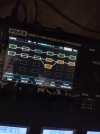
is feedback return 1 I'm doing presets like this to have all the blocks on the device in the first screen without zooming I prefer to see all the blocks in one screen without zooming inWhat's in the FIRST block on the 2nd row?
the settings of the return block are just return volume set to Max 1?
the parallel block to the reverb is a multitap delay

No.May have been mentioned here already but After FW12 beta install, do we need to soft reset amp blocks
When it happens, post similar screenshots and information, and share the preset.I've had the red block crash bug happen on presets multiple times without send/return blocks or out2/in2 effects loops.
this is what i have. also i have done this in most of my presets no oscillation. also after restart works correctly1) You are using the Return block wrong, it seems. Mix should be at 100%, and Return should be at 0dB. Your settings make the block oscillate / clip.
Rev//multitap dly -> this means reverb in parallel with multitap delay2) Multitap Delay parallel to Reverb doesn't correspond with your description in post 164 above, where AMP follows RETURN.


Please be more constructive in your comments. This thread is for beta testers. So you’ll need to describe what you are hearing that is worse, help narrow it down to specific blocks or settings that you think changed ? Maybe provide a sound example and a preset if it’s specific to a preset.Now it sounds way worse tan with 11.0

Thank you for visiting, please come again.Now it sounds way worse tan with 11.0

A tan colorway would be sick!Thank you for visiting, please come again.