Hotone Ampero Control footcontroller Bank problem

Dutch

Fractal Fanatic
I have one of the banks of the Hotone set up to switch presets and most of the time it does this just fine. Just does switches 1-4 to presets 000-003.

However, usually after having been on for a while and at inopportune moments like rehearsals, sometimes these same switches start pointing the FM3 to a bank up, so it sets the FM3 to 128, 129, etc. I can't figure out where that goes wrong! There's no bank setting in the switch programming. It just says channel, PC, and number. No bank.

Does anyone with a Hotone recognize this?

Is the FM3 sometimes misunderstanding this?

I've cleared the switches and reprogrammed them. Hopefully this solves it.
 
My problem with that controller was that it switched banks as I accidentally touched a second switch. The controller clearly was too small for my feet and there's no LEDS that could help you. I just kicked it out it and sold it.
 
My problem with that controller was that it switched banks as I accidentally touched a second switch. The controller clearly was too small for my feet and there's no LEDS that could help you. I just kicked it out it and sold it.
I have size 14s. But my aim is pretty good. Also usually it's pretty well lit where I play... I mainly use the hotone for scenes but I have one preset bank.
 
I have size 14s. But my aim is pretty good. Also usually it's pretty well lit where I play... I mainly use the hotone for scenes but I have one preset bank.
Wow, guess you can hit 3 buttons at a time with that size feet 😉.
What I liked is that it is solid as a rock, but a bit too small for gigging to my experience. The problem I encountered is that even using just one bank with long or short press it quite often changed banks due to accidentally touching a second button and there's no way to get around that.
2 strong points are that it can handle 2 expression pedals and that it has midi in so you can put it anywhere in your midi chain. Just for that one can buy it instead of getting a more expensive exp to midi converter.
 
Wow, guess you can hit 3 buttons at a time with that size feet 😉.
What I liked is that it is solid as a rock, but a bit too small for gigging to my experience. The problem I encountered is that even using just one bank with long or short press it quite often changed banks due to accidentally touching a second button and there's no way to get around that.
2 strong points are that it can handle 2 expression pedals and that it has midi in so you can put it anywhere in your midi chain. Just for that one can buy it instead of getting a more expensive exp to midi converter.
Seeing my size I opt for slenderer footwear. I'm 6'6" so I guess that's proportionate. I won't make three buttons, not even on the Hotone. Maybe on the Chocolate.

I haven't checked if the hotone midi is a through or a merge. I'll dig up some midi cables and take a gander.
 
Tengo unas 14, pero mi puntería es bastante buena. Además, suelo estar bastante bien iluminado donde toco... Uso el Hotone principalmente para escenas, pero tengo un banco de preajustes.
Hola, Compré hace poco el Hotone Ampero... Me gustaría configurarlo para cambiar escenas pero no encontró modo.
No hay mucho video en youtube tampoco para lograrlo

Porfavor me podrias ayudar para configurarlo?
 
Hola, Compré hace poco el Hotone Ampero... Me gustaría configurarlo para cambiar escenas pero no encontró modo.
No hay mucho video en youtube tampoco para lograrlo

Porfavor me podrias ayudar para configurarlo?

Hi, I recently bought the Hotone Ampero... I'd like to configure it to change scenes, but I can't find a way.
There aren't many videos on YouTube about how to do this either.

Could you please help me configure it?
Midi for scene control is CC 34, that is data 1. Data 2 is the scene number minus one so scene 1 is data 0, scene 2 is 1, etc.
1744790537066.png

1744790601677.jpeg

Unfortunately there is no dual option for the buttons, the toggle mode of the switch remembers every previous press so if you have two scenes programmed in the toggle mode, it will always switch to the other one it was switched to previously. I wish it would have short and long press functions but it the long press function in the hotone doesn't work that way. It does some timing thing.
 
El MIDI para el control de escena es CC 34, es decir, datos 1. Datos 2 es el número de escena menos uno, por lo que la escena 1 es el dato 0, la escena 2 es el 1, etc.
View attachment 153631

View attachment 153632

Lamentablemente, no hay opción dual para los botones. El modo de alternancia del interruptor recuerda cada pulsación anterior, así que si tienes dos escenas programadas en el modo de alternancia, siempre cambiará a la anterior. Ojalá tuviera funciones de pulsación corta y larga, pero la pulsación larga del Hotone no funciona así. Tiene una función de sincronización.
Buenísimo muchas gracias!!
 
Midi for scene control is CC 34, that is data 1. Data 2 is the scene number minus one so scene 1 is data 0, scene 2 is 1, etc.
View attachment 153631

View attachment 153632

Unfortunately there is no dual option for the buttons, the toggle mode of the switch remembers every previous press so if you have two scenes programmed in the toggle mode, it will always switch to the other one it was switched to previously. I wish it would have short and long press functions but it the long press function in the hotone doesn't work that way. It does some timing thing.
Just to add a note that you need to set the midi CC# for scenes on the Fractal for all current generation devices.

The use of 34 is a carry over from previous generation when the CC values were all pre-defined.
 
Just to add a note that you need to set the midi CC# for scenes on the Fractal for all current generation devices.

The use of 34 is a carry over from previous generation when the CC values were all pre-defined.
Ah. Yes. Forgot about that. It's been a while... Only have to do that once. Per device.
 
I haven't checked if the hotone midi is a through or a merge. I'll dig up some midi cables and take a gander.
The Hotone does merge midi! I can delete the midi merger from underneath my board! Both my iPad through the Yamaha MD-BT01 and the Hotone work their magic on the FM3 without the merger. Great!
 
I have one of the banks of the Hotone set up to switch presets and most of the time it does this just fine. Just does switches 1-4 to presets 000-003.

However, usually after having been on for a while and at inopportune moments like rehearsals, sometimes these same switches start pointing the FM3 to a bank up, so it sets the FM3 to 128, 129, etc. I can't figure out where that goes wrong! There's no bank setting in the switch programming. It just says channel, PC, and number. No bank.

Does anyone with a Hotone recognize this?

Is the FM3 sometimes misunderstanding this?

I've cleared the switches and reprogrammed them. Hopefully this solves it.
Found out that the bank problem that I had only happened when the FM3 was already on a preset in another bank. So it did exactly as programmed and switched to the programmed PC numbers in the then current bank.
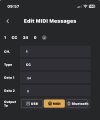
It needs a CC-0-x to choose bank x+1 before the PC. So CC -0 -0 to choose bank 1.
I'll add a screenshot later.

Stupidly I already knew about this. I've been programming my iPad to send bank messages before PC's for ages. I just didn't connect the two.

1747896618334.png
 
Found out that the bank problem that I had only happened when the FM3 was already on a preset in another bank. So it did exactly as programmed and switched to the programmed PC numbers in the then current bank.
It needs a CC-0-x to choose bank x+1 before the PC. So CC -0 -0 to choose bank 1.
I'll add a screenshot later.

Stupidly I already knew about this. I've been programming my iPad to send bank messages before PC's for ages. I just didn't connect the two.

View attachment 155074
Underneath is how I set up switch 1 in bank 0 in the hotone to alternate between presets 001 and 000 in bank 1 of the FM3.
IMG_0475.pngIMG_0474.png

Even more foolish, the templates in the hotone app do this, too...

1747903406994.png1747903406994.png1747903406994.png
 
Last edited:
Back
Top Bottom