Persistent Wah block won’t disengage

Perhaps someone already asked this, but I don't see it so I am asking again.
What is the SOURCE of your Modifier? Are you using an EXTERNAL CONTROLLER or did you directly assign a Pedal jack?
 
Perhaps someone already asked this, but I don't see it so I am asking again.
What is the SOURCE of your Modifier? Are you using an EXTERNAL CONTROLLER or did you directly assign a Pedal jack?
Hi, sorry the long time to reply, I was working in a cruise ship since then, without decent internet, etc.

I am using my EV-1 connected on FC-12, using pedal 2 (FC1 Pedal 2), auto engage 5%.
It worked for some time and now it has this problem again.Screenshot 2024-09-08 at 02.48.16.png
 
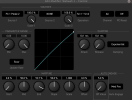
When you sweep the pedal, does the dot move completely from one side of the modifier graph to the other? In this case, heel down should be all the way to the left side while toe down is all the way to the right side of the graph like in the screenshot above. If the dot doesn't make it all the way to the other side at heel down, you need to calibrate the pedal in the FC Controllers menu.
 
Last edited:
When you sweep the pedal, does the dot move completely from one side of the modifier graph to the other? In this case, heel down should be all the way to the left side while toe down is all the way to the right side of the graph like in the screenshot above. If the dot doesn't make it all the way to the other side at heel down, you need to calibrate the pedal in the FC Controllers menu.
It’s calibrated. When the pedal it’s connected it works flawlessly.
The problem it’s using the unit without an expression pedal connected . Sometimes I just want to plug my guitar without having to connect the FC-12 or expression pedals.
 
Ah I see. Change your source assignment in the Wah modifier to one of the External Controllers and then assign the pedal to that same External Controller in the MIDI/Remote menu instead. The External Controllers have a user settable Initial Value also in the MIDI/Remote menu. Set that to zero. That way, when the pedal is not connected it will default to zero (heel down) instead of 100%. That should take care of the issue for you.
 
The other thing to check is to always make sure the wah block is bypassed when you save the preset. If no controllers are connected for auto engage to reference, I think it may revert to the original saved state of the block in each scene.

You might need to turn Auto Engage off, manually bypass the block in each scene, save the preset, then turn Auto Engage back on and then save the preset again while the block is bypassed.
 
Not sure if this helps, but I have found that if I have the Auto Engage set to "Fast Pos" the (Pitch or Wah) block will be engaged if nothing is plugged into the Pedal jack. If I choose "Fast Spd" the block will disengage when there is no pedal connected. I don't know if this the desired/expected behavior or a glitch, but it did frustrate me until I figured it out.
 
Not sure if this helps, but I have found that if I have the Auto Engage set to "Fast Pos" the (Pitch or Wah) block will be engaged if nothing is plugged into the Pedal jack. If I choose "Fast Spd" the block will disengage when there is no pedal connected. I don't know if this the desired/expected behavior or a glitch, but it did frustrate me until I figured it out.
Because Pos == Position (of the pedal), Spd == Speed (movement of the pedal).

No pedal connected is an open circuit, thus "maximum" resistance which is like a pedal fixed at toe down.

So, position of toe down is ON.

But it's not moving, so no speed, thus OFF.
 
Back
Top Bottom
