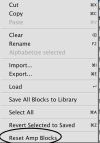
Soft Reset Utility (May 2025)

If you bring up Manage Presets and multi-select and do soft reset, do you then have to hit Save? I did, it seemed to take 5 seconds to save "something" but then when I hit Close, it warned me my updates would be lost. Did the reset take?
 
If you bring up Manage Presets and multi-select and do soft reset, do you then have to hit Save? I did, it seemed to take 5 seconds to save "something" but then when I hit Close, it warned me my updates would be lost. Did the reset take?
If the Edit light was on for the preset loaded, you will get that warning. It could be on because you edited something, or it was from an older firmware and the latest update edited something automatically upon loading the preset. Either way, the editor considers it 'edited', and gives you a chance to save the (perceived) edits before continuing.

Once this 'batch' function is completed, the presets are saved, and the edited light should no longer be lit for those presets.
 
Sorry to ask...

But in case of multiple presets using the same amps (deluxe and 59slp for me)that i have tweaked with a lot of advanced parameters, do i have to reset every block and then reload the amp block library preset in every presets ?

thanks

You need to manually resave any amp blocks in your library after doing the soft reset as well. If you don't you'll just be reloading the previous non-soft-reset settings.
 
Great feature. One thing I noticed is it reverts back to default tube selection, so if you are changing these, you will need to select your choice of tubes again.
 
Last edited:
You need to manually resave any amp blocks in your library after doing the soft reset as well. If you don't you'll just be reloading the previous non-soft-reset settings.
So If I go to manage presets and select multiple presets and reset, it automatically goes to a preset after doing this, when moving up or down a preset, it technically means it does not save and it reverts back to the older settings. Is this still the case?
 
So If I go to manage presets and select multiple presets and reset, it automatically goes to a preset after doing this, when moving up or down a preset, it technically means it does not save and it reverts back to the older settings. Is this still the case?
Presets are not related to the Block Library...
 
Back
Top Bottom