Recording DI & Re-Amping w/Pro Tools 2025.10.0

John5150!

Member
I recently purchased a Fractal Audio FM9 and was eager to re-amp several songs I had previously recorded using the Amplitube and Guitar Rig plug-ins, respectively. I believed this would be a fairly straightforward task since all the tracks were recorded as DI before using the guitar plug-ins.

I've overcome my first hurdle: FM9-Edit freezing when Pro Tools is running, thanks to a combination of posts on here and on Avid's forum. Whew.

I am now ready to re-amp previously recorded songs and begin recording new guitar tracks with DI copies.

My setup includes:
Dell Precision 5820 Tower
32GB RAM
nVidia 4GB Graphics Card
2TB SSD
Windows 11, 25H2
All firmware and drivers are up to date from Dell
Pro Tools Intro, 2025.10.0
FM9 Mark 2 /w FM9-Edit

I am connecting the FM9 via USB and have no problems recording with the Analog inputs (wet signal). I'm having trouble getting any throughput following the USB Re-Amp section on page 26 in the manual. Reaper works fine with the p26 instructions, Pro Tools, not so much (I prefer using PT). Have any FM9/Pro Tool experts come across this and found a solution? I'm struggling with re-amping and could use any guidance.
 
Has anyone been successful in getting a DI signal through input 5 (or any port for that matter) using Pro Tools 2025.10? If so, please share how you are doing it. This dunce is stumped.

I'm running a vanilla configuration of PC, FM9 connected via USB, and Pro Tools. Nothing else.

I've literally loaded Pro Tools on two different high-end new PCs (Windows 11, 25H2) and a Macintosh (Sequoia 15.7.2). I'm missing something, but it's not apparent to me. Please help this dullard find some sanity!
 
Make sure you also set Input 1 Source to Digital as well.

How are you sending the DI track back to the FM9?
 
Last edited:
No idea if this will cause issues but maybe your Pro Tools session and/or recordings are at 44100 sample rate. The FM9 only works at 48000 sample rate
 
That's the input of the track. The output is just below it and is set to Out 1 and Out 2. You need to change that to Out 5 and Out 6.

Also, set Input 1 Source to Digital instead of Analog on the FM9 when reamping.
 
Last edited:
That's the input of the track. The output is just below it and is set to Out 1 and Out 2. You need to change that to Out 5 and Out 6.

Also, set Input 1 Source to Digital instead of Analog on the FM9 when reamping.
Yes, I'm just trying to get a DI track right now. Tried all FM9 outputs. I can't wait to reamp, but first, I want to get a raw track.
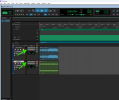
2025-11-19_19-11-45.jpg
 
Maybe check the device I/O settings in Pro Tools. Maybe something isn't right there with the inputs and outputs. Are you using the ASIO drivers?

Your FM9 settings look correct. There's not really any settings for recording the DI. USB Inputs 5 and 6 are both dedicated to the Instrument input. They both carry the same signal tapped right after the A/D converters and before the grid.
 
I just use the Input USB block at the start of the preset chain instead of Input 1. It seems more intuitive to me that way.

In Studio One the Audio I/O setup is relatively simple, probably similar in Pro Tools. I renamed the I/O inputs/outputs to make things simpler to understand. All you need to do is send your dry audio track/file in your DAW out through "In U L/R" OUTPUT (named "FM9 USB In" in the 2nd image below).

Then you just make the INPUT for your second track (will be wet after re-amp), "IN 1, IN 2" (named "Input L+R(FM9 Output 1" in the first image below).

Finally, see the FM9-Edit screenshot below for preset routing.

You can record the FM9 dry signal through the "In 1 Instr" USB input as I'm sure you already know (named "FM9 In 1 Instr Dry" in my setup, first image below).

As long as you've got your head around the fact that where the FM9 USB driver is concerned, DAW inputs/outputs are assigned to either FM9 inputs OR outputs, and you identify which are which, then you should be able to work out how to do the same thing in Pro Tools.

DAW Inputs:
1763645647983.png

DAW Outputs:
1763645672416.png

DAW Mixer Setup:
1763645810714.png

FM9-Edit:
1763646234877.png
 
Tested in Pro Tools. Works well:

View attachment 162436
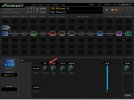
Your Pro Tools screenshot gives me great hope. The only difference in your/my FM9-Edit settings was that my Threshold was at 12:00. I adjusted it to OFF, but it didn't help. Did you get your Dry Audio DI directly in Pro Tools, or import it from Studio One? That's where I'm stuck. I'm not getting any signal on the USB Input. I realize it shouldn't make a difference, but what version of Pro Tools and Windows are you running?2025-11-20_18-16-02.jpg
 
Last edited:
Unless I'm confused as I have never used PT myself, based on your screenshots it kinda looks like you are sending an empty track with no audio (labelled "Guitar DI") to OUT 5/6. So to recap:
  • you've set Input 1 source in FM9 to "digital"
  • FM9 Digital input source is set to "USB Channels 5/6"
  • The FM9 is connected via USB, and PT is using this as the audio device
  • In PT, you are sending the output of your raw DI track to hardware OUT 5/6
If this is all true, you should be seeing some signal in the FM9. Have you checked the meters view on the grid, on the FM9 itself? Are you getting signal on the blocks grid? All the way to OUT1? If so, at least we know the DI track is making its way through the FM9.

Finally, is the recording INPUT on the PT track you want to reamp to set to IN 1/2? That should give you the output of the FM9 in stereo right in PT. Hope this helps!
 
The problem is most likely not in the FM9, it's something in Pro Tools. Recording the guitar DI via USB Inputs 5 or 6 requires no blocks or setting changes. Those inputs are dedicated to capturing the DI. It's captured right after the A/D converters, before the signal even gets to the grid. Even the Input 1 Gain setting in the I/O menu does not affect the captured DI.

Post screenshots of your device settings and I/O matrix for Pro Tools. I have a feeling something is not set up correctly there.
 
Your Pro Tools screenshot gives me great hope. The only difference in your/my FM9-Edit settings was that my Threshold was at 12:00. I adjusted it to OFF, but it didn't help. Did you get your Dry Audio DI directly in Pro Tools, or import it from Studio One? That's where I'm stuck. I'm not getting any signal on the USB Input. I realize it shouldn't make a difference, but what version of Pro Tools and Windows are you running?
I'm running latest Pro Tools, Win 11 latest update. FM9 is latest FW and latest USB driver.

I did exactly the same thing in Pro Tools as I do in Studio One. Output from track 1 is Out 7/8 which corresponds to the "In USB" block in the FM9-Edit grid.
Then the input for track 2 is In1/In2, which corresponds to the "Output 1" block in the FM9-Edit grid.

In your Pro Tools screenshot you have Guitar DI which would record the Instr1 dry guitar signal, no matter what else you are recording, and you have Guitar 1 which would record the output from the Output 1 block.
1763750963082.png

I'm assuming, as you said, that all you want to do is re-amp some dry tracks recorded at an earlier time through the FM9, and also assuming that it is track 1 that contains the original dry track audio.

All you should need to do is set the "Guitar 1" track output in Pro Tools to Out 7/8 (IUBL), which will send the output of that track to In USB in your preset.

Then, any track whose input is set to IN1(O1BL)/IN2(O2BL) will receive the re-amped output from the FM9.
 
The problem is most likely not in the FM9, it's something in Pro Tools. Recording the guitar DI via USB Inputs 5 or 6 requires no blocks or setting changes. Those inputs are dedicated to capturing the DI. It's captured right after the A/D converters, before the signal even gets to the grid. Even the Input 1 Gain setting in the I/O menu does not affect the captured DI.

Post screenshots of your device settings and I/O matrix for Pro Tools. I have a feeling something is not set up correctly there.
I completely agree. For context, I've installed Reaper, and it works right out of the gate. No issues whatsoever. Unfortunately, everything I have recorded is in PT.
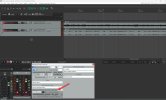
2025-11-21_18-33-15.jpg
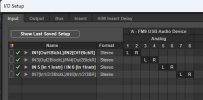
Here are my Pro Tools I/O settings; they match in Reaper.
2025-11-21_18-44-13.jpg
2025-11-21_18-43-36.jpg
 
Back
Top Bottom