FM3 new user - gear amateur

You'll get lot's of good suggestions here, but ultimately you'll go through the same journey we all have, because the FM3 is not a device you can totally have a complete overview of from the start, you have to really absorb it through experimenting with your own requirements.

Because guitars all sound different, rooms sound different, speakers are different, you'll have to tread the same ground, creating separate presets for each guitar, experimenting with IR's until you settle on something good. Before you even worry about how to lay out a preset with scenes and switches, you really want to know how to dial in a good basic tone for each guitar.

So effectively you're going to change all of these presets a few times as you discover ways to improve your tone - and the really great thing is, you get to do it all again when you start deep diving with stuff like EQ and cab cuts. It's the curse of owning such a versatile device lol.
 
Looking to get the EV PXM - do you use yours in "GUITARCAB" mode for good stage representation?
No, that turns off the tweeter. I'd rather it run its EQ as flat as possible so I use Monitor 2.

Instead of using the GUITARCAB mode I'd use a solid-state power-amp and a regular guitar cab as explained on p. 32 in the manual. That said, IF the GUITARCAB mode is actually an EVM12L sound-alike, and you like the EVM12L speaker in real life, then that'd be workable. I haven't compared that frequency response line in their graph with one for the EVM12L. Using GUITARCAB mode will give up some of the Fractal's sound-generation flexibility whereas using the MONITOR 2 setting works with the modeler's capabilities exactly as we want.
 
So effectively you're going to change all of these presets a few times as you discover ways to improve your tone - and the really great thing is, you get to do it all again when you start deep diving with stuff like EQ and cab cuts. It's the curse of owning such a versatile device lol.
^THIS^

I try new things looking to see if it makes more sense or sounds better to me, and when I find things I like I implement them in other presets. That can result in reworking many of my presets.

Just make backups often and learn what the Snapshot tool does and it's a pretty pain-free process.
 
No, that turns off the tweeter. I'd rather it run its EQ as flat as possible so I use Monitor 2.

Instead of using the GUITARCAB mode I'd use a solid-state power-amp and a regular guitar cab as explained on p. 32 in the manual. That said, IF the GUITARCAB mode is actually an EVM12L sound-alike, and you like the EVM12L speaker in real life, then that'd be workable. I haven't compared that frequency response line in their graph with one for the EVM12L. Using GUITARCAB mode will give up some of the Fractal's sound-generation flexibility whereas using the MONITOR 2 setting works with the modeler's capabilities exactly as we want.
I just saw the manual on the PXM. As you said, the "MONITOR" (or monitor2) mode makes more sense for an accurate representation.
The "GUITARCAB" is cut down above 8khz.
 
I just saw the manual on the PXM. As you said, the "MONITOR" (or monitor2) mode makes more sense for an accurate representation.
The "GUITARCAB" is cut down above 8khz.

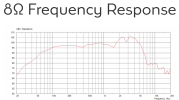
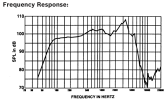
From what I’ve seen, most guitar speakers begin rolling off their highs somewhere between 5K and 8K.

This is a Celestion G12M Greenback from their site:

1750570793110.png

and an EVM12L:

1750570950241.png

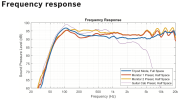
and the EV PXM-12MP cab:

1750571147706.png
The Guitar Cab preset in half-space (against a single surface) begins rolling off about 700Hz and by 8K appears to be about 20dB down. I’m guessing the sound is kinda, maybe, similar to the raw EV. Maybe.

The Monitor 2 response for the PXM cab is based on the cabinet resting on the floor or against a wall (half space), without another surface near enough to affect its sound (quarter space). Add 3-4 dB to the curve below 120Hz for each additional surface if others are nearby.Then counter them using the global EQ for the modeler’s send to the PXM, or a GEQ or PEQ before the OUT block to the PXM to counter the physics for accurate sound. Leave the send to FOH alone because that’s their problem and their speakers are probably not in half or quarter space).
 
Last edited:
Gotcha. So the Monitor 2 is a more faithful rep of a PA in a live situation. With PEQ and GEQ, we can roll off unwanted noise/hiss for the guitar part. Thank you. I bought the EV PXM :)
 
Gotcha. So the Monitor 2 is a more faithful rep of a PA in a live situation.
It’s a flatter, more accurate representation of the signal sent into the unit. Good PA speakers do the same, but that doesn’t mean the PXM is a faithful replacement or representation of a PA. It’s just accurate.

With PEQ and GEQ, we can roll off unwanted noise/hiss for the guitar part.
You shouldn’t hear noise or hiss from the Fractal, it’s digital so the various blocks don’t add hiss. We can get hum or buzz because the pickups or circuit in the guitar pick up noise from other electronics nearby, and gain in a drive, compressor or amp block can amplify that, just as the analog/real devices would. You can’t really roll that off with a PEQ/GEQ because you will also be rolling off the fidelity/frequency response of the guitar’s sound.

Make sure your guitar is wired correctly and you shouldn’t have any real issues. If you have noise from electrical devices being picked up by the pickups you can:
  • add/improve the guitar’s shielding
  • replace the pickups
  • reduce the gain
  • change the distance or orientation of the guitar to the noise source
  • use the noise gate in the Input block in the modeler.
Single-coil pickups are more susceptible to external noise than humbuckers but either type can pick up noise.

I use PEQ to control the speaker’s lows due to them being on the floor or also against the back wall. I’ve never needed to adjust for anything else.
 
Back
Top Bottom