EQ curve preset that mimics regular guitar cabs for FRFR users?

1000001394.png
After watching Cooper's video I played around with these settings to more closely match my cab (has a little more high end than his example)... not sure if that's exactly what you're looking for, but I'm running FRFR with this preset and am digging not having a mic baked into an IR. Saves a little DSP too.
 
View attachment 132009
After watching Cooper's video I played around with these settings to more closely match my cab (has a little more high end than his example)... not sure if that's exactly what you're looking for, but I'm running FRFR with this preset and am digging not having a mic baked into an IR. Saves a little DSP too.

I tried that awhile ago and ran with it for a week or so. It sounded pretty good but had no speaker coloring baked in. You get some from the speaker curve but the IR does some of that too. Just my opinion.
 
Well thanks. That's really cool. But this is about using FRFR and Axe Fx III/FM9. LOL!
No shit, lol. I’m telling you, that FRFR is not the solution to your problem. I have the III, the FM9, and the FM3. The approach I suggested is the solution. If you stick with FRFR, then so be it.
 
No shit, lol. I’m telling you, that FRFR is not the solution to your problem. I have the III, the FM9, and the FM3. The approach I suggested is the solution. If you stick with FRFR, then so be it.
Perhaps, but I came from a long line of two 12" cabs. I know. But FRFR should be able to be given the EQ curve to relatively match. This is what the question was about. Not going back to a power amp and guitar cabs.
 
View attachment 132009
After watching Cooper's video I played around with these settings to more closely match my cab (has a little more high end than his example)... not sure if that's exactly what you're looking for, but I'm running FRFR with this preset and am digging not having a mic baked into an IR. Saves a little DSP too.
Nice. That's very similar to what I do. A little on the 63 and 125 bands. But I haven't used the Filter yet. Cool idea.
 
I love how a dude as skilled and knowledgeable as Henry asks for EQ correction curves
and gets a boatlaod of replies that have ZERO to do with his request, and and then he
gets all of these suggestions about doing things a)he is not interested in, and b) he is probably
more aware of than we are.

And he handles it with style and grace, unlike what I would do. 🤣
Sounds like you’re a fan. I am too. But I’m not a fan of FRFR. They just don’t work for me. I just suggested how I solved the problem.
 
Perhaps, but I came from a long line of two 12" cabs. I know. But FRFR should be able to be given the EQ curve to relatively match. This is what the question was about. Not going back to a power amp and guitar cabs.
I thought so too. But couldn’t get anything cooking with FRFR.
 
I love how a dude as skilled and knowledgeable as Henry asks for EQ correction curves
and gets a boatlaod of replies that have ZERO to do with his request, and and then he
gets all of these suggestions about doing things a)he is not interested in, and b) he is probably
more aware of than we are.

And he handles it with style and grace, unlike what I would do. 🤣
I got the impression that he was happy with his tone, but people were asking him to turn down the lows. I probably misunderstood.
 
Having re-read the thread, one thing that worked for me was using dynacabs with a single ribbon mic at 20cm. That produces a great amp in the room sound from my monitors. It sounds more natural and doesn’t have the girth that the traditional IR I was using before had.
 
This is a weird request and maybe quite stupid. Is there a setting or EQ preset that models the curve of a guitar cab? It's taken me a while to overcome the massive lows of a FRFR cab. I use the XiTone wedges, which I love. But I've had to high pass a LOT so as not to piss off the bass player and FOH. I just thought it might be helpful if it exists. I've saved some setting. Shelve anything below 100 hz. Drop a lot below 250 as well.
I don't own these wedges, I use a Fender FR-12. The best advice I have seen here is to get these off the floor. I put mine on an appendage stand and it is way better. Those wedges are coupling with the floor and making the low end very loud and probably muddy. Getting them off the floor fixes this.
Another option is the Auralex amp mats. I use them on our bass players cabinet and my 2x12, they decouple the cabinets from the floor, sounds so much clearer and the booziness is gone.
 
I find that I always need to HPF in the cab block. Many players and whoever is creating factory presets keep an ample amount of extended low-end in the presets, I assume because some players (especially bedroom players) like it, and on the basis that studio and FoH engineers will as a matter of course filter it out. But when you run it straight into FRFR wedges it may be way too bassy - so I HPF each channel of the cab IR to keep it out of the low bass, and if I put the wedges in a room/stage where there is still too much low end (which is rare, but happens) I use the global output EQ to shave it down some more for that particular room.
 
I find that I always need to HPF in the cab block. Many players and whoever is creating factory presets keep an ample amount of extended low-end in the presets, I assume because some players (especially bedroom players) like it, and on the basis that studio and FoH engineers will as a matter of course filter it out. But when you run it straight into FRFR wedges it may be way too bassy - so I HPF each channel of the cab IR to keep it out of the low bass, and if I put the wedges in a room/stage where there is still too much low end (which is rare, but happens) I use the global output EQ to shave it down some more for that particular room.
(Points for user name being ironic in context ;) )
 
@henryrobinett,

Almost a year ago, a forum member by the name of @WKSmith wrote up a EQ projection curve for HeadRush FRFR108s so they would sound like studio monitors.

You might make his acquaintance and PM him regards his current projects. Somewhere during the past year I recall reading something about him hoping to research EQ curves for a variety of products.

An alternative might be to research a guitar cabinet that you prefer and read up on its EQ frequency response curve. Or, simply view a variety of EQ curves in the cabinet block's section that displays it.

From there you might be able to work with a PEQ and emulate what's most pleasing to your ears. The reason I suggest using your ears is because bedroom volume will not compare to stage volume. In that case, it would be wise to recreate 2 separate user presets for each application.

Rather than give you a direct answer (that I don't know), my solution is to encourage you how to solve your problem with a few DIY steps (that you'll learn something from). Less of a hand-out approach, more of a hand-up approach.
 
Was just browsing the forum and chanced upon this:

My understanding is that Output 1 is used for FRFR made to sound like a guitar cabinet, whereas Output 2 is for FOH. Both are EQ'd differently.


Last edited:
Was just browsing the forum and chanced upon this:

My understanding is that Output 1 is used for FRFR made to sound like a guitar cabinet, whereas Output 2 is for FOH. Both are EQ'd differently.


This is the first I’ve heard of the two outputs having different tone/purpose. I’m a little skeptical.
 
This is the first I’ve heard of the two outputs having different tone/purpose. I’m a little skeptical.

Didn't watch the vids, but I agree, the outputs themselves don't have different frequency response. He may be using them for different purposes though.
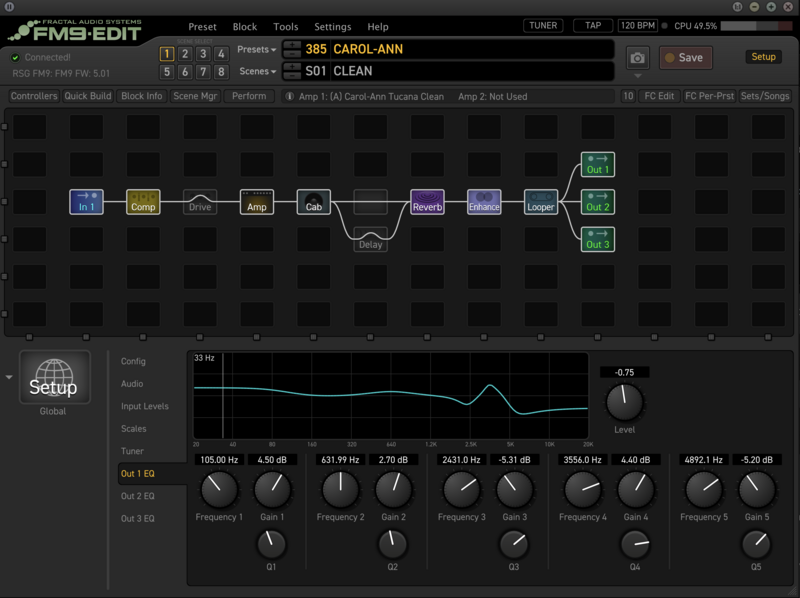
Allow me to clarify...the outputs themselves can be EQ'd within FM9-Edit within SetUp (next to the Save button) either graphically or parametrically.

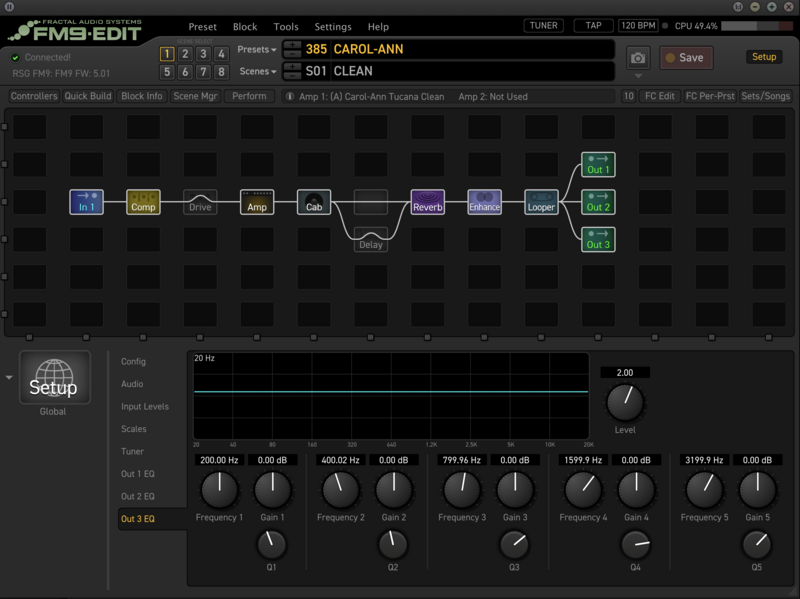
What @WKSmith had suggested was to utilize output 1 for headphones, the 2nd for FRFR and the 3rd for FOH. The FOH output was strictly left flat response, so the FOH guy could tailor the curve as necessary for the FOH PA Speakers.

The first output by default is copied to the headphones output, so any EQing of the first output should reflect how you'd like your headphones to sound. You can selectively choose either output 2 or 3 for either FRFR or FOH, and EQ as needed.

Please observe the following examples of how each output is EQ'd. The first is for my Grado entry level headphones, the 2nd and 3rd for my QSC CP8 FRFRs, and FOH.

Since I've not yet gigged with my FM9, I've not yet needed to tweak any EQ in outputs 2 and 3. One of the benefits of owning QSC CP8s is that the FRFRs have a contour switch on the back which can select from default, to default external sub, to dance, to dance sub, to floor monitor, to speech. The contour feature makes it much easier to EQ my CP8s at the speaker level rather than within FM9-Edit.

M6yrPAv.png


HmYTgYC.png


q6aepkT.png


Regards @henryrobinett, he might simply tweak either his FRFR or FOH EQ to reflect a guitar cab's EQ response curve (the hard way) or work within the cab block and within preamp, use the filter to cut lows and highs at 80 and 6500 Hz. Because FRFRs are designed to reproduce the full range of frequency response (20 - 20K), and knowing that guitar cabs have tighter limits (again, about 80 - 6500 Hz), this can be adjusted in several places (cab block, filter block, setup output EQ).

To be clear, my FRFR's are located up on speaker stands, not on the floor. EQing is different for both locations, and placing FRFRs on the floor introduces excess bass "woof." Raising FRFRs to ear level helps clarify and reduce bass woof.

Best wishes.

 
Last edited:
Back
Top Bottom