
Dual hard-panned amps into a single stereo cab volume jump when muting one speaker?

shmaque

Member
Apologies if this has been covered - I've searched here & on the wiki and haven't found an answer:
I've got a simple preset attached that demonstrates this, but for example if I have a setup with:
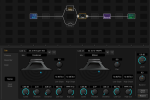
  • Two amps (AMP1 hard panned left, AMP2 hard panned right) in parallel, feeding into:
  • One cab configured for Stereo / L goes to speaker 1, R goes to speaker 2(e.g., here I'm using a DynaCab but seems to happen w/ Legacy IRs as well)
    • Both cab speakers are panned dead center to allow hard panned amps to go back to summed output
  • Bypass one amp (e.g., AMP2) (bypass function set to Mute)
1769476045354.png
All operates as you'd expect, and the cab block is mixing that hard-panned L AMP1 to center as intended.
Mute cab speaker 1L (with M button in cab block), and the output goes dead silent... again, as expected.

But leave Speaker 1L on and mute Speaker 2R (which has no input), and the volume out of the cab jumps dramatically. This is also visible on the meters screen on the unit.

I've seen elsewhere that the level on the cab block is relative and plays with other cabs, but why does en/disabling a speaker that services a (muted input) R stereo channel impact the processing volume of the L channel inside the same cab? I’d understand if it were to compensate for perceived volume drop when losing one channel, but you can’t attach controls to it either, so I’m not sure if that’s it either.

-- FM9 FW 11.0
 

Attachments

Last edited:
This is due to a large amount phase cancellation taking place when the 2 speakers are heard together. Muting one speaker removes this phase cancellation which means you also gain back the energy lost from the phase cancellation. This is even more evident when you adjust the pan and volume of one of the speakers. You might observe percieved volume drop or seemingly no change when you are "adding" the additional speaker via volume and/or pan controls. All of this is seems to be following the laws of physics, as we understand it, within a digital environment of course. Still impressive, non-the-less. When 2 audio signals are in opposing phase they cancel eachother.
 
This is due to a large amount phase cancellation taking place when the 2 speakers are heard together. Muting one speaker removes this phase cancellation which means you also gain back the energy lost from the phase cancellation. This is even more evident when you adjust the pan and volume of one of the speakers. You might observe percieved volume drop or seemingly no change when you are "adding" the additional speaker via volume and/or pan controls. All of this is seems to be following the laws of physics, as we understand it, within a digital environment of course. Still impressive, non-the-less. When 2 audio signals are in opposing phase they cancel eachother.
I’m aware. Please read the setup more closely - the input channels are hard panned to left and right, the right amp is bypassed (muted) and muting the left speaker has zero audio output as expected. There is no information processing through the right channel with which to impact the let channel’s output, either constructively or destructively. Where is this supposed phase cancellation coming from?
 
It's the auto-normalization. Given equal Cab 1/2 level settings, muting one makes the other get 6 dB louder.
This. It's totally normal. If you leave both amps on and do the same thing there would be no/minimal volume difference (if the volume of the two amps is close enough).
 
Yeah, that’s the best I could figure it would’ve been - just struck me as odd in a stereo setup, especially since you can’t attach controls to the mute button on the cab speaker.
I was about to ask if dropping a given speaker’s level to as low as it can go in the cab block controls be subjected to the same auto-normalization but I see you can’t attach a control to that either.
Interesting.
 
Changing channels in the cab block will let you balance the level between those two configurations.
Yep, so would adding a second cab block. My issue is that I’ve got 8 amps models in this preset (it’s a kitchen sink preset) and I was aiming for optimized cabs per amp channel, utilizing all 4 channels in the cab block already (can’t afford the extra cpu to instantiate a second cab block). The fact that I can’t CS control the mute or speaker level makes what I was trying to accomplish moot anyway - was just really curious about the behavior I was seeing & wanted to understand it more.
 
Yep, so would adding a second cab block. My issue is that I’ve got 8 amps models in this preset (it’s a kitchen sink preset) and I was aiming for optimized cabs per amp channel, utilizing all 4 channels in the cab block already (can’t afford the extra cpu to instantiate a second cab block). The fact that I can’t CS control the mute or speaker level makes what I was trying to accomplish moot anyway - was just really curious about the behavior I was seeing & wanted to understand it more.
If you're just trying to have a different amp/cab combination in each scene, just bypass the unused amp block (with bypass mode set to Mute) and/or set the level via the amp's level control.
 
If you're just trying to have a different amp/cab combination in each scene, just bypass the unused amp block (with bypass mode set to Mute) and/or set the level via the amp's level control.
Yeah I’m already there 👍 - like I said, I was more interested in understanding what the cab block was doing.
 
Do you ever use both amps at the same time? That would also give you +6dB unless compenasated.
Yeah that’s how I got down this rabbit hole - previously I only ever ran one at a time, but I was expanding the preset to include options to blend them as well & was zeroing in on the most efficient places to compensate volume when I’m running just one while not hampering my ability to tweak amp levels live in performance view by having them hard strapped to CS toggles.
 
Yeah that’s how I got down this rabbit hole - previously I only ever ran one at a time, but I was expanding the preset to include options to blend them as well & was zeroing in on the most efficient places to compensate volume when I’m running just one while not hampering my ability to tweak amp levels live in performance view by having them hard strapped to CS toggles.
Attach the CS to the Cab block main level control and reduce it by 6dB whenever both amps are active. Or just bypass/engage a volume block.
 
You could also use a Mixer block and use three channels set up for amp 1 alone, amp 2 alone, and both together.
Yep thought about this as well but assumed it’d be too much of a cpu hit. I’ll have to check. I used to ping off of 78-79% all the time without concern but ever since v10 I’ve been trying to keep it below 76% to avoid issues.
 
You could also use a Mixer block and use three channels set up for amp 1 alone, amp 2 alone, and both together.
You, sir, are a genius. I didn't realize the mixer only added about ~1% CPU usage. I bet I can make that fit... plus it opens up so many more blending options (like for wiggles, I just flipped on scene controllers to have scenes with different amp mix levels based on the types)! This is great.
 
Last edited:
Back
Top Bottom