
Welcome to the ICONS sub-forum

I think it is also important for rock and metal plugins, in addition to simulating a double track, to provide the ability to create chains with two amplifiers and cabinets within one plugin. Example for creating a classic combination of JCM800 + Rectifier. I think this is done through a DAW by launching two parallel plugins, but I, as a simple user and many others, don’t want to bother like that. Not everyone can do this, not everyone works through a DAW.
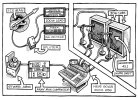
45-SOAD-Guitar-Rig.jpg
 
I think it is also important for rock and metal plugins, in addition to simulating a double track, to provide the ability to create chains with two amplifiers and cabinets within one plugin. Example for creating a classic combination of JCM800 + Rectifier. I think this is done through a DAW by launching two parallel plugins, but I, as a simple user and many others, don’t want to bother like that. Not everyone can do this, not everyone works through a DAW.

View attachment 166473
You would do that with multiple instances of the plugin...

I don't think it will be different for ICONS.
 
You would do that with multiple instances of the plugin...

I don't think it will be different for ICONS.

I understand that. This can be easily done in AX FXIII and FM9 using a grid. I wanted to convey the idea that why not let users do this through the plugin interface. Moreover, as I understand it, the plugin also has a Standalone version, and not just daw, and those who prefer Standalone will no longer be able to implement this.
 
I understand that. This can be easily done in AX FXIII and FM9 using a grid. I wanted to convey the idea that why not let users do this through the plugin interface. Moreover, as I understand it, the plugin also has a Standalone version, and not just daw, and those who prefer Standalone will no longer be able to implement this.
I assume this first ICONIC series in a first (big) step from FAS in the world of plugin and will open the path for more complete solutions.
A way this encourage this initiative is to get this first product and enjoy it as it is. All companies do that, start slow to make the product more mature with the customers feedback.

Can’t wait to try the demo first btw.
 
I assume this first ICONIC series in a first (big) step from FAS in the world of plugin and will open the path for more complete solutions.
A way this encourage this initiative is to get this first product and enjoy it as it is. All companies do that, start slow to make the product more mature with the customers feedback.

Can’t wait to try the demo first btw.

Yes, it takes time to collect a lot of feedback and select the best solutions for improvements from it.
 
...and those who prefer Standalone will no longer be able to implement this.
I hear you. LOVE Standalone modes. My solution...

Blue Cat Patchwork

You can run it within DAWs (host VSTs in Pro Tools even). Or run in Standalone. It actually uses grids (adjustable widths and heights)... not unlike AXE and FM's (except full plugins instead of blocks).

You can run incredibly complex chains of plugins. Serial, Parallel chains. Pre and Post slots for each, too. Save Presets of MONSTER plugin chains. Can even default a preset to load on launch.

Can also force multi-core CPU usage. Also releases CPU usage when idle.

Killer tool. KILLER company. Long time customer. Can't recommend any higher. Pretty rapid updates, too. Maybe not Cliff on the AXE ((:)... but certainly FM-Like pace.

I've used it for years. It would shine in this scenario. Add some Valhalla Verbs, Soundtoys EchoBoy, UA Tapes and some Type-A. Whoa baby!!!
 
A random and wild thought, but... Would it be possible to have a hybrid version of Icons/FM3-edit in the future, so we can dial in songs without even plugging into the physical hardware, then export/import said preset for live gigs :eyes:
 
Hi all. I've noticed issues with adding multiples of ICONS on tracks. I'm using Studio Pro 8 on a mac at the moment. I normally start tracking with buffer set at 64 or 32 samples, so when I load up another track with ICONS there is a huge jump up in latency although the DAW is still showing 32 or 64. When I change the buffer to something different it behaves normal again. It's slightly annoying. :grimacing: I've yet to try with Studio One 7 so will do that later tonight.

Just wondering if anyone else has experienced something similar?
 
I'm using Studio Pro 8 on a mac at the moment. I normally start tracking with buffer set at 64 or 32 samples, so when I load up another track with ICONS there is a huge jump up in latency
What's your audio interface?
 
hi all
Did anyone had a problem with icons trial
i just downloaded to try this and i got trail activation error/ attempt to start trial too many times /
it strange because i open this once
also i try to uninstall and install again but it dosent work
Does anyone has any suggestions
i really love to try this one
 
hi all
Did anyone had a problem with icons trial
i just downloaded to try this and i got trail activation error/ attempt to start trial too many times /
it strange because i open this once
also i try to uninstall and install again but it dosent work
Does anyone has any suggestions
i really love to try this one
Do you have ILok License Manager installed ? The trial will not work without it, I think.
Www.ILok.com
 
Demo is really nice, works well with my interface (Clarett 4).
The software will be perfect to jam in my study while the afx is setup elsewhere.

Is there any thread about future amp packs yet?
 
What's your audio interface?
I did a few tests and found the problem.
Posted this over at TGF as well.

Seems to be the Motu M4's input. Here's what I tried, starting with buffer at 64:

Scenario 1) Motu M4 input and output / Studio Pro 8 / when ICONS is inserted on a channel the latency audibly glitches and jumps up.
Scenario 2) Motu M4 input and output / Studio One 7 / same glitch in different DAW
Scenario 3) Presonus Studio 192 input and output / Studio Pro 8 or Studio One 7 / ICONS inserted and working fine
Scenario 4) Presonus Studio 192 input with Motu M4 output / Studio Pro 8 or Studio One 7 / ICONS inserted and working fine
Scenario 5) Motu M4 input with Studio 192's output / ICONS glitch occurs

Note: this glitch has never happened before with any other plugin.
 
Hey all!

Anyone running ICONS on PC with a Blackstar POLAR 2 interface?
I'm getting really bad digital distortion making the plugin unusable with ASIO on almost all buffer settings! :(

Any help is always appreciated!
 
Last edited:
  • Like
Reactions: sol
I'm having trouble with ICONS-F3 in MainStage. It works when the plugin is added. But when you restart MainStage and the plugin reloads, after a few seconds the track with ICONS shows full meter in the read and there is no sound. If I remove the plugin and add it back, it work again until the next app restart. Support has been notified. Anyone else seen this?

I found what appears to be a reliable work around: save the MainStage concert with any ICONS plugins turned off. The concert will then load OK and you can turn the plugins on after the Audio Units have initialized. They seem to work fine after that, but don't save the concert with them turned on. Once they fail, there doesn't seem to be a way to recover.
 
Last edited:
Back
Top Bottom