
Midi trouble Morningstar MC4 Pro

Madafaka

Member
Hi guys,
Have Morningstar mc4 pro for two days and problem with editor. When i go to midi dictionary section and when using select device option, i can't get VP4 in the list. Only options are AX8, FX8, and Axe-fx...
Getting a kinda headache for something that shouldn't be that difficult. Want to use it only for presets up/down (A/C) and bank up/down (D/E).
Connected with 3.5mm trs to Fractal, usb to pc
Thanks for any input
Cheers
Alex
 
Morningstar hasn't added the MIDI dictionary for the VP4. In the Morningstar editor, you will need to manually map the buttons on the MC4 to send PC/CC commands. On page 56 of the VP4 Manual you'll find the MIDI PC to preset map, which is pre-assigned. Other functions on the VP4 need to be assigned.

From page 55 of the VP4 manual:
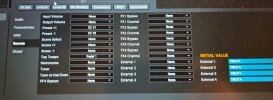
Receivable CCs are globally soft-assigned to functions via the MIDI/Remote menu under SETUP. These include Input and Output volumes, Tap Tempo, Tuner, 4 “External Controllers” (assignable as modifiers to one or more parameters on a per-preset basis), additional Preset and Scene functions, , and all block BYPASS and CHANNEL switches.

For preset up / down and bank up / down, you'll need to make those MIDI assignments in the VP4, and then send the corresponding command from the MC4.
 
Last edited:
Morningstar hasn't added the MIDI dictionary for the VP4. In the Morningstar editor, you will need to manually map the buttons on the MC4 to send PC/CC commands. On page 56 of the VP4 Manual you'll find the MIDI PC to preset map, which is pre-assigned. Other functions on the VP4 need to be assigned.

From page 55 of the VP4 manual:
Receivable CCs are globally soft-assigned to functions via the MIDI/Remote menu under SETUP. These include Input and Output volumes, Tap Tempo, Tuner, 4 “External Controllers” (assignable as modifiers to one or more parameters on a per-preset basis), additional Preset and Scene functions, , and all block BYPASS and CHANNEL switches.

For preset up / down and bank up / down, you'll need to make those MIDI assignments in the VP4, and then send the corresponding command from the MC4.
Thnx mate...but apparently I'm totally midiot for this shizzel...programming effects is the other kinda fun...this is painful
 
Thnx mate...but apparently I'm totally midiot for this shizzel...programming effects is the other kinda fun...this is painful
Fractal doesn't enforce a pre-programmed MIDI command set for their most recent devices. It does mean we have more flexibility, but it also means we have to manually create those mappings. It's actually not very difficult though. On the VP4 go to SETUP -> MIDI / REMOTE and find the command you want to use (e.g., bank up). Assign a command number to it, then go to the Morningstar editor and have your button send that command.

If you want to make your life easier, as you program commands in the VP4, add those to a custom library in the Morningstar Editor. That way as you continue to add to your commands, you can just pick functions from from a list in the Morningstar Editor.
 
Fractal doesn't enforce a pre-programmed MIDI command set for their most recent devices. It does mean we have more flexibility, but it also means we have to manually create those mappings. It's actually not very difficult though. On the VP4 go to SETUP -> MIDI / REMOTE and find the command you want to use (e.g., bank up). Assign a command number to it, then go to the Morningstar editor and have your button send that command.

If you want to make your life easier, as you program commands in the VP4, add those to a custom library in the Morningstar Editor. That way as you continue to add to your commands, you can just pick functions from from a list in the Morningstar Editor.
Thnx buddy...figured it out when it comes to presets up/down in midi/remote section...but there's no bank up/down choice...?
 
Thnx buddy...figured it out when it comes to presets up/down in midi/remote section...but there's no bank up/down choice...?
That's odd. I would expect those functions to be available via MIDI. I don't have a VP4 so I'm unable to check on this.
@Admin M@ can you comment on this?
 
I've received the mail from the Fractal customer support , and I wasn't surprised that nobody here knew the answer right away..
Especially that part "because you don't need it"..


"Hi Alex,
There is no bank up/down function via MIDI.
Because you simply don't need it.
Each bank is a preset that you can access with a single PC message.
You can program your Morningstar so that this button increases/decreases a PC message. Then you have bank up and bank down....."

 
Hi guys,
Have Morningstar mc4 pro for two days and problem with editor. When i go to midi dictionary section and when using select device option, i can't get VP4 in the list. Only options are AX8, FX8, and Axe-fx...
Getting a kinda headache for something that shouldn't be that difficult. Want to use it only for presets up/down (A/C) and bank up/down (D/E).
Connected with 3.5mm trs to Fractal, usb to pc
Thanks for any input
Cheers
Alex
A lot of times the midi dictionaries for devices are submitted by end users so that's probably the reason. It hasn't been done yet.
 
Back
Top Bottom