SOLVED - Importing IR changes phase (turned off cabinet import processing)

ApocalypticKatana

Power User
Edit 9/16 SOLVED

see post #11 - https://forum.fractalaudio.com/thre...cabinet-import-processing.215379/post-2706163

-----------------------------------------------------------------------------------------------------------------

For context it's an IR for room correction (phase + amp can't be changed for proper correction)

I imported in Ultra Res

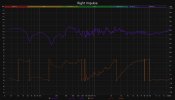
I double checked in Room EQ Wizard the amp+phase after importing into the AX3 and checked it with the original and the Left side's phase is correct +/- 1 degree but the right side IR file completely changes phase!

any idea what I can do?

attached are the phase diagrams before and after importing into AX3

Don't mind the amplitude difference as I've no problem correcting for relative L/R db values compared to original.
 

Attachments

  • R corr after import into ax3.jpg
    R corr after import into ax3.jpg
    188.4 KB · Views: 39
  • r corr.jpg
    r corr.jpg
    187.9 KB · Views: 40
Last edited:
If you imported it from a wav file, check your import settings in Axe Edit. Try turning off zero phase there.
I made sure per thread title to turn off IR Processing under Preferences>Cabinet Import>IR Processing=None

IR Output=Ultra Res

The left side IR imported properly +/-1 deg phase compared to the original in REW

I've no idea why this right side IR isn't importing properly without changing any changing settings in the creation and importing of the IR
 
I see, than even in axe edit with IR processing set to None by choosing Ultra Res it still applies MPT if I understand correctly.

if that's the case I find it odd how it didn't change the phase for the Left side import as Ultra Res
 

Attachments

  • left correction after ax3 import.jpg
    left correction after ax3 import.jpg
    189 KB · Views: 25
  • left correction.jpg
    left correction.jpg
    186.7 KB · Views: 26
Unfortunately the same problem still arises even with importing the Right side IR using Normal Res.

While importing using Normal Res changes the IR phase on the left side IR a bit after import its's acceptable for use

But the Right side IR is completely out of phase form the original.

see pictures from REW
 

Attachments

  • R Correction after Normal Res Import.jpg
    R Correction after Normal Res Import.jpg
    188.5 KB · Views: 57
  • L Correction after Normal Res Import.jpg
    L Correction after Normal Res Import.jpg
    189.6 KB · Views: 50
  • R Correction.jpg
    R Correction.jpg
    183 KB · Views: 55
  • L Correction.jpg
    L Correction.jpg
    182.4 KB · Views: 61
Report

Importing my "left" and "right" room correction 40ms wav files still changes the phase importing to Normal Res

Using CabLab4 doesn't help either
 

Attachments

  • right after.jpg
    right after.jpg
    206 KB · Views: 33
  • left after.jpg
    left after.jpg
    209.3 KB · Views: 35
  • right.jpg
    right.jpg
    205.2 KB · Views: 36
  • left.jpg
    left.jpg
    207.1 KB · Views: 36
Report

Importing my "left" and "right" room correction 40ms wav files still changes the phase importing to Normal Res

Using CabLab4 doesn't help either
Looks fine to me. You're looking at absolute phase which is irrelevant. If you trim a couple samples off the beginning you'll change the absolute phase. The IR import utility automatically trims any leading silence. Also, the program you're using to plot the phase isn't unwrapping the phase.
 
Looks fine to me. You're looking at absolute phase which is irrelevant. If you trim a couple samples off the beginning you'll change the absolute phase. The IR import utility automatically trims any leading silence. Also, the program you're using to plot the phase isn't unwrapping the phase.

I’ve been meticulous to align the single sample impulse to align from my tests from DAW to AX3 to DAW (with IR Player off then on) to get the resulting normal res output.

Other than doing this I’m not sure what else I can do to make this work as it sounds off with the AX3 compared to using the IR on a computer.

I realize there’s a lot of variables to account for but I’ll look into unwrapping the phase in REW and trying to align things somehow.

Thank you for your time @FractalAudio
 
Last edited:
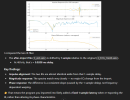
I had chatgpt analyze the before and after files and here's the result

Screenshot 2025-09-14 143548.png

And yes unwrapping the phase shows the graph matching in shape now (before offsetting)

Thank you again @FractalAudio
 

Attachments

  • L Correction Phase Unwrapped.jpg
    L Correction Phase Unwrapped.jpg
    376.2 KB · Views: 23
  • L Correction After Import Phase Unwrapped.jpg
    L Correction After Import Phase Unwrapped.jpg
    377.4 KB · Views: 23
Last edited:
EDIT 9/16, 11:39 (gmt-4)

After offsetting/aligning in the DAW and windowing properly in REW.

I realized one of my IR's was inverted after importing in Ultra-Res so I just used the filter block to phase invert the IR.

After that there was no phase difference!

see pictures!
 

Attachments

  • PRE Over Post Phase Difference.jpg
    PRE Over Post Phase Difference.jpg
    183 KB · Views: 21
  • IR POST Ultra-Res Import.jpg
    IR POST Ultra-Res Import.jpg
    174.7 KB · Views: 20
  • IR PRE Ultra-Res Import.jpg
    IR PRE Ultra-Res Import.jpg
    176.7 KB · Views: 21
Last edited:
Back
Top Bottom