Forum Wish List - Add To The Search box

What are the chances that in the “Advanced Search” criteria, you can add an “Exact Phrase” search criteria?
Reason: currently if you do a search for more than one word, you get a bazillion posts with one of the words…..waste of a forum member’s time to find a needle in a haystack…..
 
works perfectly for me. Searching for "bazillion posts" returns only your post above. Removing the quotes returns a ton of stuff. Make sure you're using double quotes, not single.
 
works perfectly for me. Searching for "bazillion posts" returns only your post above. Removing the quotes returns a ton of stuff. Make sure you're using double quotes, not single.
Try searching for "search phrase"... It isn't working for me.
 
+1 for "bazillion posts". The OP's original thread was the one that displayed. Not sure how other phrases might work. How about "tasty bit"?
(Yup, that works as well...)
 
Yeah looks like it's filtering the results, but not like it should. Searches with and without quotes return different results but it's not always excluding incomplete matches for some reason.
 
What are the chances that in the “Advanced Search” criteria, you can add an “Exact Phrase” search criteria?
Reason: currently if you do a search for more than one word, you get a bazillion posts with one of the words…..waste of a forum member’s time to find a needle in a haystack…..
Quote it if you want to match an exact phrase.

Search syntax for ElasticSearch is:
  • + signifies AND operation
  • | signifies OR operation
  • - negates a single token
  • " wraps a number of tokens to signify a phrase for searching
  • * at the end of a term signifies a prefix query
  • ( and ) signify precedence
  • ~N after a word signifies edit distance (fuzziness)
  • ~N after a phrase signifies slop amount
Works great:

1691547540926.png
 
Try searching for "search phrase"... It isn't working for me.
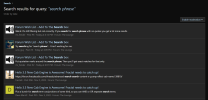
Works perfectly. The search results page hides quoted text in the result view, but if you click through you'll see the exact phrase "search phrase" appears in quoted text where the search matched.

For example, the last two results you see in this screen shot appear to be incorrect. But they are not. If you click through, you'll see both of them quote a post that contains "search phrase".

1691547968677.png
 
Quote it if you want to match an exact phrase.

Search syntax for ElasticSearch is:
  • + signifies AND operation
  • | signifies OR operation
  • - negates a single token
  • " wraps a number of tokens to signify a phrase for searching
  • * at the end of a term signifies a prefix query
  • ( and ) signify precedence
  • ~N after a word signifies edit distance (fuzziness)
  • ~N after a phrase signifies slop amount
Hmmm... Before you posted this, I tried search+phrase and got unexpected results.

At least until just repeated it and looked deeper. The result summary threw me off because it wasn't showing matching context. But when I looked farther I found it was actually working and finding results within quoted content of a post.

Then I tried again with "search phrase" and found the same thing.

So it looks like it was user error on my part...
 
Works perfectly. The search results page hides quoted text in the result view, but if you click through you'll see the exact phrase "search phrase" appears in quoted text where the search matched.
Yes - we were posting at the same time. That's exactly it! :)
 
search+phrase and "search phrase" are not the same search expression.

The former would match on the sentence "i'm searching for the right phrase" and the latter would not.
Yes... I explained why I thought it was unexpected in my post. And definitely understand the difference between the 2 searches.

My problem initially was not seeing the quoted text and being too quick to judge :D
 
I think its a bit confusing because the search results are highlighting (bolding) all of the individual words of the phrase it finds and not just the exact phrase. Made it look like it was including more than it should.
 
Back
Top Bottom