

Petrocelli
Experienced
Since two Days i have big problems with Axe-Edit III (1.14.19) connection to my AxeFXIII Mark II (FW29.01).
I am on Win11 24H2 and had zero problems before.
Axe-Edit connects and shows the actual Preset in the Grid, but the connection is extremely slow - on Startup Reading Preset names is about 2-3 Sekunds per Name and it is finished with reading Preset and Cab names about more the 30 Mins!!!
I recognized it first during jamming that the Axe-Edit window was frozen!
I tried:
If i use my FM3 with this PC, even with the same USB Cable and Port it works totaly normal as ever.
Strange is, if i connect my AxeFXIII to my Win10 Laptop, it starts reading preset names as fast as usually!
So anybody can give me a Tipp what to do?
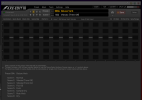
After more ten 30 Mins of scanning Program and Cab Names it looks like this and i can do nothing with it!
I am on Win11 24H2 and had zero problems before.
Axe-Edit connects and shows the actual Preset in the Grid, but the connection is extremely slow - on Startup Reading Preset names is about 2-3 Sekunds per Name and it is finished with reading Preset and Cab names about more the 30 Mins!!!
I recognized it first during jamming that the Axe-Edit window was frozen!
I tried:
- switched PC and AxeFX off and booted them new
- different USB Cables,
- different USB Ports (I have also an extra USB Card in my PC),
- reinstalled Axe-Edit,
- reinstalled the USB Audio Driver
If i use my FM3 with this PC, even with the same USB Cable and Port it works totaly normal as ever.
Strange is, if i connect my AxeFXIII to my Win10 Laptop, it starts reading preset names as fast as usually!
So anybody can give me a Tipp what to do?
After more ten 30 Mins of scanning Program and Cab Names it looks like this and i can do nothing with it!


